

This free MT5 pivot points indicator is the tool I built for my own trading — and it's now fully open-source. No black-box compiled file. Full MQL5 source on GitHub, MIT licence, five calculation methods, and clean horizontal lines that never repaint.

Fxtt Pivot Points Indicator for MT5
Pivot points have been part of my workflow for years. They're not exciting. That's why I trust them.
No lookback period to optimise. No parameter to overfit. Just last session's high, low, and close — turned into levels for today.
What are MT5 pivot points?
Pivot points are calculated from the prior session's OHLC data and used as support and resistance levels for the current session. One formula, no settings to argue about:
PP = (High + Low + Close) / 3
R1 = 2 × PP − Low
S1 = 2 × PP − High
That's the classic version. Every trader using pivots is looking at the same numbers.
That's the point. Levels work partly because they're shared. If enough people are watching 1.0850 as a resistance, price tends to react there. Pivots are self-fulfilling in the way most reliable technical levels are.
Intraday traders use daily pivot points to read session bias. Above PP: favour longs. Below PP: favour shorts. Swing traders shift to weekly or monthly for broader structure. The logic is the same at every timeframe.
What the free MT5 pivot points indicator does
It draws pivot levels on your MT5 chart. Clean horizontal lines. Labels. Nothing else.
Five pivot point calculation methods
Different methods suit different strategies. All five are included in this free MT5 indicator:
- Classic — the standard formula. Works on almost everything.
- Fibonacci — applies 0.382, 0.618, and 1.000 ratios to the prior range.
- Camarilla — places levels tight to price using a 1.1 multiplier. Good for mean-reversion strategies.
- Woodie — weights the close more heavily in the pivot calculation.
- DeMark — adjusts the formula based on how the session closed relative to the open.
The DeMark logic in the source code is three lines:
double X = (C  O) ? 2.0*H + L + C
         :            H + L + 2.0*C;
PP = X / 4.0;
R1 = X / 2.0 - L;
S1 = X / 2.0 - H;
Close below open: weight the low. Close above open: weight the high. Neutral: weight the close. That's the entire method.
Daily, Weekly, and Monthly pivot points for MT5
You pick the source timeframe. D1, W1, or MN1. The indicator fetches that OHLC data and draws the levels on whatever chart you're on — M5, H1, H4, doesn't matter.
Historical pivot periods
Set InpLookback and you'll see pivot levels for previous periods alongside the current one. Useful for reviewing how price behaved around those zones. The drawing loop is straightforward:
for(int p = 0; p < periods; p++)
{
   const int calcBar = p + 1; // previous closed period
   const double H = iHigh(_Symbol,  g_tf, calcBar);
   const double L = iLow(_Symbol,   g_tf, calcBar);
   const double C = iClose(_Symbol, g_tf, calcBar);
   const double O = iOpen(_Symbol,  g_tf, calcBar);

   SPivotData pv;
   pv.timeStart = iTime(_Symbol, g_tf, p);
   pv.timeEnd   = (p == 0) ? pv.timeStart + PeriodSeconds(g_tf)
                            : iTime(_Symbol, g_tf, p - 1);

   if(!CalcPivots(H, L, C, O, pv)) continue;
   DrawPeriod(p, pv, p == 0);
}
Bar p is the period being drawn. Bar p+1 is the closed bar we pull OHLC from. Levels never repaint — they come from a completed bar and don't move until the next period opens.
Full display customisation
- Independent colour, line style, and width controls for PP, resistance, and support groups
- Optional price labels — font and size configurable
- Extend-right option for the current period's lines
- Display-only — doesn't interfere with EAs
- Lightweight, VPS-friendly
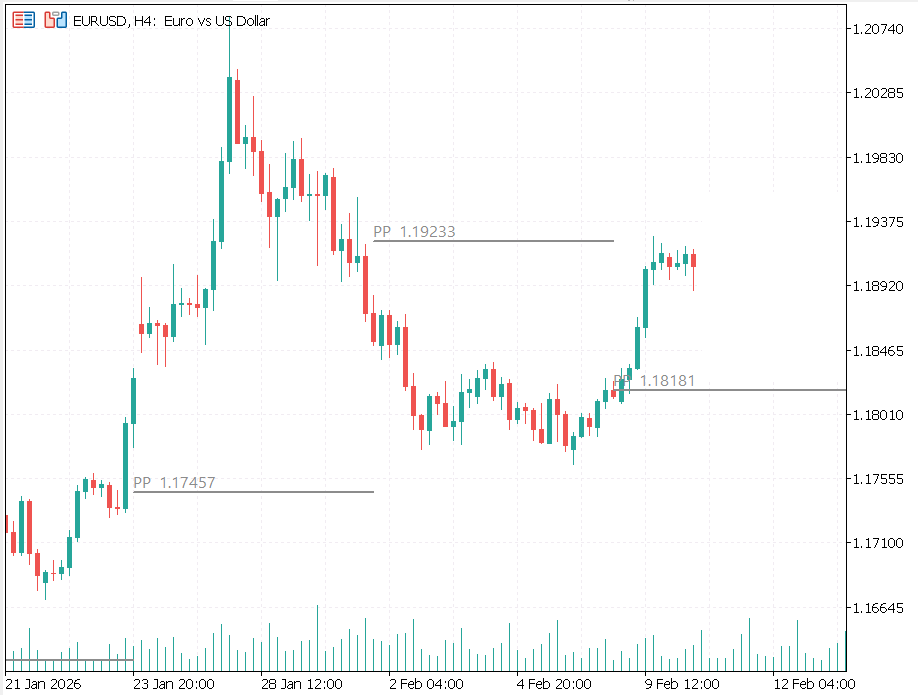
Pivot-Points-Breakout-Example
Why I open-sourced this MT5 pivot points indicator
When you download a compiled .ex5 file, you're running code you can't read.
Most people don't think about that. They install, they use, they move on. But if I were on the other side, I'd want to know exactly what I'm running on my trading terminal.
Opening the source is the simplest answer. Here's the code. Read it. Compile it yourself if you want. You don't have to trust me.
The other reason: pivot point formulas have been public for decades. There's nothing to protect. Keeping the code closed serves no one. It just adds friction for traders who want to adapt the indicator or pull pivot values into their own MQL5 projects.
So it's on GitHub now. MIT licence. Fork it, modify it, use it however you want.
How to install the MT5 pivot points indicator
Under a minute if you use the compiled file:
- Download
FXTT_PivotPoints.ex5from the product page - In MT5: File → Open Data Folder
- Go to
MQL5/Indicators/and paste the file there - Restart MT5 — or right-click Navigator → Refresh
- Drag FXTT_PivotPoints onto any chart
Prefer to compile it yourself? Grab FXTT_PivotPoints.mq5 from the src/ folder on GitHub. Open it in MetaEditor. Hit F7. Done.
How to trade with pivot point levels in MT5
PP is the session bias line. Above it, I lean long. Below it, I lean short. That's the first read every morning.
R1 and S1 are the most useful levels on most instruments. They're where price tends to stall first. I use them as initial targets and the first place to watch for reversals.
When price breaks through R1 cleanly, R2 becomes the next target. R3 only matters on strong trending days.
For swing setups, I switch to weekly pivot points. The levels hold up across multiple sessions and give a cleaner read on broader structure.
I don't display all nine levels at once. Usually just PP + R1/R2 + S1/S2. The visibility toggles let you hide anything you're not using. A clean chart is easier to trade than a crowded one.
Frequently asked questions
Is this MT5 pivot points indicator really free?
Yes — free to download, free to use, free to modify. MIT licence. No subscription, no trial, no catch.
Does the pivot points indicator repaint?
No. Levels are calculated from a fully closed bar and never change once drawn. What you see on your chart is what was valid at that time.
Which pivot point method is best for forex trading?
Classic is the most widely used and a solid default. Camarilla works well for intraday mean-reversion on liquid pairs. Fibonacci suits traders already comfortable with Fib levels. Try them against your own strategy — the source code makes it easy to see exactly how each one is calculated.
Can I use this indicator with an Expert Advisor?
It's display-only and won't interfere with any EA running on the same chart. If you want to read pivot values inside an EA, the open MQL5 source makes it straightforward to extract the calculation logic.
Does it work on all MT5 instruments and timeframes?
Yes. Forex pairs, indices, commodities, crypto — any instrument available in MT5. You can display Daily, Weekly, or Monthly pivots on any chart timeframe from M1 upwards.
Download the free MT5 pivot points indicator
Free to download, free to use, free to modify.
If you find a bug or want to add something — open an issue on GitHub. I read them.
— Carlos