
Trendline EA – Semi-Automated Trading Robot for Breakouts, Pullbacks & Alerts

Version 2.20
March, 2026
€30.00
Trade Trendlines on Autopilot
Simply draw a trendline, set an action command, and the EA executes your trades automatically when price hits your level.
🎯 4 trigger events
📈 Works on all symbols & timeframes
🔔 Multi-channel alerts
🛡️ Built-in risk management
♾️ Multiple trendlines
⬇️ Lifetime free updates
Compatible with MT4 & MT5. 60-day money-back guarantee. The most trusted trendline EA for traders who want precision execution without giving up control.
What is the Trendline EA?
The FXTT Trendline EA is a semi-automated Expert Advisor for MetaTrader 4 and MetaTrader 5 that bridges the gap between manual chart analysis and automated execution. MetaTrader does not natively support trade placement directly from trendlines — this EA fills that gap entirely.
Draw a trendline on any chart, assign an action command in the trendline name, and the EA monitors price around the clock. When price interacts with your trendline, it executes your predefined action — a buy, a sell, a close, or an alert — with no further input required from you.
You stay in control of the strategy. The EA handles the execution.
How It Works
- Attach the EA to your chart in MetaTrader 4 or MetaTrader 5.
- Draw a trendline using the standard MetaTrader drawing tools.
- Add an action command to the trendline's name (e.g.
SoT SL:100 TP:200 V:0.05). 
- The EA monitors the line continuously and executes the action when triggered.


The EA never draws, moves, or modifies your trendlines. Your chart analysis remains entirely your own.
Supported Trigger Events
Each action command can be triggered by one of four price events:
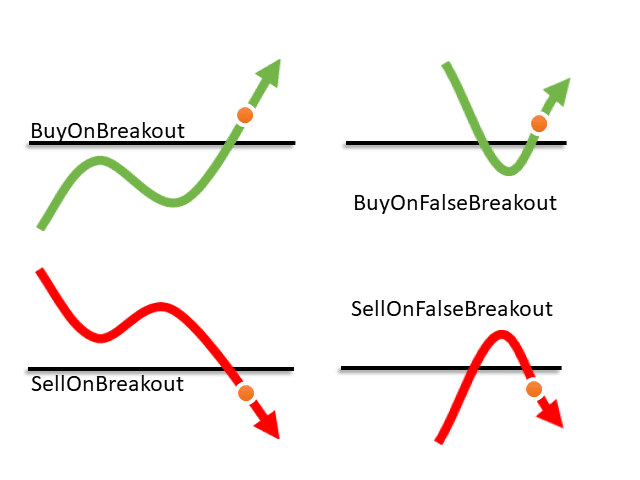
- Touch — price reaches the trendline
- Breakout — price closes or moves beyond the trendline by a defined distance
- Pullback — price breaks through, then returns to the trendline from the other side
- False Breakout — price briefly breaks through then reverses, invalidating the breakout
Complete List of Action Commands
Trade Actions
- Buy / BoT / BuyOnTouch — Open a buy order on trendline touch
- Sell / SoT / SellOnTouch — Open a sell order on trendline touch
- BoB / BuyOnBreakout — Open a buy order on upside breakout
- SoB / SellOnBreakout — Open a sell order on downside breakout
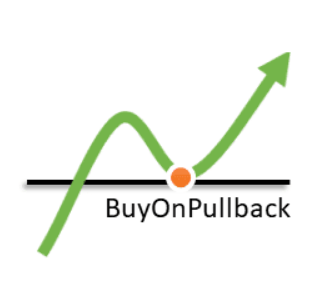
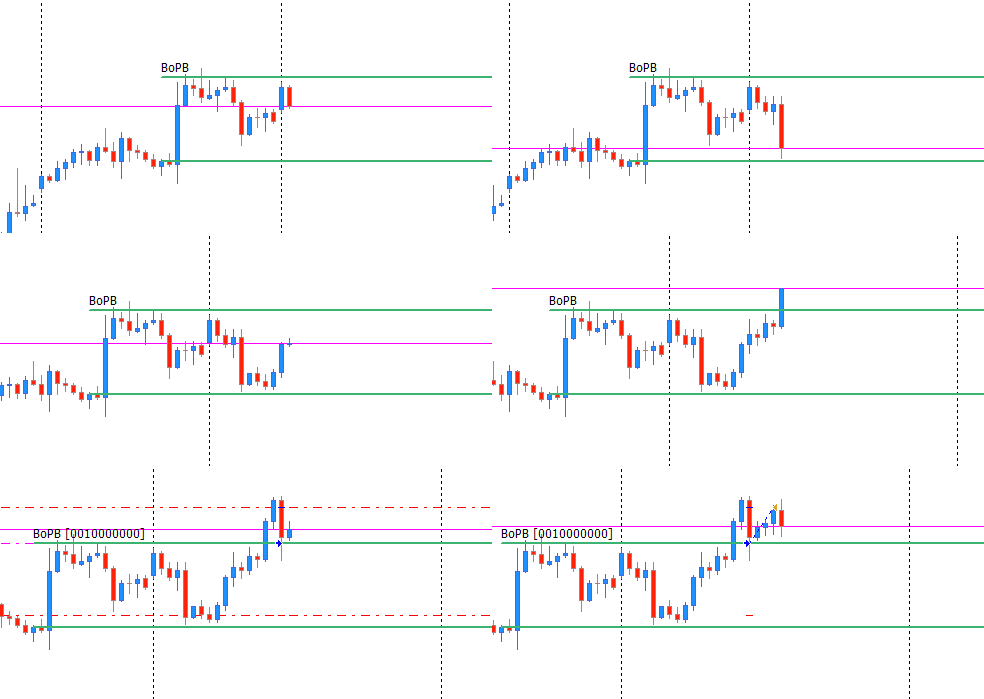
- BoPB / BuyOnPullback — Buy after price breaks up and pulls back to the line
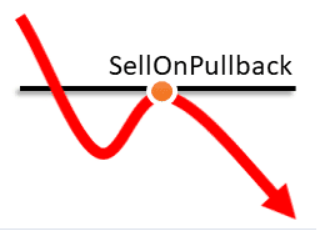
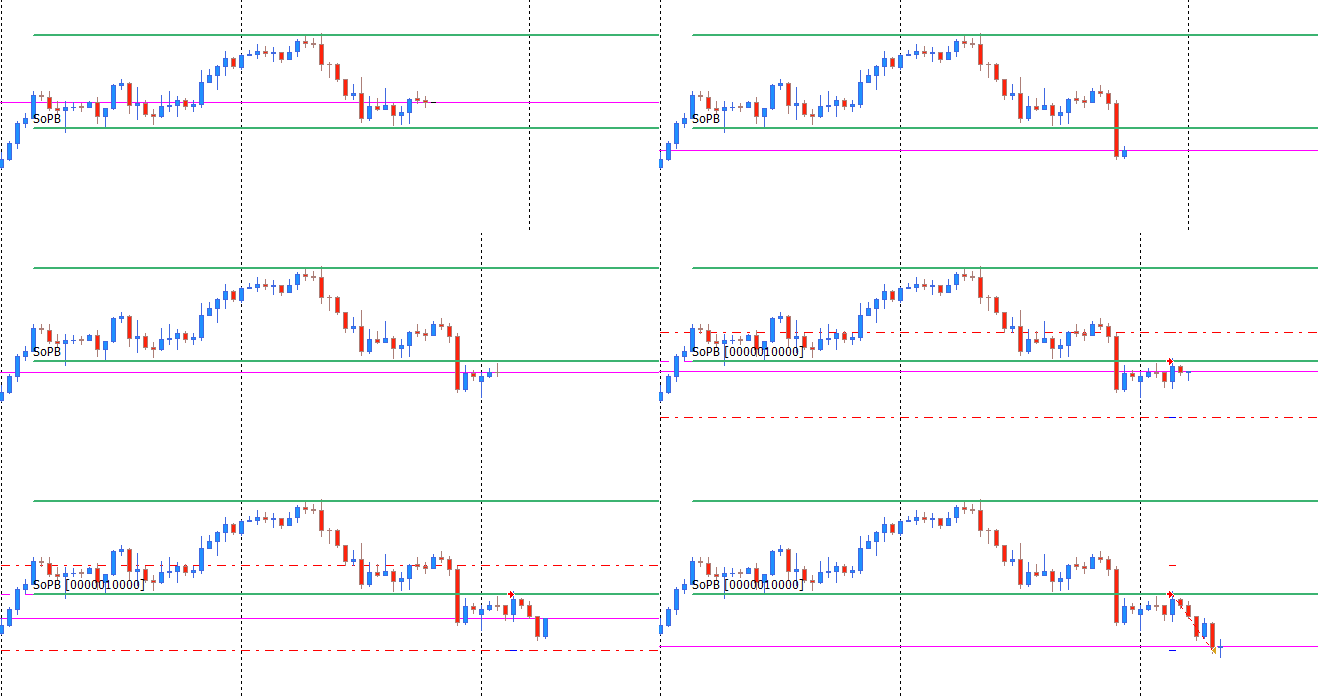
- SoPB / SellOnPullback — Sell after price breaks down and pulls back to the line
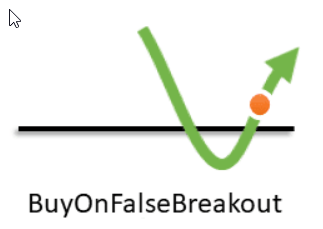
- BoFB / BuyOnFalseBreakout — Buy when a bearish breakout fails and reverses
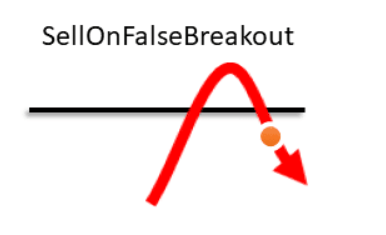
- SoFB / SellOnFalseBreakout — Sell when a bullish breakout fails and reverses
Position Management
- CaB — Close all open Buy positions
- CaS — Close all open Sell positions
- CaO — Close all open positions
- CP — Close a partial volume of a position
Alert Actions
- Alert / AoT — Alert when price touches the trendline
- AoB — Alert on breakout
- AoP — Alert on pullback
- AoFB — Alert on false breakout
Action Parameters
- SL: — Stop loss in points (e.g.
SL:100) - TP: — Take profit in points (e.g.
TP:200) - V: — Trade volume / lot size (e.g.
V:0.05)
Usage Examples
Buy on touch with take profit parameter:
BoT TP:300
Sell on pullback:
SoPB SL:80 TP:160 V:0.03
Alert only — no trade:
AlertClose all Buy positions when price touches a trendline:
CaB
Key Features
- Works on all symbols and timeframes supported by MetaTrader 4 and MetaTrader 5
- Run multiple trendlines simultaneously on the same chart, each with independent actions, SL, TP, and volume
- Choose between candle-close confirmation or pip-distance breakout detection
- Configure re-entry: allow the EA to open a new trade after the previous one closes
- Set a maximum number of re-entries per trendline
- Trailing Stop and Breakeven Stop support to protect open profits
- Customize whether buy triggers fire on Bid or Ask price
- Multi-channel alerts: popup, email, push notification, and sound file
- No trading strategy is embedded — all logic and decisions remain yours
Input Parameters
- Enable / disable EA operation
- Magic Number for trade identification
- Maximum slippage in points
- Default Stop Loss and Take Profit
- Default trade volume
- Breakout detection method (candle close or pip distance)
- Breakout distance in pips
- Buy trigger price type (Bid or Ask)
- Re-entry configuration per trendline
- Maximum number of re-entries
- False breakout minimum shift (filters weak breakouts)
- Stop Reentry on Breakeven option
- Alert delivery options (popup, email, push, sound)
- Custom alert sound file
What This EA Is Not
This is not a fully automated trading system. The Trendline EA will never open a trade unless you have explicitly configured a trendline with an action command. There is no built-in strategy, no signal generation, and no autonomous decision-making. It is a precision execution tool — you provide the analysis, it handles the order placement.
Purchase Includes
- Expert Advisor file for MT4 and MT5
- Lifetime free software updates
- Lifetime technical support
- 60-day money-back guarantee
Important Notes
- Testing on a demo account is strongly recommended before live use
- Trading results depend entirely on your trendline placement and configuration
- A VPS is optional but recommended for uninterrupted monitoring
- Review the full documentation and user guide before going live
Additional information
| version | MT4, MT5 |
|---|
10 reviews for Trendline EA – Semi-Automated Trading Robot for Breakouts, Pullbacks & Alerts
❓ FAQ
How do BuyOnPullback and SellOnPullback work?
First a candle must close on the opposite side of the trendline. If a later candle returns and touches the line, the EA executes the order.
How do BuyOnFalseBreakout and SellOnFalseBreakout work?
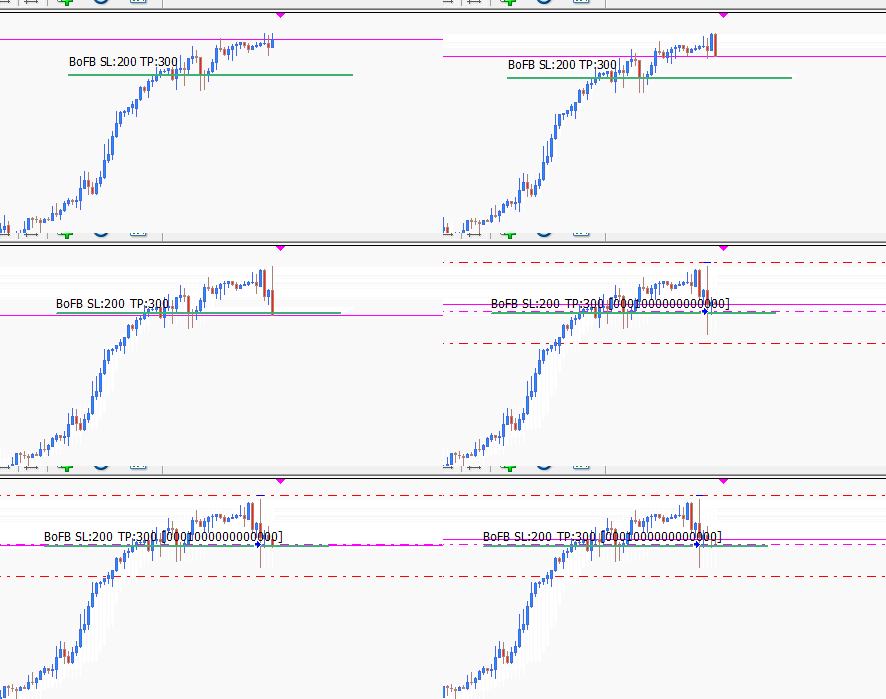
These actions trigger when price breaks through the trendline and then reverses back, forming a false breakout.
Minimum distance filters weak breakouts. If set to 100 points, but price only moves 50 points before returning, no trade will be opened.
What is the difference between the types of breakouts?
- On close of candle: order opens only after the candle closes beyond the trendline.
- On distance in pips: order opens as soon as price exceeds the trendline by the defined number of pips.
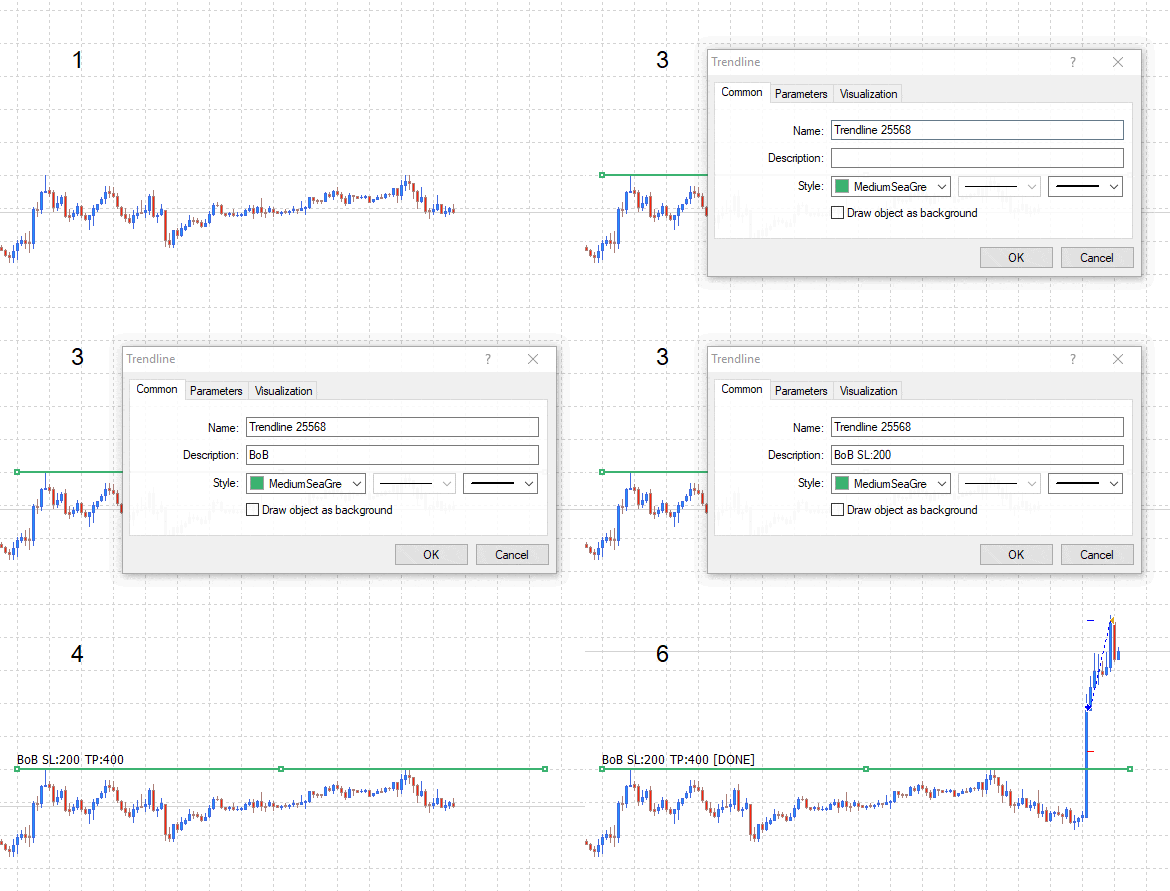
Breakout triggered on candle close
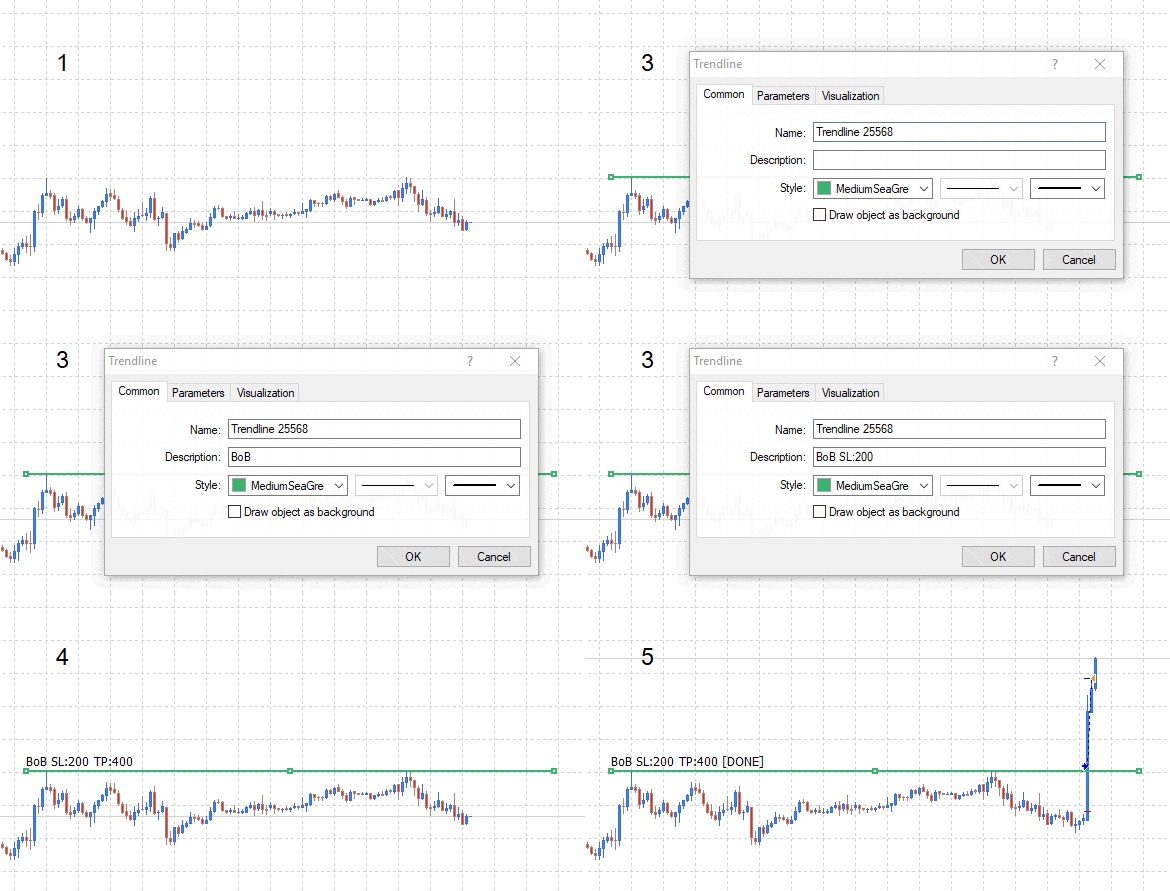
Breakout triggered by distance in pips
If you have questions or suggestions, feel free to message me anytime.
Check out the detailed guide here.
Installing the EA on Metatrader
- Installing the FXTT Trendline EA on Metatrader 5
- Download the “FXTT_TrendlineEA.ex5” file to your computer.
- Open the MT5 platform
- Navigate to the “File” menu at the top of the screen.
- Click on “Open Data Folder” in the “Files” menu.
- In the file window that appears, click on “MQL5” then “Experts”.
- Copy and paste the “FXTT_TrendlineEA.ex5” file into the “Experts” folder.
- Navigate back to the MT5 platform and open the “Navigator” window.
- Right-click on “Expert Advisors” and select “Refresh”. The FXTT Trendline EA should now appear in the list.
- Drag and drop the EA from the navigator window to a chart.
- Configure EA settings and input parameters if necessary.
- Click on “OK” and the FXTT Trendline EA will start working on the chart.
- Installing the FXTT Trendline EA on Metatrader 4
- Download the “FXTT_TrendlineEA.ex4” file to your computer.
- Open the MT4 platform
- Go to the “File” menu at the top of the screen and then “Open Data Folder”.
- Choose “MQL4” and then “Experts” or “Indicators”.
- Copy the “FXTT_TrendlineEA.ex4” file into this location.
- Close and reopen MT4, and you should see the FXTT Trendline EA in the navigator window.
- Drag and drop the EA from the navigator window to a chart.
- Configure EA settings and input parameters if necessary.
- Click on “OK” and the FXTT Trendline EA will start working on the chart
Basic Usage
- Attach the Expert Advisor to a chart
- Draw a trendline using standard MetaTrader tools
- Add an action command to the trendline name
- The Expert Advisor monitors the trendline and executes the specified action
BoB SL:100 TP:200 V:0.05
How the Trendline EA works
- Open your chart.
- Draw your trendlines,
- On the properties page of the trendline, define the desired action to take.
- Go about your day.

- Added trading session filter (UseSessionFilter/SessionStartHour/SessionEndHour);
- Added line color feedback on trigger (ShowTriggerFeedback/TriggerFeedbackColor);
- Added per-line max:N modifier to override MaxCommandExecutions;
Version 2.20 2026.17.03
- Close commands (CP, CaS, CaB, CaO) now work reliably on all account types (including futures netting accounts).
- Additional improvements include a “Stop Reentry on Breakeven” option
- Fixes for the CaO atclose command and other close command edge cases.
- Added “Max number of reentries” feature
Version 2.10 2025.12.07
- Fixed issue in CaO for multiple orders in crypto symbols
- Stability improvements
- Fixe issue with move to Breakeven stop loss
- Fixed issue where CaO would not close all orders
- Fixed small issue in TrailingStop
- Added support for Trailing Stop
- Added support for Breakeven Stop
- Improved stability of EA
- Hotfix for some brokers where order open was failing
- Fixed bug with commands BoPB & SoPB
- Fixed issue were multiple orders were opened upon broker error
- Other stability improvements
- Improved trendline detection when price moves very rapidly
- Removed automatic setting of trendlines description on chart
- Fixed bug where Reentry after previous order closes would not work
- Fixed bug where the commands CaO CaB CaS would not work properly
- Several improvements
- Fixed bug where CaO command would close orders on all charts
- Fixed bug with Breakout commands
- Several stability improvements
Images Gallery
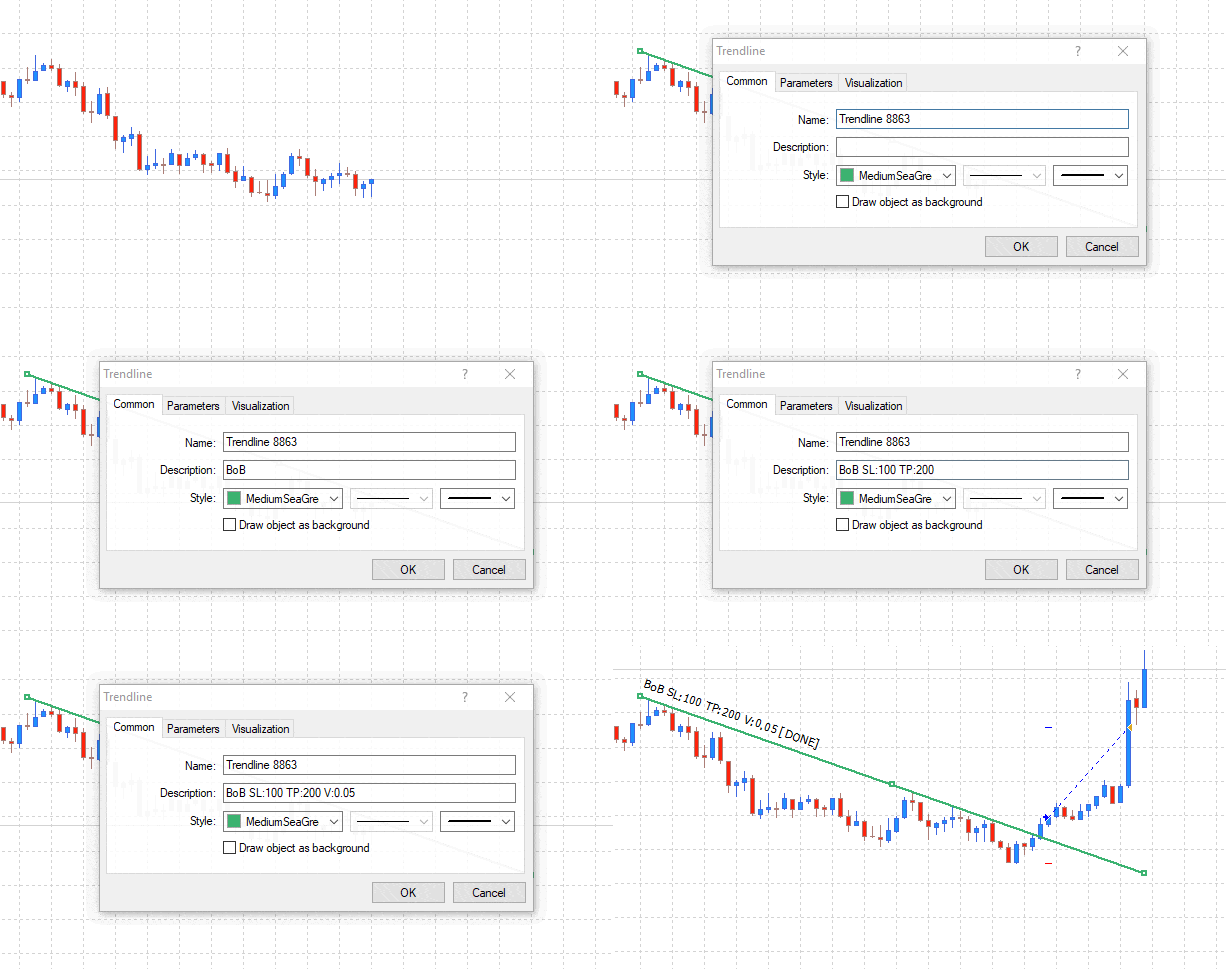
Trendline EA Working Example
Trendline EA Working Example
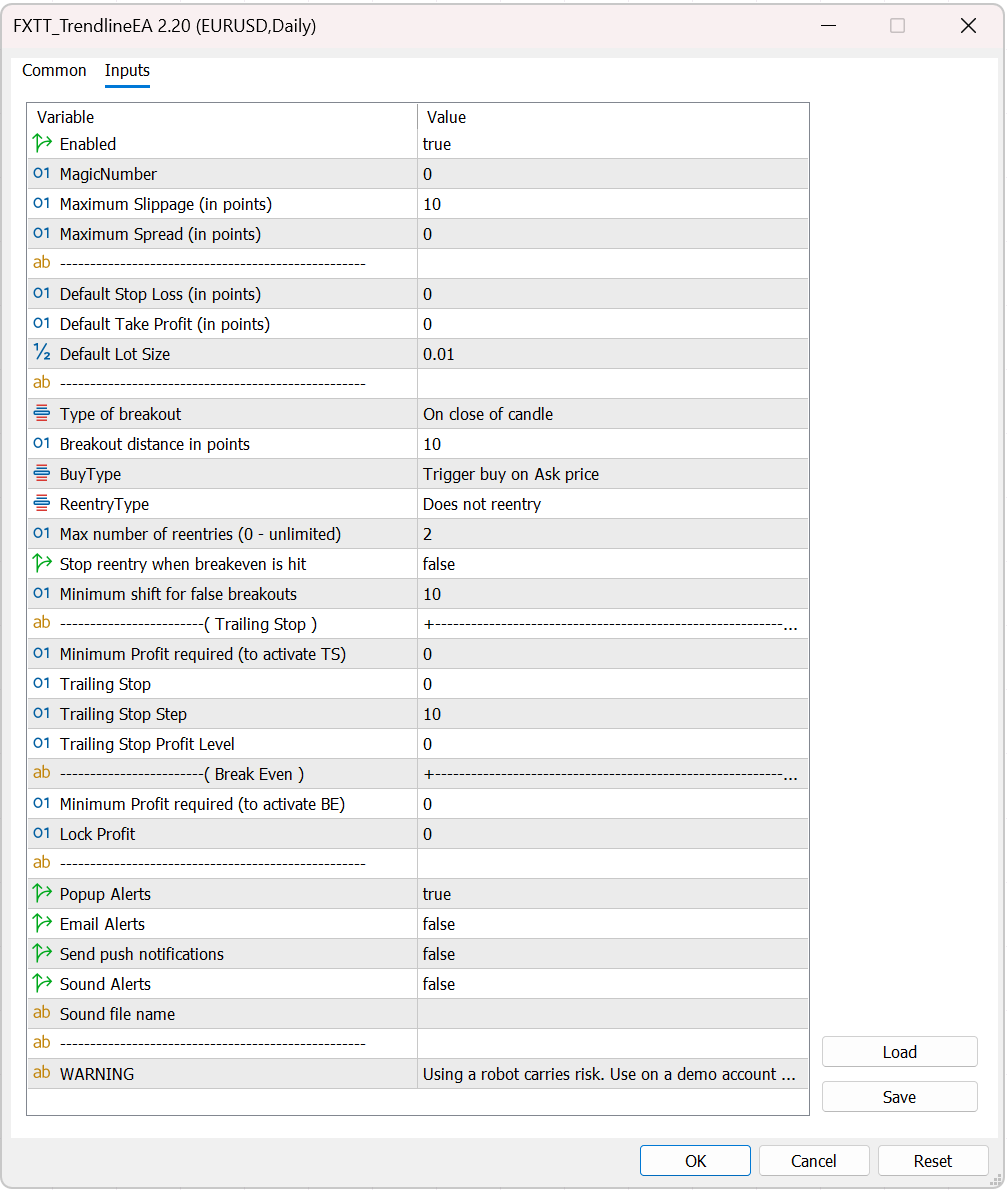
Trendline-EA-MT5-Settings-2.20
Trendline-EA-MT5-Settings
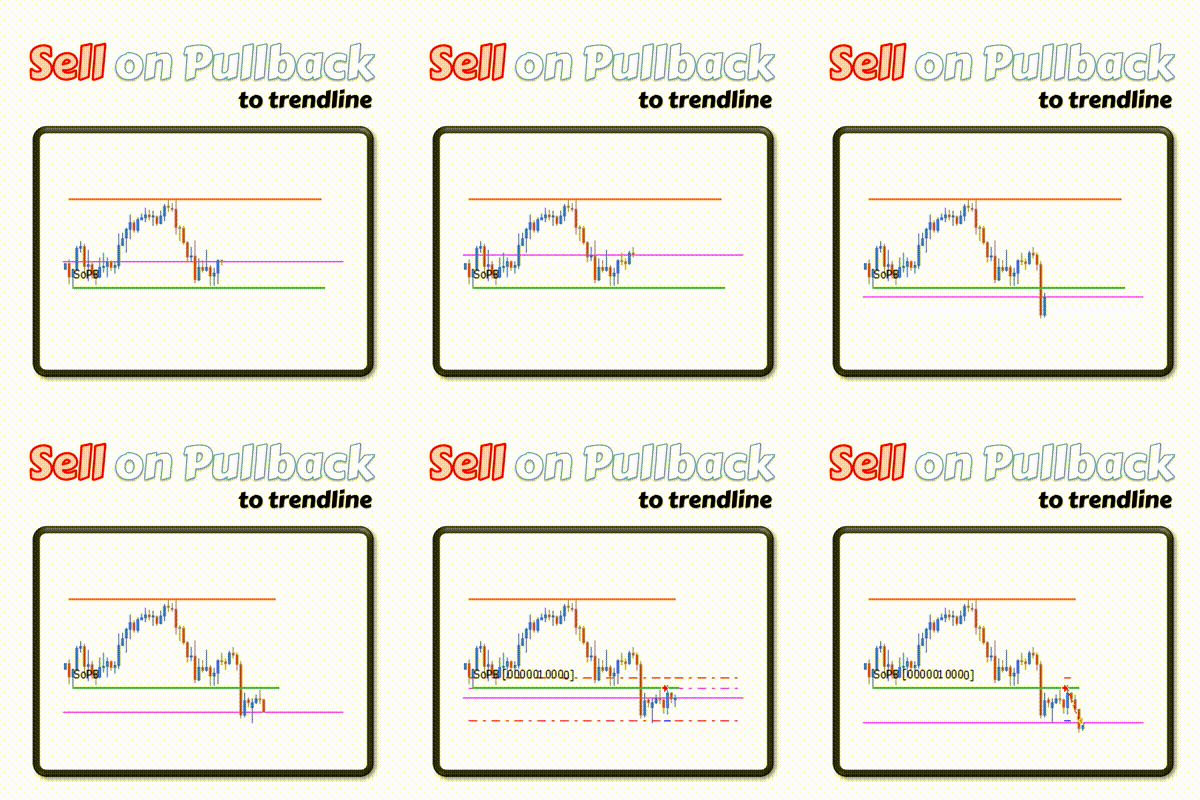
Sell On Pullback

Sell On Touch
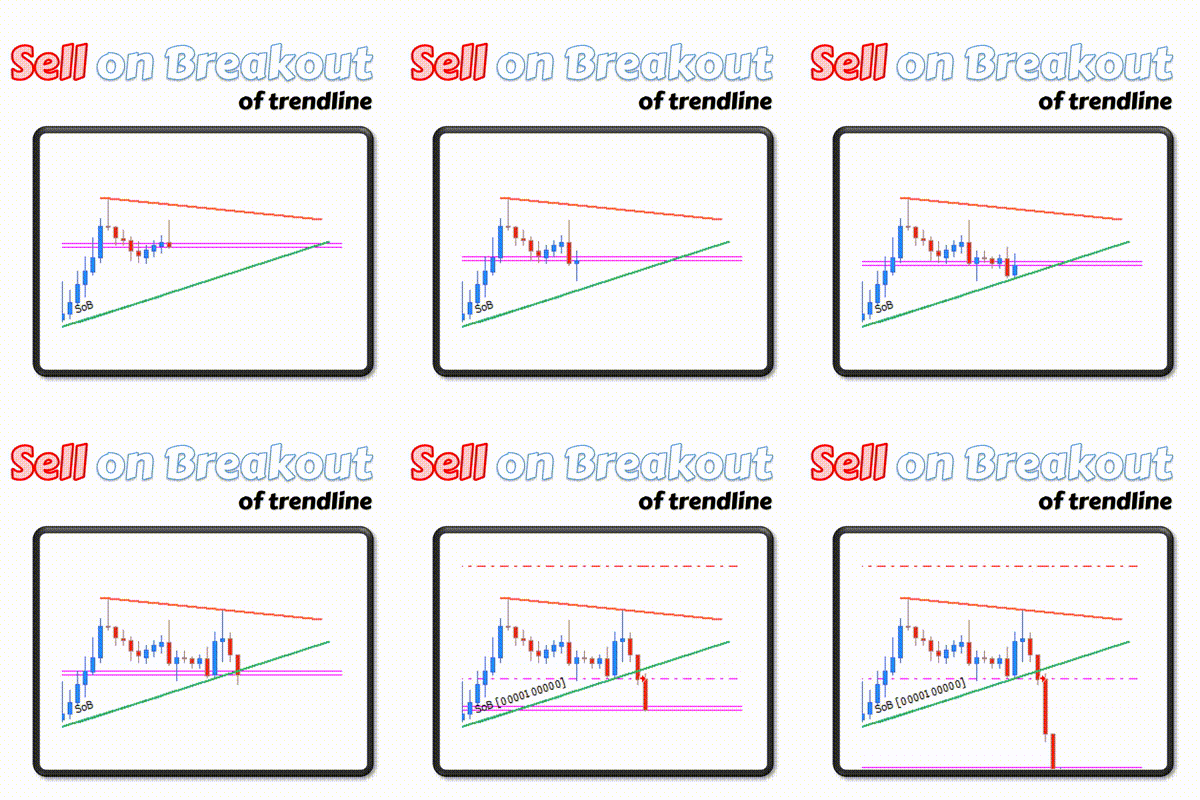
Sell On Breakout

Buy On Touch
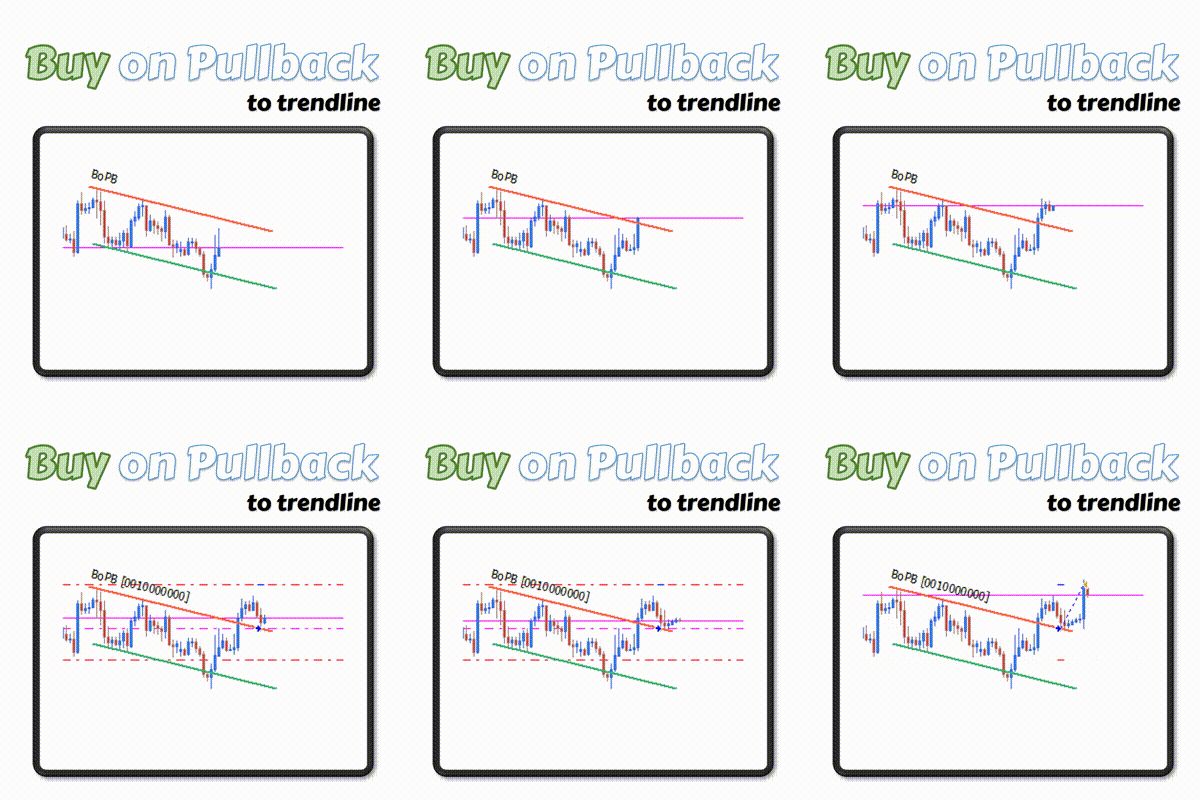
Buy On Pullback
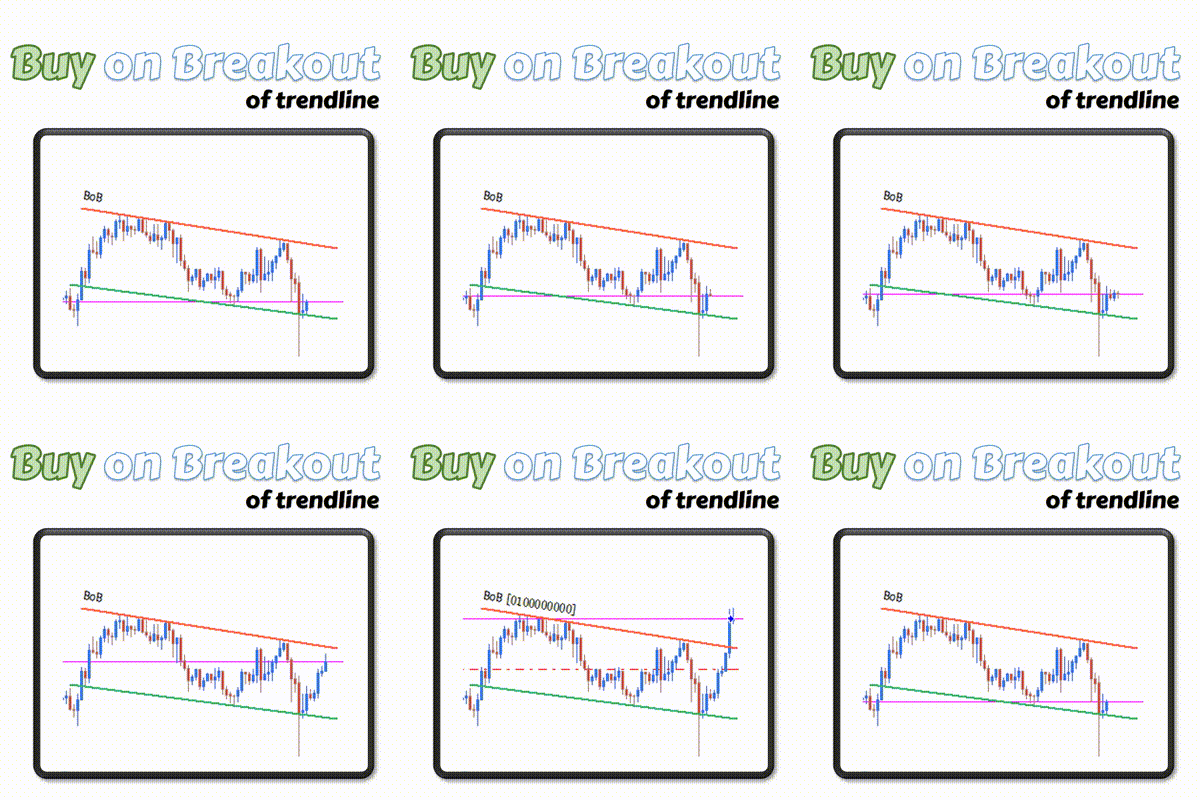
Buy On Breakout

Trendline EA supported commands
Trendline EA supported commands
Erwin Oscar –
I’ve been looking for this EA from a long time however I couldnt fine the one and even if there was then it had alot of bugs,delay in opening orders and several other issues,I’m gladful to coder of this Trendline EA, I must say He did a Great Job in developing this EA,Its response time and accuracy of opening trade is really good! and moreover price of this EA is very low which makes it accessable to everyone! I believe every trader should have this Amazing EA in their trading ToolBox, and Again Thanks alot for developing this EA!!! Keep up the good work Mate! you saved me a alot of time&hassle!!!
Carlos Oliveira –
Thank you Erwin. I’m very happy that my tool can help you in your trading. I wish you lots of success. Best regards.
ciprian orban (verified owner) –
By far one of the smartest trading tools available. Breakout strategies are the most profitable ones and usually, the breakout happens when you are asleep.
With Carlos EA I can capture those breakouts no matter what time of the day is. Moreover, the developer is extremely dedicated to develop this tool continuously and even to put in some extra help to personalize it.
Thank you, Carlos
5 North Pole Stars for you and your work!!!!
Carlos Oliveira –
Thank you for your comment Ciprian!
I work hard to make sure that the EA meets expectations like yours, and I’m very happy to hear that you like it.
I wish you lots of success. Best regards.
Neves Chrichlow (verified owner) –
Review for Trendline EA – Automated Trading Robot
Aleš Ridl –
Hi,
Do you have some recommended settings of this EA and backtests on 99.90% data?
Thanks for info
Ales
Carlos Oliveira –
Hi Ales,
Thank you for your comment.
Unfortunately I don’t have any recommended settings or any backtests to share with you because this EA does not trade completely unattended.
It requires that you open your charts and draw your own trendlines.
In this regard it allows you to trade whatever strategy you already have that uses trendlines, but it also makes no sense to share my backtests because they will be different from everybody else.
I hope this answers your question.
Fell free to contact me if you have any more doubts.
Budi Rachmat –
is your product automatic execute order also has stoploss and take profit?, what the guarantee when using this robot is profitable..
Carlos Oliveira –
Hello Mr. Rachmat
The Trendline EA does not trade fully automatically. It requires that you make your analysis and draw the trendlines on the chart.
It works more like a tool that helps you issue commands that MT4 does not support.
In this regard it does not offer any guarantee of profitability since it depends on your trading strategy.
Art D (verified owner) –
So easy to use and works like a charm. Looking forward to the pro version!
yapingmo –
The indicators you share are very good
Xu Yang (verified owner) –
Hello all,
I am here to leave my honest review and comment on the Trendline EA. Anyone who has any doubt or concern, you’re more than welcome to email me about what my experience has been with Carlos Oliveria. Email: viximum@gmail.com
I am a fund manager myself starting out not long ago. I trade with strong discipline and strict risk management. And I’m located in Mountain Time zone which makes it really hard to trade. In order not to, stay up beside computer 1am in the morning every day, I have to find myself a very effective and efficient pending breakout method for a long time. And I end up with FXTT.
There are many breakout methods you can trade depends on what type of aggressive trader you are. So you may use all the different set ups to fine tune your entry point using the powerful tools Carlos has provided. The EA is designed in a very clear to understand way. And it only take seconds to get use to his easy-to-read command lines. And it shows the command right on the line that you just draw and stays there. So you know what you expect to happen with the line that you put on the chart. Straight forward nice and clear.
I have been trading forex for over ten years, and nothing is coming even close to what this EA can offer. It will bring your trading to the next level if you can make the most use of this little tool. You will not regret at a such a low price.
Carlos’s tool allows me to draw the trendline and walk away from the trade. Set up before I go to sleep during Asian session and let the trade to play out itself during EU and US session. It saves me a lot of time for many other things. It’s a hundred percent “Plan the Trade and Trade the Plan”.
Another reason that I’m really happy is how reachable Carlos is. Whenever I email him, he emails me back right away with the answer that I was looking for. He’s very humble and honest that deserves the best. I pointed out a bug to him, and the problem gets fixed right away. And also, whatever is in my mind, Carlos comes back with a modification version that fits my requirement. He is currently developing a powerful version of the trendline EA that gives you the power to do anything that you will possibly need in trading forex.
I highly recommend this product. And you will never feel that you were left behind. Thanks programmer’s effort to make us traders’ life much easier. Thank you Carlos. Keep up with the great job.
Xu
Dave –
I am extremely happy with this EA.
Its simple, intuitive, inexpensive and works. To be able to apply/draw trendlines on a chart and then have trades placed automaticity as price reacts with the levels is a great advantage. It is also very nice to able to test out trading ideas etc.
Carlos has been fast to respond and very helpful with questions as well.
Dave
Reinhold Neumann (verified owner) –
I am most grateful for Carlos’ Trendline EA. This EA has helped me generate consistent profits and works with me as I study my charts. Now I don’t have to wait all night or enter at a wrong time, I set this EA and check back later on when I get an alert.
Carlos does reply quickly to any messages so I am also grateful for his attentive responses.
Reinhold Joachim