
FxTT MT5 Forex Scanner – Free Multi-Pair Indicator
Version 1.30
March, 2026
Download the free FXTT Multi Forex Scanner for MetaTrader 5 and monitor your entire watchlist at a glance. View live RSI, Stochastic, ADX, ATR, Volume, Pivot Points, and Moving Average data for every pair on a single auto-refreshing on-chart dashboard. Built-in alerts with push notifications fire on RSI extremes, Stochastic extremes, and MA crossovers — so you never miss a key market event across your watchlist.
The MT5 forex scanner from Forex Trading Tools gives you a fast, single-screen market overview for MetaTrader 5. Instead of switching across many charts, you can monitor multiple symbols at once and spot momentum, trend strength, and overbought or oversold conditions in seconds.
MT5 Forex Scanner for Multi-Pair Analysis
This free indicator is built for traders who want clarity and speed. The scanner reads symbols from your Market Watch or from your own custom symbol list, then displays key data in a compact dashboard directly on your chart. It is designed to help you reduce chart-hopping and make cleaner, faster decisions.
At a glance, you can track RSI, Stochastic, ADX, ATR percentage, Volume percentage, Pivot context, moving average direction, and MA-cross status across your selected symbols. Refresh is timer-based, which keeps the panel responsive while limiting unnecessary resource usage.
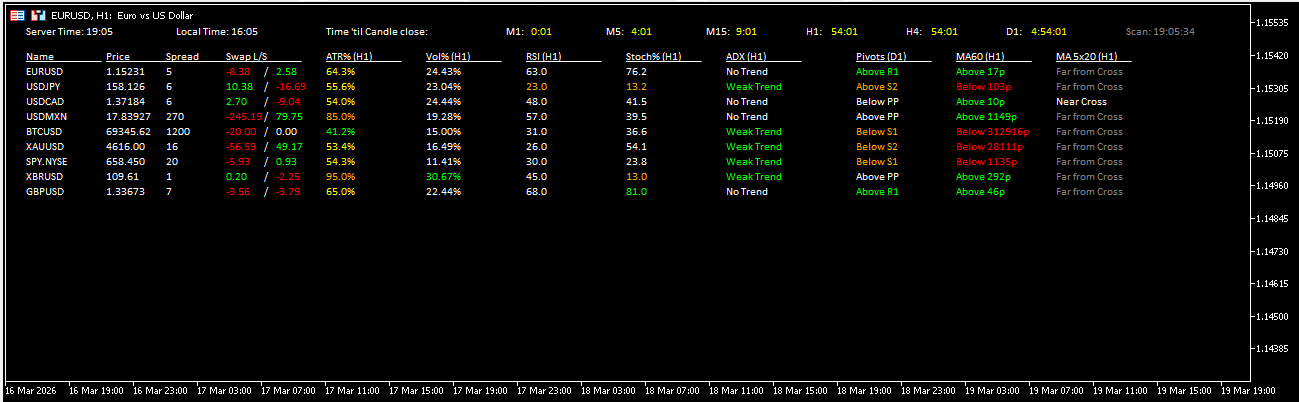
Why Traders Use This Forex Scanner Indicator in MT5
- See multiple pairs in one place, rather than opening many separate charts.
- Catch confluence faster by combining momentum, trend, and volatility context.
- Use alert options for RSI, Stochastic, and MA-cross events.
- Keep your workflow clean with scanner-only display mode.
- Run it on any chart while data is calculated from your chosen timeframes.
Practical Workflow
A common workflow is to keep this MT5 forex scanner open on a dedicated chart while trading from your normal execution charts. The scanner helps you shortlist pairs with active conditions first; then you perform your deeper entry validation on the selected symbols. This approach saves time and helps maintain consistency when scanning broad watchlists.
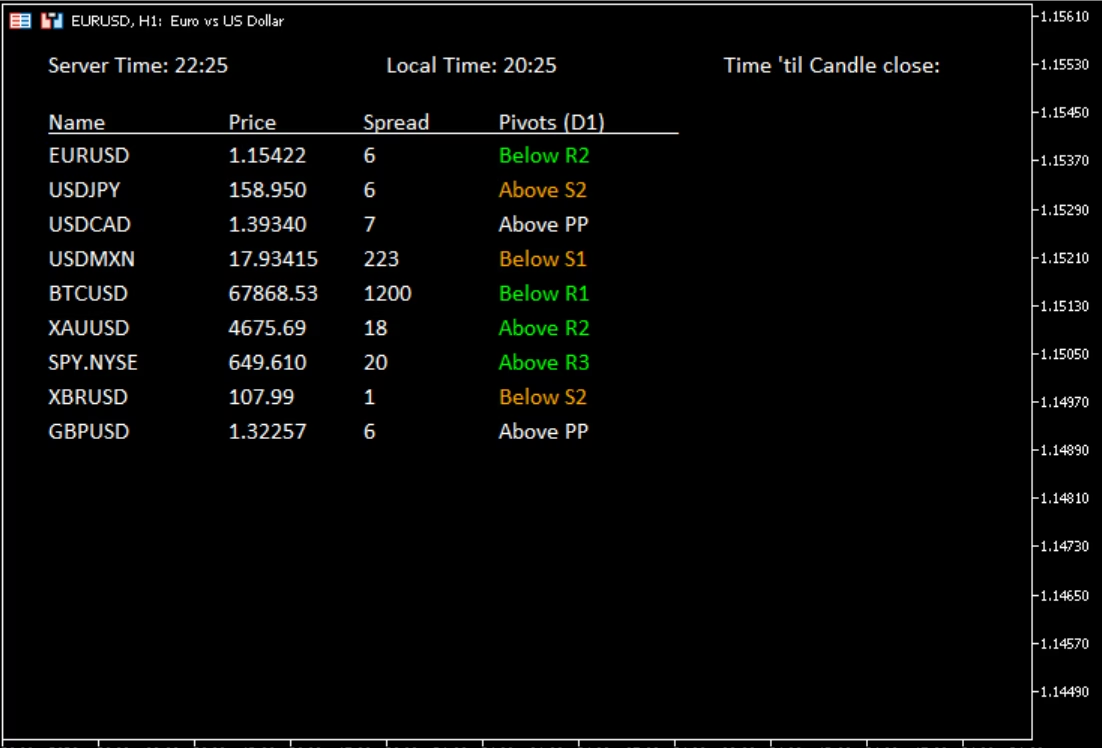
Fx Scanner minimal setup with pivot points
Open Source and Transparent Development
Open source: View the GitHub repository here: https://github.com/ForexTradingTools/fxtt-mt5-forex-scanner
Because the project is open source, you can review implementation details, follow updates, and better understand how the indicator computes and presents each signal block.
Installation and Full Settings
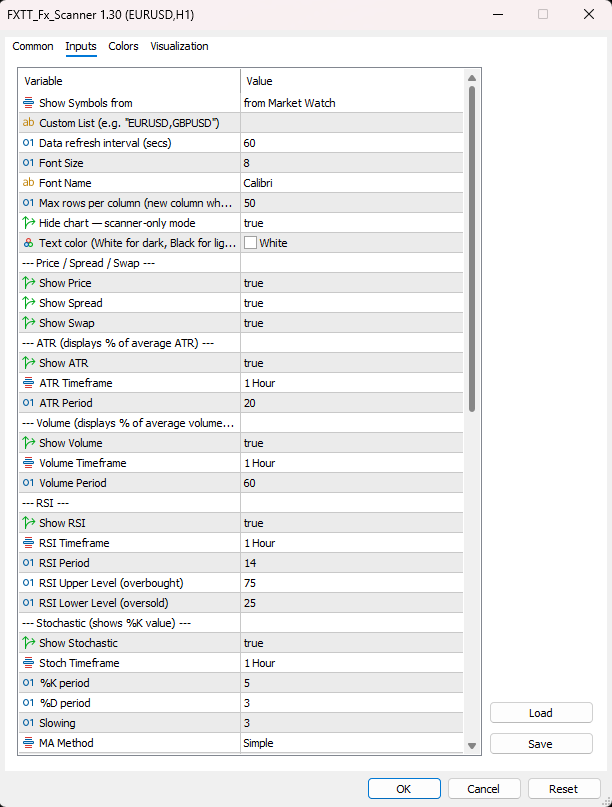
For step-by-step setup instructions, use the Installation Guide tab below. For every input parameter and default value, use the Settings Reference tab. This keeps the main page concise while preserving complete technical documentation in the correct tab sections.
Related Resources
Browse more tools in our Forex indicators collection, or visit the Forex Trading Tools homepage to see all MT4 and MT5 products.
Who This Is Best For
This scanner is ideal for discretionary traders who monitor many symbols, for intraday traders who need quick context before execution, and for swing traders who want a structured top-down shortlist process. If your challenge is speed and consistency across multiple pairs, this MT5 forex scanner is a practical way to simplify your analysis loop without sacrificing visibility.
It is also useful as a companion tool for strategy validation. You can keep the scanner as your broad market filter, then apply your own entry and risk model only when conditions align. That separation can improve discipline and reduce random trade selection.
How to Use Scanner Signals More Effectively
For best trading discipline, treat scanner output as a filter, not as an automatic entry trigger. The panel helps you identify where conditions are interesting, but entries still benefit from your normal confirmation process, market session context, and risk controls. Many traders use a simple routine: shortlist symbols from the scanner, review structure on the execution chart, then confirm timing with their preferred setup rules.
To keep quality high, avoid overreacting to every alert. Use the cooldown and timeframe settings to match your strategy horizon, and focus only on symbols with strong alignment across multiple columns. This reduces noise and helps you prioritize better opportunities instead of chasing isolated signals.
Used this way, the scanner supports better focus, cleaner execution plans, and more consistent decision quality across your full watchlist.
- Click the download button on this page to get the free indicator file.
- In MetaTrader 5, go to File → Open Data Folder.
- Navigate to MQL5 → Indicators and copy the
.ex5file into that folder. - Restart MetaTrader 5, or right-click the Navigator panel and select Refresh.
- Open any chart — the scanner reads all Market Watch symbols regardless of the chart’s symbol or timeframe.
- Find FXTT_Fx_Scanner under Indicators in the Navigator and double-click or drag it onto the chart.
- Configure timeframes, columns, font size, and alert settings in the inputs panel.
- Enable Hide Chart Elements for a clean scanner-only view with a black background.
- The scanner panel appears immediately and auto-refreshes on the configured timer interval.
Tip: For best results, attach the scanner to a dedicated chart window on any symbol and dock or minimise it. This keeps the scanner running independently while you trade from other charts.
| Setting | Description | Default |
|---|---|---|
Show Symbols From | Market Watch or Custom List | Market Watch |
Custom List | Comma-separated symbols, e.g. EURUSD,GBPUSD | — |
Timer Interval (secs) | Data refresh rate (minimum 5) | 60 |
Font Size | Scales the entire panel layout proportionally | 8 |
Font Name | Panel font family | Calibri |
Column Height | Max rows before starting a new column | 50 |
Hide Chart Elements | Scanner-only mode — black background, chart elements hidden | true |
Text Color | White for dark themes, black for light themes | White |
Show Price / Spread / Swap | Toggle each data column on or off | true |
ATR Timeframe / Period | Timeframe and lookback for ATR % column | H1 / 20 |
Volume Timeframe / Period | Timeframe and lookback for Volume % column | H1 / 60 |
RSI Timeframe / Period / Levels | Full RSI configuration with upper and lower thresholds | H1 / 14 / 75–25 |
Stochastic Timeframe / %K / %D / Slowing / Method | Full Stochastic configuration | H1 / 5 / 3 / 3 / SMA |
ADX Timeframe / Period | ADX trend strength and direction configuration | H1 / 20 |
Pivot Timeframe | Timeframe used to calculate pivot points | D1 |
MA Timeframe / Period / Method / Applied Price | Single MA for direction and pip distance column | H1 / 60 / SMA / Close |
Fast MA / Slow MA settings | Independent MA Cross pair configuration | H1 / 5 & 20 / SMA / Close |
MA Cross ATR Period | ATR period used for near-cross proximity detection | 20 |
Alert RSI / Stoch / MA Cross | Enable or disable each alert type independently | false |
Alert Push Notify | Send push notification to MT5 mobile app | false |
Alert Cooldown (hours) | Per-symbol cooldown to prevent repeated alerts | 4 |
Forex Scanner Settings
What is the FXTT MT5 Forex Scanner?
A free multi-pair forex scanner indicator for MetaTrader 5 that displays live RSI, Stochastic, ADX, ATR, Volume, Pivot, MA, and MA Cross data for all Market Watch symbols — or a custom list — on a single on-chart dashboard that auto-refreshes at a configurable interval.
Is the indicator free?
Yes. The FXTT Multi Forex Scanner is completely free to download and use. Click the download button on this page and install it in your MT5 platform.
How do I install the MT5 Forex Scanner?
Download the file, copy the .ex5 file to your MQL5/Indicators folder (File → Open Data Folder → MQL5 → Indicators), restart MT5 or refresh the Navigator, then drag the indicator onto any chart.
Which pairs does the scanner show?
By default, all symbols visible in your Market Watch. Switch Show Symbols From to Custom List and enter a comma-separated list (e.g. EURUSD,GBPUSD,USDJPY) to restrict the scan to specific pairs.
Can I get alerts when RSI or Stochastic hits an extreme?
Yes. Enable Alert on RSI Overbought/Oversold and Alert on Stochastic Overbought/Oversold in the settings. Toggle Push Notifications to also receive alerts on your MT5 mobile app.
What is near-cross detection?
When the fast MA and slow MA are within ATR-defined proximity of each other, the MA Cross column highlights this as a near cross — allowing you to anticipate potential crossover signals before they fully form.
Does it work on any chart timeframe?
Yes. You can attach the scanner to any chart on any timeframe. It reads data from its own independently configured timeframes regardless of the chart it runs on.
Why does the chart turn black when I attach the indicator?
This is the Hide Chart Elements feature. It sets a clean black background and hides all chart elements so only the scanner panel is visible. Set it to false to keep your existing chart appearance. When the indicator is removed, the original chart colors and settings are fully restored.
Can I receive alerts on my phone?
Yes. Enable Alert Push Notify in the settings and ensure your MetaTrader 5 mobile app is connected to your account. Alerts for RSI extremes, Stochastic extremes, and MA crossovers will be sent as push notifications.
Does the scanner affect chart performance?
The scanner refreshes on a timer (default 60 seconds) rather than on every tick, keeping CPU and memory usage low even with many symbols in Market Watch. Increase the timer interval if you notice any performance impact.
Can I run it on a VPS?
Yes. The indicator runs normally on a VPS and continues scanning and alerting as long as MetaTrader 5 is running, with no user interaction required after initial setup.
Can I use it alongside Expert Advisors?
Yes. The Multi Forex Scanner is a visual-only indicator. It does not place orders, modify positions, or interact with any Expert Advisors running on the same or other charts.
Is there an MT4 version?
This version is built specifically for MetaTrader 5. The .ex5 file is not compatible with MT4.
v1.30 2026-03-25
- Initial public release.
- 11 data columns: Price, Spread, Swap, ATR %, Volume %, RSI, Stochastic, ADX, Pivot Levels, MA direction, and MA Cross.
- Market Watch and Custom List symbol sources.
- Color-coded RSI and Stochastic cells with configurable overbought/oversold thresholds.
- Independent timeframe configuration per indicator column.
- Configurable alert system for RSI, Stochastic, and MA Cross signals with push notification support.
- Per-symbol alert cooldown to prevent repeated alerts.
- Near-cross detection using ATR proximity between fast and slow MAs.
- Multi-column layout with configurable max rows per column.
- Font size scaling — entire panel scales proportionally.
- Ghost-row cleanup when symbols are removed from Market Watch.
- Full chart restoration (colors, mode) on indicator removal.
Images Gallery
Forex Scanner screenshot
Forex Scanner screenshot
Fx-Scanner-Settings
Forex Scanner Settings
fxscanner-minimal-pivot-points
Fx Scanner minimal setup with pivot points
Reviews
There are no reviews yet.