
MTF Bollinger Bands – Free Indicator
Version 1.10
December, 2023
The MTF Bollinger Bands indicator is an indicator that I implemented for my personal use.
It’s purpose is to show the Bollinger Bands from different timeframes to help find the dynamic levels of support and resistance.
The MTF Bollinger Bands indicator is an indicator that I implemented for my personal use.
I developed it because I wanted to visualize the Bollinger Bands from other (higher) timeframes and without leaving the current chart.
Furthermore it would help me to find the dynamic levels of support and resistance.
Usage
Just choose the timeframe you desire on the configuration window that is automatically placed on the chart (named “MTF BBands“) and the indicator will do the rest.
The checkboxes are used to show/hide the different Bollinger Bands and allow for a cleaner reading of the price chart without requiring to change the current timeframe.
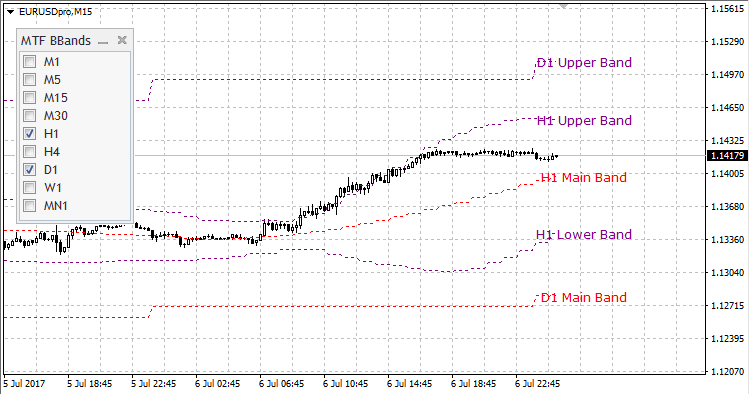
MTF Bollinger Bands example
Settings

MTF Bollinger Bands Settings
The configurations for the MTF Bollinger Bands indicator allow you to change:
- the period of the Bollinger bands
- the shift of the Bollinger Bands
- the deviations of the Bollinger Bands
- the line style, line width and line color for the different bands:
- Upper band
- Main band
- Lower Band
Disclaimer
Please contact me, if you’re not completely satisfied after using the MTF Bollinger Bands indicator.
I’ll do my best to address whatever issues you may have.
Since I am also a user of all my tools, I’ll be glad to hear your suggestions / improvements.
I am always striving to make them even better for everyone.
Installing MTF Bollinger Bands for MT4
- Download the ZIP file from this product page.
- Extract the archive and locate the
.ex4indicator file. - In MetaTrader 4, open File -> Open Data Folder.
- Go to
MQL4/Indicatorsand copy the indicator file there. - Restart MT4 or refresh the Navigator.
- Drag MTF Bollinger Bands onto any chart and configure the inputs.
Tip: Save your setup as a template if you regularly use the same band period and display preferences across multiple charts.
Settings Reference
| Parameter | Description |
|---|---|
Period |
Bollinger Bands lookback period. |
Deviations |
Standard deviation multiplier used for the upper and lower bands. |
Shift |
Horizontal shift applied to the Bollinger Bands values. |
Panel Position |
On-chart position of the timeframe control area. |
Timeframe Visibility |
Enable or disable the Bollinger Bands for each available timeframe. |
This legacy MT4 version is intended for traders who want a compact higher-timeframe Bollinger overview inside the classic MetaTrader 4 environment.
v1.10 2023-12-09
- Initial public release of the legacy MT4 MTF Bollinger Bands indicator.
- Added multi-timeframe Bollinger Bands display for faster higher-timeframe context.
- Added configurable visualization controls for discretionary chart analysis.
Reviews
There are no reviews yet.