
Most retail forex traders lose money — not because they lack discipline or pick the wrong currency pairs, but because they look at the market through a dangerously narrow window. Multi-timeframe trading MT5 is the practice that separates consistently profitable traders from those who wonder why their technically perfect setups keep failing. Trading from a single timeframe is like navigating a city by staring at one street sign: you know exactly where you stand, but have no idea whether you are heading toward the city centre or into a dead end. If you have ever placed a trade on a textbook chart pattern only to watch it get steamrolled by a larger trend you never saw, this complete guide to multi-timeframe trading MT5 will change the way you read markets forever.
What Is Multi-Timeframe Trading?
Multi-timeframe (MTF) trading is the discipline of analysing the same currency pair across two or more timeframes simultaneously before making any trading decision. Rather than isolating your view to a single chart, you assess market structure, trend direction, momentum, and key levels at a higher timeframe first, then step down to progressively shorter timeframes to refine your entry with precision.
The concept is not new. In the 1980s, Dr. Alexander Elder formalised what he called the Triple Screen Trading System — one of the most influential frameworks in technical trading history. Elder’s method required traders to examine three timeframes in sequence:
- The tide — a weekly or daily chart to identify the dominant trend direction
- The wave — an intermediate chart (such as H4 or H1) to identify corrections and setups within that trend
- The ripple — a short-term chart (such as M15 or M30) to time the precise entry
| The Tide Weekly / Daily Dominant trend direction. Overrides all lower timeframes. |
► | The Wave H4 / H1 Corrections & setups within the tide. Where the trade forms. |
► | The Ripple M30 / M15 Precise entry timing. Tight stop, confirmed trigger. |
| Dr. Alexander Elder’s Triple Screen — the original multi-timeframe framework (1980s). | ||||
Elder’s insight was profound: every timeframe exists within the context of a larger one. A strong bullish trend on the H1 chart is just a retracement on the H4. A major support level on the daily chart might be completely invisible on the M15. By systematically working top-down, traders eliminate the most common cause of failed setups — trading against the larger trend without realising it.
Decades later, this philosophy has become the backbone of professional forex trading. Institutional desks, hedge funds, and proprietary trading firms all use some version of top-down multi-timeframe analysis. MetaTrader 5 gives retail traders the exact same infrastructure to do it properly.
How MT5 Supports Multi-Timeframe Analysis
MetaTrader 5 was engineered from the ground up to be a superior multi-timeframe trading platform compared to its predecessor, MT4. Understanding the specific features available is essential before building your MTF workflow.
21 Built-In Timeframes
MT5 offers 21 native timeframes, ranging from M1 (one minute) to MN1 (monthly) — nearly double what MT4 provided. This gives you granular control at every level of analysis.
Minutes — M1 to M30
M1M2M3M4M5M6M10M12M15M20M30
Hours — H1 to H12
H1H2H3H4H6H8H12
Higher Timeframes
D1W1MN1
Multiple Chart Windows and Profiles
You can open as many chart windows as your hardware supports and arrange them in any layout. MT5 allows you to save entire chart profiles — complete sets of open charts with their indicators, zoom levels, and window arrangements. Create a “Swing Trading Profile” with H4, D1, and W1 charts pre-loaded, and switch to it in a single click.
Templates
Templates in MT5 let you save a chart’s full indicator configuration — colours, parameters, all attached tools — and apply it instantly to any symbol or timeframe. Build your ideal MTF analysis template once and deploy it across every pair you trade.
Custom Timeframes via MTF Indicators
MT5’s MQL5 language allows indicators to call data from any other timeframe directly within a single chart window. Thousands of MTF tools are available through the MQL5 Market. This is the technical foundation that makes true MTF indicators possible — the kind that display higher-timeframe data directly on your lower-timeframe chart without switching windows.
The Strategy Tester with MTF Support
MT5’s Strategy Tester supports multi-symbol, multi-timeframe backtesting in a single pass using “Every tick based on real ticks” mode. Validate whether your MTF strategy would have been profitable historically — something MT4 users could only approximate.
Top-Down Multi-Timeframe Analysis in MT5 — Step by Step
Top-down multi-timeframe analysis MT5 is the systematic process of starting your chart reading at the highest relevant timeframe and working progressively downward to the execution timeframe. Each step narrows your focus and adds precision to the picture established above it.
|
► |
|
► |
|
||||||
| Never enter on the entry timeframe before Steps 1 and 2 are complete. | ||||||||||
The power of this approach is that you are never fighting the tape. Your trade is already positioned in harmony with the dominant market force. Your entry is precise. Your risk is tightly defined at the lower timeframe. And your reward potential is validated by the higher-timeframe target — exactly the kind of asymmetric trade setup that builds equity over time.
Best Timeframe Combinations for Forex Trading
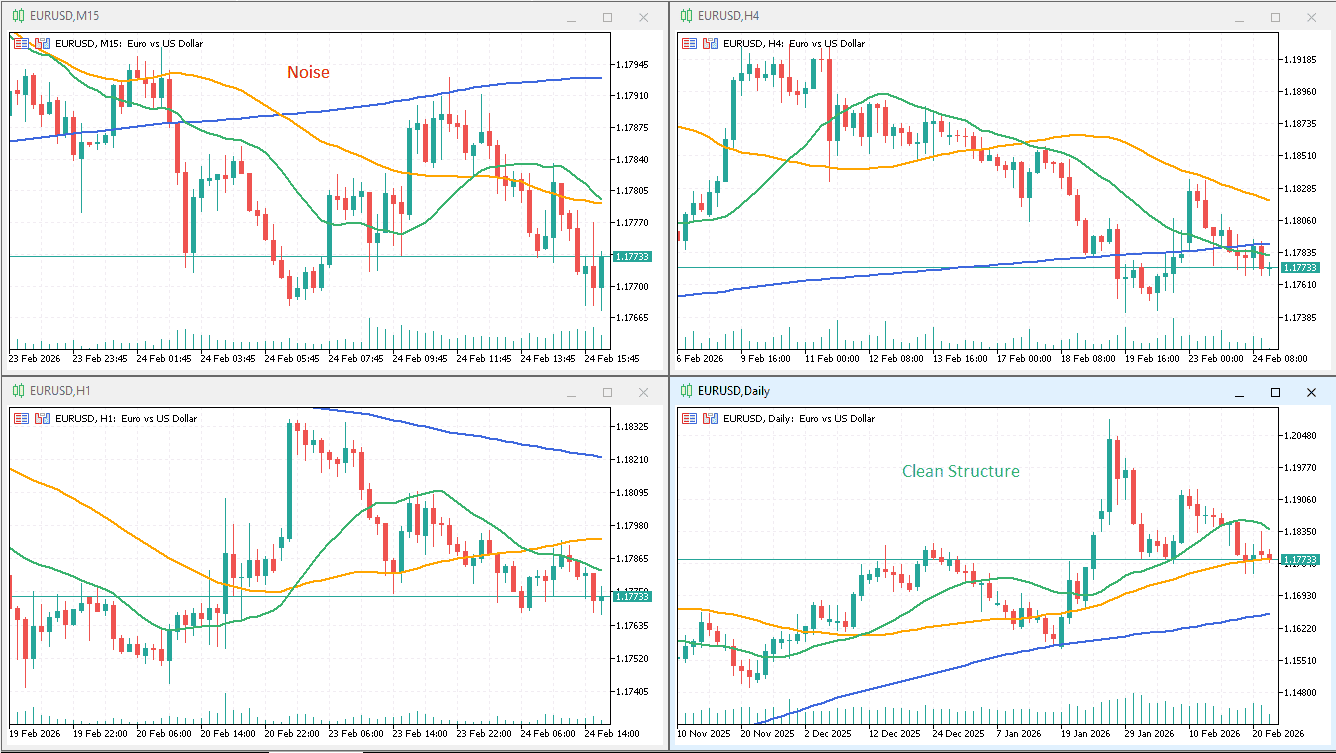
Not every combination works equally well for every trading style. Below is a reference table with the recommended timeframe triads for each major trading style, followed by a visual overview.
| Trading Style | Context Timeframe | Setup Timeframe | Entry Timeframe | Typical Hold Time |
|---|---|---|---|---|
| Scalping | M15 | M5 | M1 | Seconds to minutes |
| Day Trading | H4 | H1 | M15 | Hours (same session) |
| Swing Trading | W1 | D1 | H4 | Days to weeks |
| Position Trading | MN1 | W1 | D1 | Weeks to months |
Scalping (M1 / M5 / M15)
Scalpers operate at the edge of the market’s noise floor, seeking tiny price movements. Using M15 as context ensures that the short bursts of momentum you are chasing on M1 align with at least the intra-session trend direction. Without this context check, scalpers are essentially flipping coins on individual ticks. With it, win rates improve measurably because entries are filtered by a legitimate directional bias.
Day Trading (M15 / H1 / H4)
This is the most popular MTF combination among active retail traders. The H4 chart defines the session trend. The H1 identifies the setup — where is the pullback, where are the key decision levels? The M15 delivers the entry trigger, keeping the stop loss tight and the reward-to-risk ratio compelling. Day traders who adopt this triad consistently report fewer whipsaw trades and cleaner entry timing.
Swing Trading (H4 / D1 / W1)
Swing trading is where multi-timeframe trading MT5 delivers its most dramatic performance improvement. The weekly chart filters out daily noise and reveals the true institutional trend. The daily chart shows the correction or pattern setting up the trade. The H4 entry timeframe provides the precision needed to keep a tight stop relative to a multi-day target.
Position Trading (D1 / W1 / MN1)
Position traders think in weeks and months. The monthly chart identifies macro currency trends driven by interest rate differentials, economic cycles, and central bank policy. The weekly chart shows where major corrections occur within those macro trends. The daily chart provides the entry and initial risk framework.
Multi-Timeframe Trading MT5: Step-by-Step Workflow
Multi-Timeframe Indicators for MT5
One of the most practical advancements in modern multi-timeframe trading MT5 is the development of indicators that bring higher-timeframe data directly onto your current chart. Instead of constantly switching windows, you see the higher-timeframe trend, levels, or signals overlaid on your entry chart — dramatically speeding up your workflow and reducing the chance of missing context.
Multi-Timeframe Moving Averages
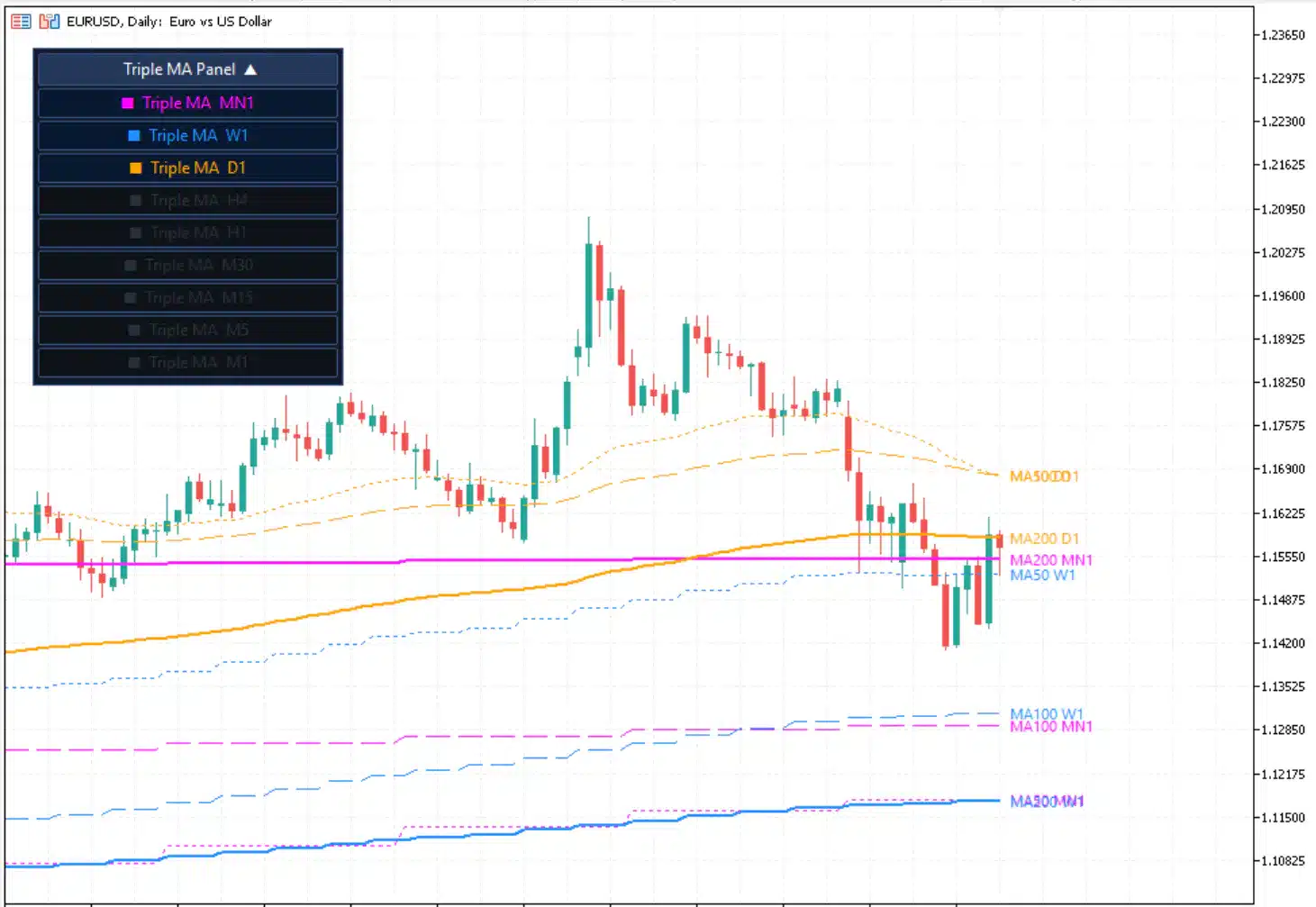
The most widely used MTF indicator type. A standard 200-period moving average on the H4 chart is one of the most watched levels in forex. An MTF moving average indicator allows you to display that same H4 200 MA on your M15 chart, so you can see exactly where it sits relative to current price as you time your entry. This eliminates the constant need to flip between charts.
Multi-Timeframe RSI
RSI signals are far more powerful when confirmed across timeframes. An MTF RSI indicator displays the RSI reading from a higher timeframe directly on your lower timeframe. When the H4 RSI shows oversold conditions while your M15 RSI turns up from below 30, you have a powerful confluence signal. This is multi-timeframe analysis MT5 at its most practical.
Multi-Timeframe Bollinger Bands
Bollinger Bands measure volatility and identify mean-reversion and breakout conditions simultaneously. In their standard form, they only show bands for the timeframe you are currently viewing. This is where an MTF Bollinger Bands indicator becomes genuinely powerful.
The MTF Bollinger Bands MT5 indicator from ForexTradingTools.eu overlays Bollinger Bands from a higher timeframe — such as the H4 or D1 — directly onto your current entry chart. When you are timing an entry on the M15 chart, you can instantly see whether price is testing the lower band of the Daily Bollinger Bands without opening a second chart window.
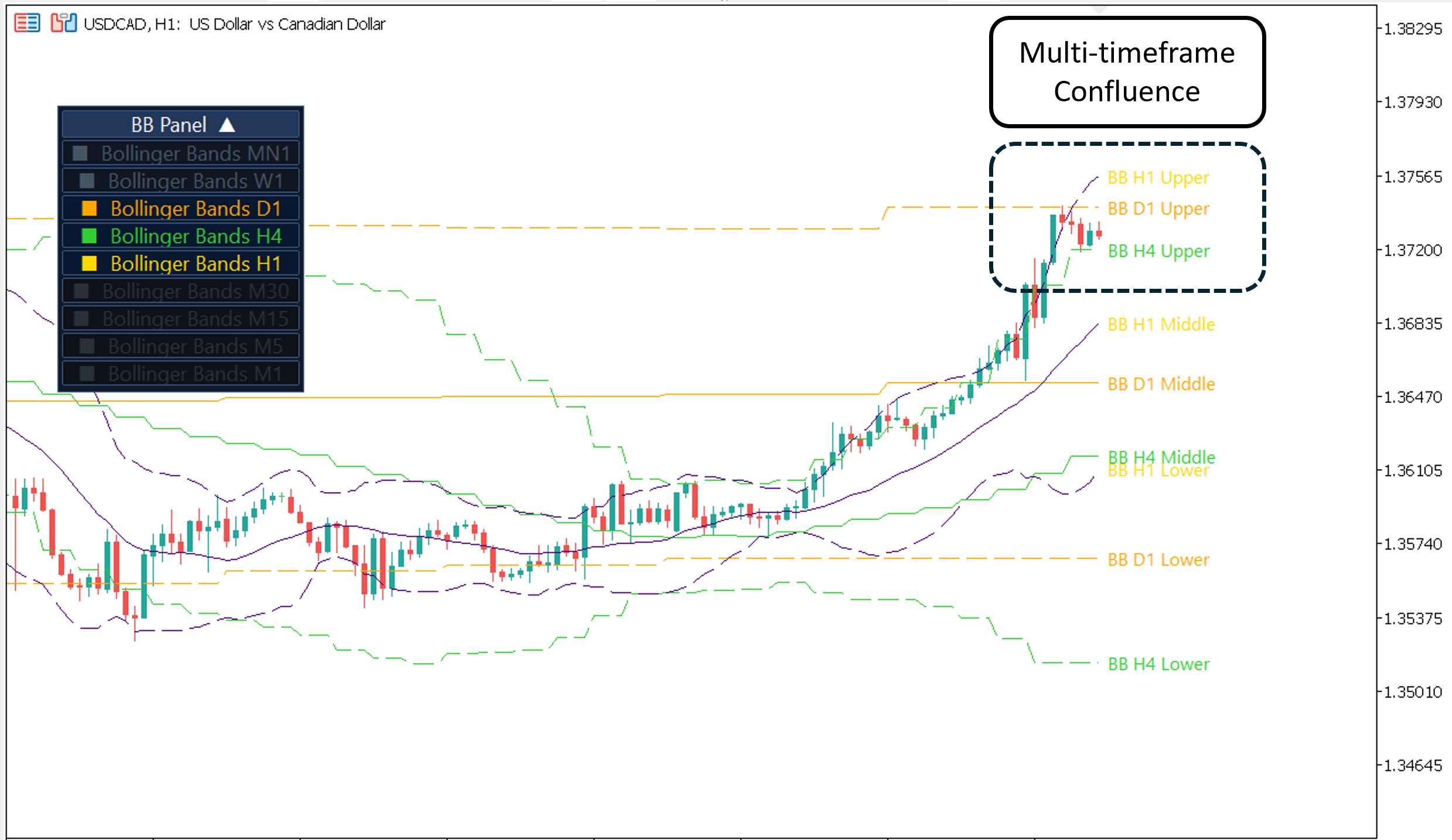
This is particularly effective for swing traders who use Daily Bollinger Band extremes as their higher-timeframe context signal, then refine entries on H4 or H1. When price reaches the outer band of a higher timeframe, it signals a statistically abnormal extension — conditions where mean reversion trades have historically high probability.
Entry and Exit Techniques Using MTF Confluence
Confluence means the simultaneous agreement of multiple independent signals. In multi-timeframe trading MT5, confluence occurs when your context timeframe, setup timeframe, and entry timeframe all point in the same direction at the same moment. The more layers of agreement, the higher the probability of the trade working.
The Higher-Timeframe Level + Lower-Timeframe Pattern
Identify a major support or resistance level on your context timeframe — a previous swing high, a round number, a key Fibonacci retracement. When price reaches that level on the entry timeframe, wait for a confirming candlestick pattern (engulfing, pin bar, inside bar breakout). The higher-timeframe level gives the setup its significance. The lower-timeframe pattern gives you a low-risk entry. Together, they form a high-quality trade.
Trend + Correction + Momentum Shift
The most reliable entry sequence in trending markets: confirm the trend on the context timeframe, identify a corrective move on the setup timeframe, then wait for a momentum shift signal on the entry timeframe — a bullish MACD crossover, RSI moving back above 50, or a breakout above a short-term descending trendline. This sequence filters out early, low-probability entries during the middle of corrections.
MTF Band Extremes with Reversal Triggers
When a higher-timeframe Bollinger Band extreme is reached, monitor the entry timeframe for a reversal trigger. Set the stop just beyond the band extreme. Target the middle band of the higher-timeframe Bollinger Bands — a natural mean-reversion target that consistently offers 2:1 or 3:1 reward-to-risk.
Exit Techniques
For exits, the intermediate (setup) timeframe should be your primary reference. Close the trade when: the setup timeframe hits your pre-defined higher-timeframe target level, the intermediate timeframe shows a clear reversal pattern against your position, or a trailing stop based on the setup timeframe’s swing lows is triggered. Avoid exiting solely based on the entry timeframe’s noise — you will exit far too early and undermine your average reward-to-risk.
Risk Management with Multi-Timeframe Analysis
Multi-timeframe trading MT5 does not just improve trade selection — it fundamentally improves risk management by giving you an accurate picture of where market structure actually sits.
| Stop Placement Set stop on entry TF. Validate against context TF — if stop is inside a major higher-TF zone, widen or skip the trade. |
Position Sizing Size by context TF volatility. If Daily Bollinger Bands are expanding, reduce position size even if M15 looks calm. |
| Context Break = Exit If price breaks higher-TF trend structure, exit. Never add to a loser because “the M15 looks like a reversal.” |
Scale by Quality High confluence (all 3 TFs agree) → max allocation (1–2% risk). Low confluence → half size or skip entirely. |
Common Mistakes in Multi-Timeframe Trading
Frequently Asked Questions
What is the best timeframe combination for beginner forex traders?
For beginners, the H4 / H1 / M15 combination used in day trading is the most forgiving and practical starting point. The H4 chart moves slowly enough that you have adequate time to analyse and plan without feeling rushed. The M15 entry timeframe provides enough granularity for precise entries without the extreme noise of sub-five-minute charts. This combination is the ideal introduction to multi-timeframe trading MT5 before adding complexity.
Do I need to be at my computer all day to use multi-timeframe analysis?
No. MTF analysis actually reduces the time you need to spend watching screens. By using higher-timeframe context (daily or weekly), your trade setups develop over hours or days rather than minutes. You can set price alerts in MT5 to notify you when price approaches your key zones, then check the setup and entry timeframes only when alerted. Swing traders using D1/H4/H1 combinations often spend less than 30 minutes per day on active analysis.
How do MTF indicators like the MTF Bollinger Bands save time?
Standard multi-timeframe analysis requires you to constantly switch between chart windows to check the higher-timeframe picture as you time your entry. MTF indicators eliminate this by displaying the higher-timeframe data directly on your entry chart. With the MTF Bollinger Bands MT5 indicator, for example, you can see the Daily Bollinger Band levels on your H1 chart in real time — meaning you immediately know if price is at a statistically extreme daily level while you are timing your entry, without opening a second chart.
Can multi-timeframe analysis be used in automated trading (EAs) in MT5?
Yes, and this is one of MT5’s most powerful features. Expert Advisors (EAs) in MQL5 can request data from any timeframe, allowing you to build automated systems that check the H4 trend before executing M15 signals — the same top-down logic a manual trader would apply. Building in at least one higher-timeframe filter dramatically improves signal quality and reduces false entries in any EA strategy.
What should I do when timeframes conflict?
When your context and setup timeframes are in direct conflict — for example, the daily chart shows a strong bearish trend but the H4 chart is breaking out bullishly — the correct answer in almost all cases is to skip the trade. Conflicting timeframes indicate that the market is at a major decision point, often near a significant higher-timeframe level. Wait for the conflict to resolve, then trade the confirmed direction with confidence.
Conclusion
Multi-timeframe trading is not an advanced technique reserved for professional traders — it is the foundational technique that makes everything else in technical analysis actually work. Without higher-timeframe context, even the best patterns, indicators, and setups operate in a vacuum, vulnerable to being overrun by forces you simply were not looking at. Multi-timeframe trading MT5 gives you a structured framework to position every trade within the full context of the market.
Start with a three-timeframe approach suited to your trading style. Build your MT5 profiles and templates so the workflow is fast and repeatable. Apply the top-down method rigorously — context first, setup second, entry last. Use MTF indicators like the MTF Bollinger Bands MT5 indicator to see multiple timeframes simultaneously without breaking your analytical flow. Manage risk by validating your stops and targets against the higher-timeframe structure.
The market rewards those who see the full picture. Build the habit of always asking “what does the bigger timeframe say?” before every trade, and you will quickly find that fewer — but far better — trades produce significantly better results. That is the compounding edge that multi-timeframe analysis MT5 gives you, available to every trader with an MT5 terminal and the patience to use it properly.