
Strategy Checklist – Free Indicator
Version 1.00
December, 2023
This is an indicator that I implemented to help me in my manual trading.
It allows you to define a checklist that helps you check your rules before opening a trade.
Keep in mind that this is not automatic. You must manually define the checks and mark them as according to your strategy.
The Strategy Checklist is an indicator that I implemented to help me in my manual trading.
It allows you to define a checklist that helps you check your rules before opening a trade.
Keep in mind that this is not automatic. You must manually define the checks and mark them as according to your strategy.
Strategy Checklist Settings:
- TAG : Allows you to have more than one instance of this indicator on a chart. (Keep in mind that the instances must all have different TAG values)
- Window Position: Allows you to define the default position where the window is opened
- Check01...Check20: Allow you to define the rules of your checklist.
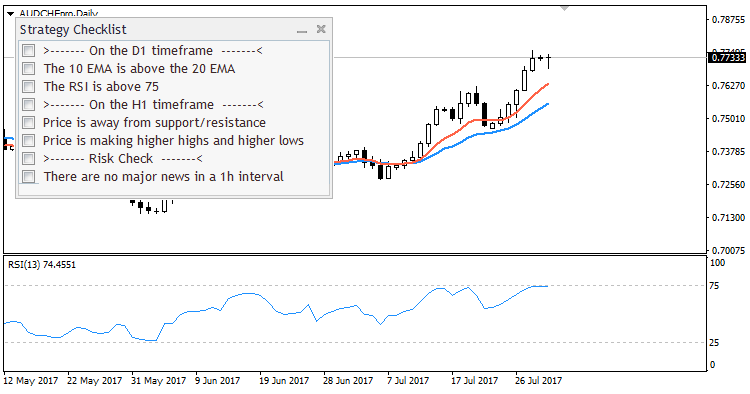
Strategy Checklist

Strategy Checklist Settings
Disclaimer
Please contact me, if you have any problem using this indicator.
I’ll do my best to address whatever issues you may have.
Since I am also a user of all my tools, I’ll be glad to hear your suggestions / improvements.
I am always striving to make them even better for everyone.
Installing Strategy Checklist for MT4
- Download the ZIP package from this product page.
- Extract the archive and locate the indicator file.
- In MetaTrader 4, open File -> Open Data Folder.
- Go to
MQL4/Indicatorsand copy the extracted file there. - Restart MT4 or refresh the Navigator.
- Attach Strategy Checklist to any chart and configure the checklist items in the inputs.
Tip: Define your setup rules before the trading session begins, then use the panel as a pre-entry checklist instead of making decisions in the heat of the moment.
Settings Reference
| Setting Group | Description |
|---|---|
| Layout | Controls dialog width, chart corner, spacing, inner padding, row height, and distance from the chart edge. |
| Appearance | Controls font name, font size, checked color, unchecked color, section color, title color, and tooltips. |
| Persistence | Lets you save checklist state per symbol and optionally per timeframe. |
| Checklist Items | Up to 20 custom lines. Use a leading > to create section headers such as setup, entry, or management blocks. |
The indicator is designed for discretionary traders who want a visible, repeatable execution process instead of relying on memory or emotion.
v1.00 2023-12-09
- Initial public release of Strategy Checklist.
- Added on-chart checklist dialog with customizable sections and rule items.
- Added persistent checklist state to support repeatable trading workflows.
Reviews
There are no reviews yet.