
Multi-Indicator Panel MT5
Version 1.00
May, 2026
€10.00
7-in-1 Trading Dashboard
Control seven essential MetaTrader 5 analysis tools from one draggable chart panel: Triple MA, Bollinger Bands, ZigZag, Support & Resistance, Pivot Points, Sessions, and Daily News levels.
Multi-Indicator Panel MT5 is a compact 7-in-1 MetaTrader 5 indicator for traders who want faster chart analysis without stacking separate tools manually. One draggable on-chart panel lets you toggle trend, volatility, structure, session, pivot, and news context on demand.
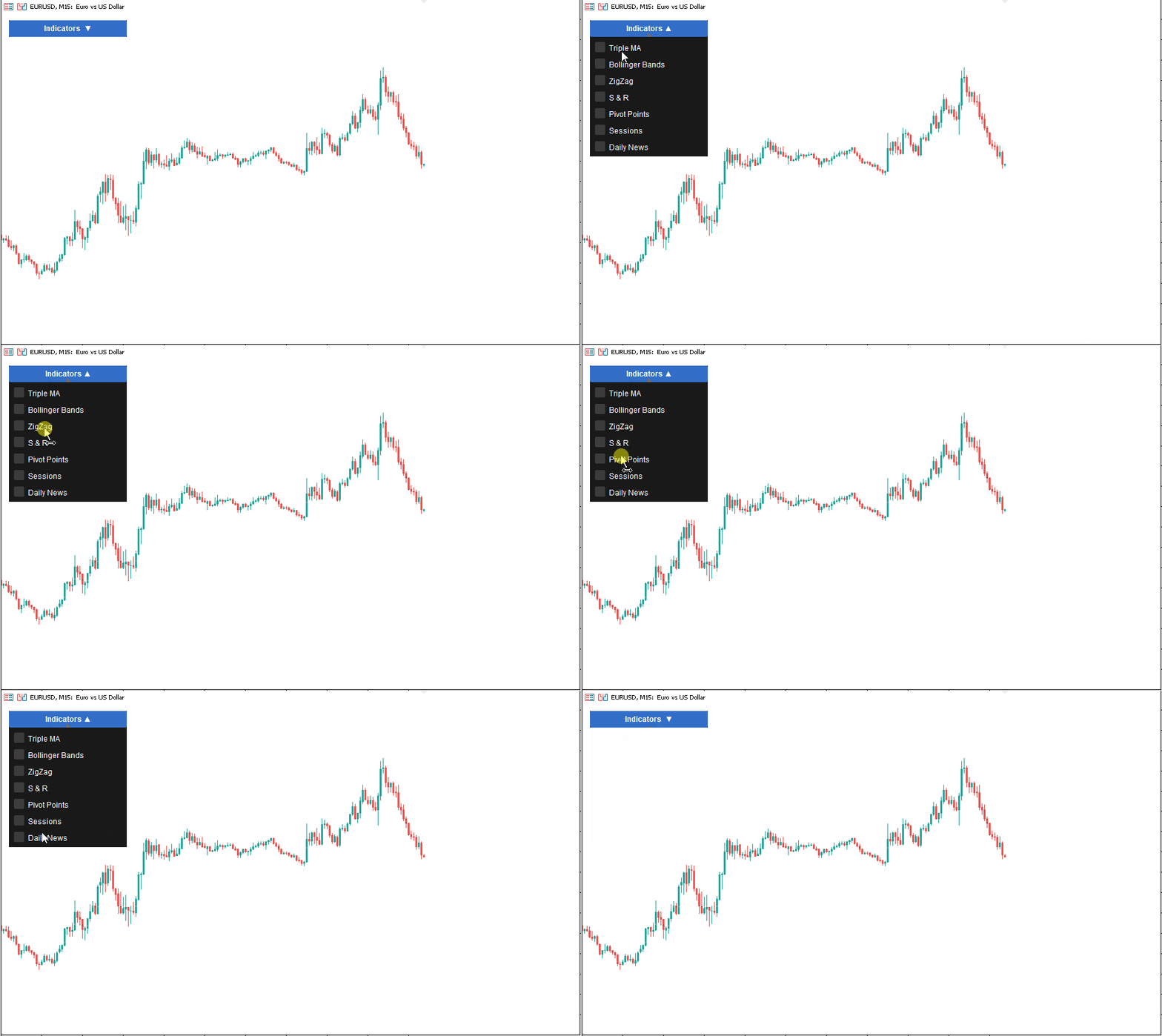
Multi-indicator-panel MT5 working
7 MT5 Indicators in One Clean Panel
The indicator is built for active MetaTrader 5 workflows where screen space and decision speed matter. Instead of loading several separate indicators, adjusting visibility one by one, and losing chart clarity, you control the full analysis stack from a single checkbox panel.
- Triple MA: fast, mid, and slow moving averages for trend structure.
- Bollinger Bands: volatility envelopes for expansion, compression, and touch alerts.
- ZigZag: swing structure for cleaner high and low mapping.
- Support & Resistance: clustered pivot zones based on market structure.
- Pivot Points: classic pivot levels with configurable timeframe and history.
- Sessions: Asia, Europe, New York, and daily high/low context.
- Daily News: economic calendar levels with impact filtering.
Built for Practical Trading Decisions
Multi-Indicator Panel MT5 is strongest as a workflow tool. Use it to build a quick market read, then remove visual noise when a specific layer is no longer needed. A trend trader can enable Triple MA and Support & Resistance first, add Bollinger Bands during volatility checks, then switch on Sessions and News before London or New York opens.
The panel remembers its dragged position and checked rows when persistence is enabled. This keeps your workspace consistent between chart sessions and reduces repeated setup time.
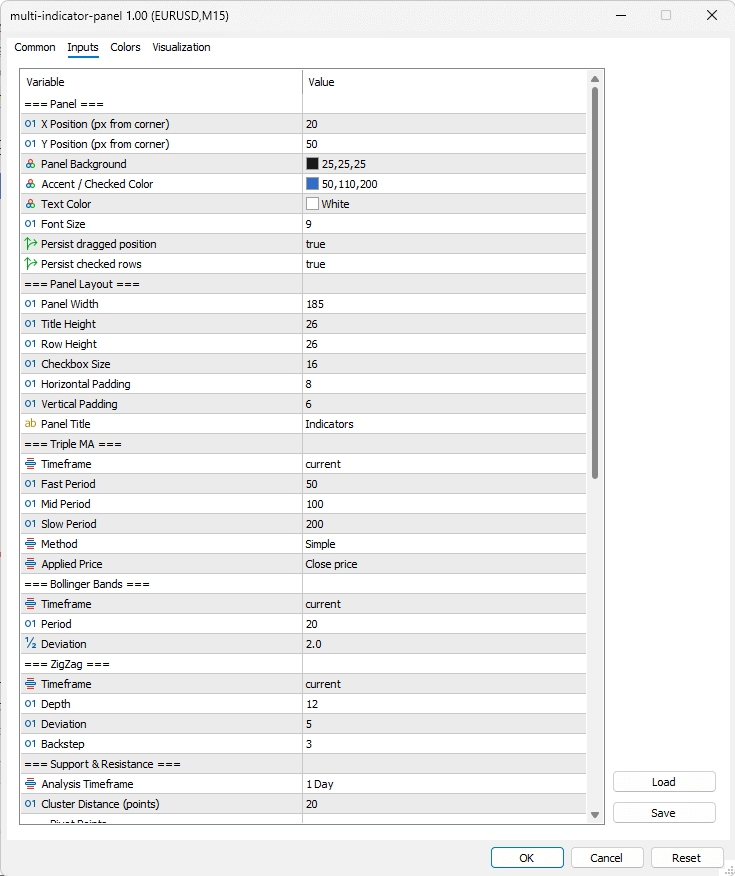
Multi-Indicator-Panel MT5 Settings window
Alerts for Key Conditions
The indicator supports popup, push, and email alerts for practical events: fast/mid MA crosses, Bollinger Band touches, Support & Resistance zone touches, and high-impact news windows. Alerts are configurable, so traders can keep only the notifications that match their process.
Who This Indicator Is For
This tool fits discretionary forex, indices, metals, crypto, and CFD traders who want multiple analysis layers available without cluttering every chart permanently. It is useful for intraday traders, session traders, and swing traders who need quick context before entry and cleaner charts during execution.
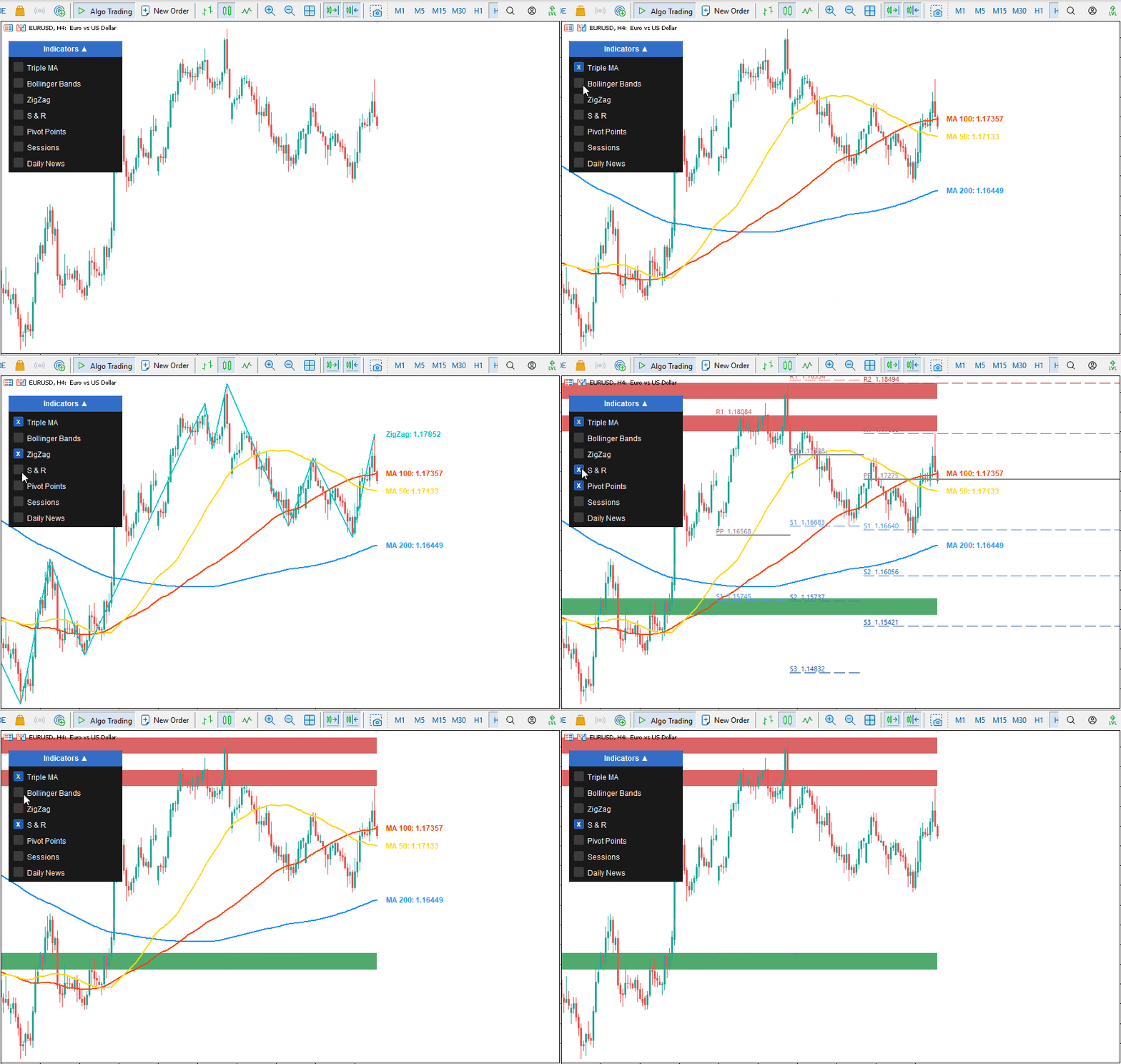
Multi-Indicator-Panel MT5 example working
Pair It With Visual Trade Execution
Multi-Indicator Panel handles the analysis layer — trend direction, volatility, structure, and timing context. For the execution layer, FxTT Trendline PRO lets you draw entry lines, TP/SL zones, auto-breakeven triggers, and trailing stops directly on the same MT5 chart. Use Multi-Indicator Panel to identify the setup, then use Trendline PRO to define and execute the trade rule. Both tools run independently on the same chart without interference.
MetaTrader 5 Only
This product is built for MetaTrader 5. It is not an MT4 indicator and does not place trades, manage orders, or modify positions. It is a visual analysis and alert tool. You need the official MetaTrader 5 platform to run the delivered .ex5 indicator file.
Related Tools
For focused single-purpose tools, browse the Forex Trading Tools indicators collection. Traders who want multi-pair scanning can also use the FXTT MT5 Forex Scanner as a companion tool. For account-level equity and drawdown monitoring, see FxTT Equity Tracker MT5.
Installing Multi-Indicator Panel MT5
- After purchase, download the product file from your account or order confirmation.
- Extract the zip file if your download is packaged as a
.zip. - In MetaTrader 5, open File → Open Data Folder.
- Go to MQL5 → Indicators.
- Copy
multi-indicator-panel.ex5into the Indicators folder. - If the package includes an
includesfolder, keep the delivered folder structure exactly as provided. - Restart MetaTrader 5, or right-click the Navigator panel and select Refresh.
- Drag multi-indicator-panel onto any MT5 chart.
- Allow notifications in MT5 if you want push, popup, or email alerts.
Recommended First Setup
- Attach the indicator to a clean chart.
- Enable only the rows you need for your current analysis.
- Drag the panel to a clear chart area.
- Keep
Persist dragged positionandPersist checked rowsenabled if you want the panel layout remembered. - Save the chart as a template after configuring your preferred layout.
Updating
- Close charts using the indicator, or remove the indicator from those charts.
- Replace the old
.ex5file with the new version. - Restart MT5 or refresh Navigator.
- Reattach the indicator or reload your saved template.
Troubleshooting
| Problem | Fix |
|---|---|
| Indicator not visible in Navigator | Confirm the file is inside MQL5/Indicators, then refresh Navigator or restart MT5. |
| Panel appears but rows do not draw | Check that the relevant row checkbox is enabled and that the selected timeframe has enough chart history loaded. |
| News data does not appear | Confirm MT5 calendar data is available and your selected currencies and impact filters are not too restrictive. |
| Alerts do not arrive on phone | Enable push notifications in MT5 options and set InpAlerts_Push to true. |
Multi-Indicator Panel MT5 Settings
Panel
| Setting | Default | Description |
|---|---|---|
InpX |
20 | Panel X position in pixels from the chart corner. |
InpY |
50 | Panel Y position in pixels from the chart corner. |
InpClrBg |
25,25,25 | Panel background color. |
InpClrAccent |
50,110,200 | Checked row and accent color. |
InpClrText |
White | Panel label color. |
InpFontSz |
9 | Panel font size. |
InpPersistPanelPos |
true | Save dragged panel position. |
InpPersistCheckedRows |
true | Save enabled indicator rows. |
Panel Layout
| Setting | Default | Description |
|---|---|---|
InpPanelWidth |
185 | Panel width. |
InpPanelToggleH |
26 | Title bar height. |
InpPanelRowH |
26 | Each checkbox row height. |
InpPanelCheckboxSz |
16 | Checkbox size. |
InpPanelPadX |
8 | Horizontal padding. |
InpPanelPadH |
6 | Vertical padding. |
InpPanelTitle |
Indicators | Panel title text. |
Indicator Modules
| Module | Main Settings | Use |
|---|---|---|
| Triple MA | Timeframe, Fast 50, Mid 100, Slow 200, method, applied price | Trend direction and moving average confluence. |
| Bollinger Bands | Timeframe, Period 20, Deviation 2.0 | Volatility, compression, expansion, and band touches. |
| ZigZag | Timeframe D1, Depth 12, Deviation 5, Backstep 3 | Swing highs and lows. |
| Support & Resistance | Analysis timeframe D1, sensitivity 20 points | Clustered structure zones. |
| Pivot Points | Weekly timeframe, Classic method, lookback 3, extend right | Pivot levels and historical pivot context. |
| Sessions | Auto GMT offset, GMT offset, lookback, Asia, Europe, New York, Daily H/L | Session ranges and daily high/low context. |
| Daily News | Currencies, lookback days, impact filters, upcoming rows, history rows | Economic calendar levels and news awareness. |
Alerts
| Setting | Default | Description |
|---|---|---|
InpAlerts_Popup |
true | Show MT5 popup alerts. |
InpAlerts_Push |
false | Send push notifications to MT5 mobile app. |
InpAlerts_Email |
false | Send MT5 email alerts. |
InpAlerts_MACross |
true | Alert when fast MA crosses mid MA. |
InpAlerts_BBTouch |
true | Alert when price touches a Bollinger Band. |
InpAlerts_SRTouch |
true | Alert when price touches an S/R zone. |
InpAlerts_NewsHigh |
true | Alert for high-impact news. |
InpAlerts_NewsMinutes |
15 | News alert window in minutes. |
Multi-Indicator Panel MT5 FAQ
What is Multi-Indicator Panel MT5?
It is a MetaTrader 5 indicator that combines seven chart-analysis modules in one draggable toggle panel: Triple MA, Bollinger Bands, ZigZag, Support & Resistance, Pivot Points, Sessions, and Daily News.
Does it place trades?
No. It is an indicator for visual analysis and alerts. It does not open, close, or modify trades.
Is this for MT4 or MT5?
This product is for MetaTrader 5 only. The .ex5 file is not compatible with MetaTrader 4.
Can I toggle each indicator separately?
Yes. Each row in the panel controls one module, so you can keep the chart clean and enable only the tools needed at that moment.
Does the panel remember my layout?
Yes, when persistence inputs are enabled. The indicator can remember dragged panel position and checked rows.
Can I use it on forex, indices, metals, and crypto?
Yes. It works on any symbol supported by your MT5 broker, as long as the required price history and calendar data are available.
Which alerts are included?
Popup, push, and email alerts are available for MA fast/mid crosses, Bollinger Band touches, Support & Resistance touches, and high-impact news timing.
Why use this instead of seven separate indicators?
The panel reduces setup time, keeps chart visibility under control, and gives one consistent place to enable or disable core analysis layers.
Version 1.00 2026.05.01
- Initial product draft for Multi-Indicator Panel MT5.
- Seven toggleable modules: Triple MA, Bollinger Bands, ZigZag, Support & Resistance, Pivot Points, Sessions, and Daily News.
- Draggable on-chart panel with persistent position and checked-row options.
- Configurable panel layout, colors, sizing, title, and fonts.
- Popup, push, and email alert support for selected market events.

Reviews
There are no reviews yet.