
FxTT Trendline PRO – MT5 Trendline EA

Version 1.3
May, 2026
Original price was: €79.00.€59.00Current price is: €59.00.
Visual execution for trendline traders.
Draw the setup on MetaTrader 5, define the rule, and let Trendline PRO monitor entries, breakouts, closes, alerts, TP/SL zones, breakeven, and trailing stop logic
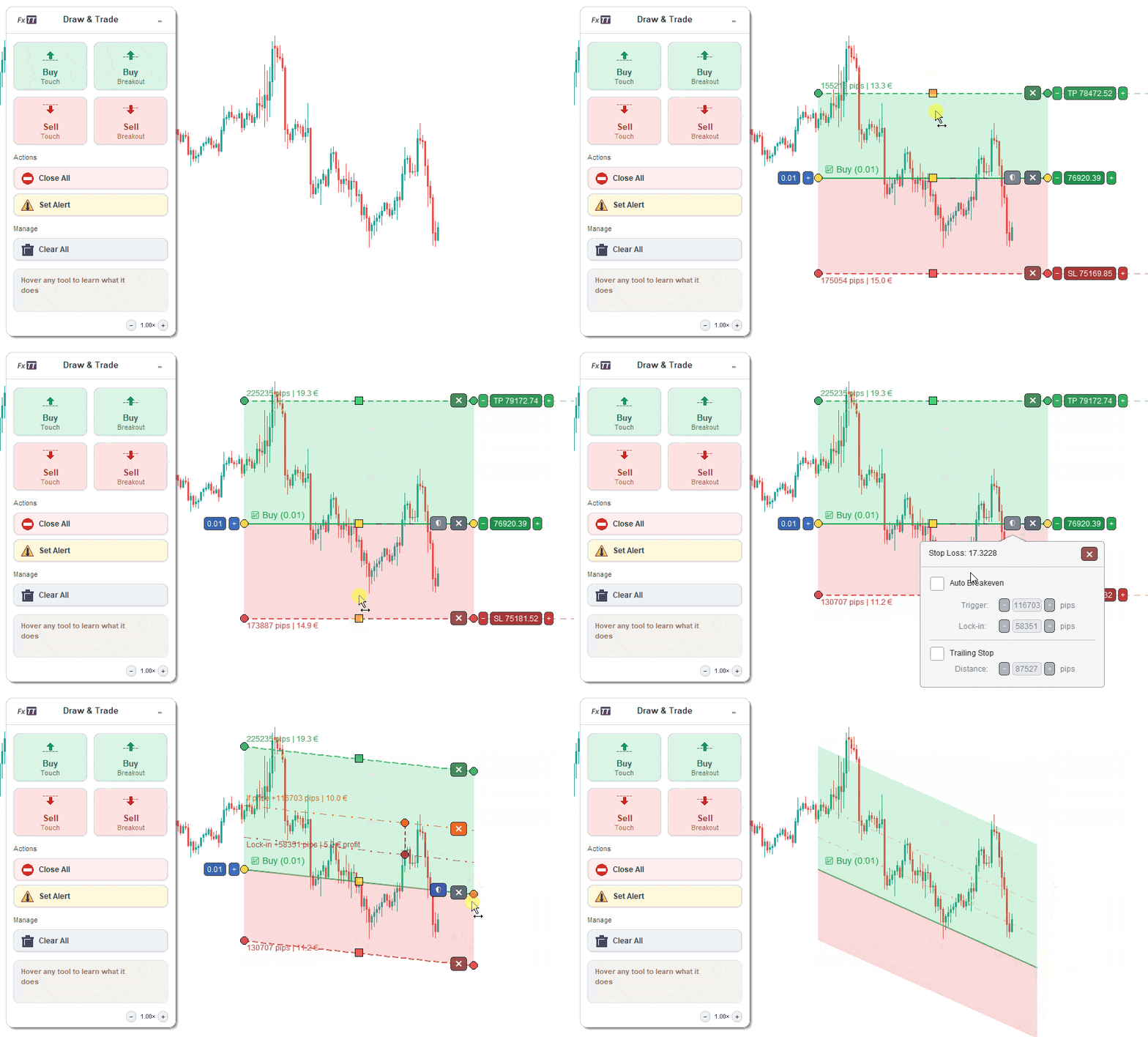
Trendline PRO is a semi-automated MT5 trendline EA for traders who plan setups visually and want execution rules handled by MetaTrader 5. Draw buy entries, sell entries, breakout rules, close lines, alerts, TP/SL zones, auto-breakeven, and trailing-stop protection on the chart, then let the EA monitor price and act on the rule you defined. The strategy stays yours. Trendline PRO handles the execution discipline.
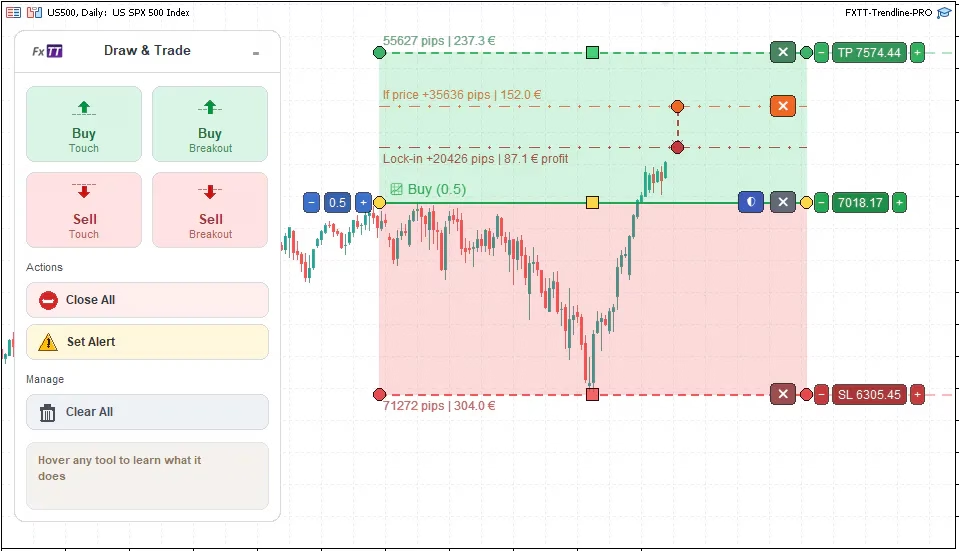
Trendline PRO MT5 trendline EA — buy entry setup with TP/SL zones, auto-breakeven protection, and the chart panel on MetaTrader 5
Why Manual Execution Breaks Down
Most discretionary traders can identify a valid setup before price arrives. The failure happens at execution. Entries are missed while away from the screen. Breakout decisions come late after the move is already in progress. Stops shift under emotional pressure. Breakeven never gets moved. Trade management becomes improvised after entry, not planned before it.
These are not strategy problems — they are execution problems. Trendline PRO addresses the execution layer, not the strategy layer. It does not find trades, predict direction, or promise performance. It turns the chart plan the trader already has into a rule MT5 can monitor and act on consistently.
MT5 Trendline EA Workflow
Add a line from the chart panel, position it where the setup matters, choose the action, configure volume and risk, then decide whether the line should alert, open a trade, close a position, or apply management rules. Trendline PRO monitors price continuously and performs the defined action when the rule is met and execution permissions allow it.
- Add a buy, sell, breakout, close, or alert line from the panel.
- Drag the line, anchors, and zone handles into position on the chart.
- Set TP and SL zones visually around the entry line.
- Choose lot size using the volume badge on the selected line.
- Add auto-breakeven and trailing-stop protection if the setup needs it.
- Use alert mode first, or enable trading only after confirming behavior on demo.
- Let the EA monitor price and execute the rule when conditions are met.
Interactive Trendlines on the MT5 Chart
Trendline PRO renders its interface on a transparent canvas overlay above the MetaTrader 5 chart. Lines added from the panel are fully interactive. Click near the line body to select it, then drag start and end anchors to reposition across price levels and time. A middle handle moves the entire line. Unselected lines stay visually clean; selected lines reveal handles and controls.
Lines can be repositioned as market structure changes, deleted when no longer relevant, or cleared all at once from the panel. Every adjustment is visible on the chart before a trade triggers.
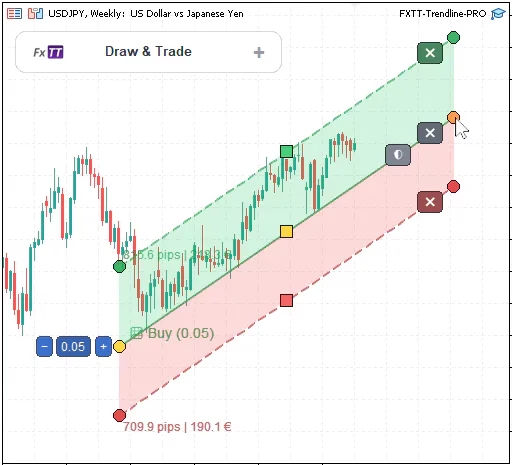
Selected trendline with start anchor, end anchor, and middle drag handle — reposition any line at any time before or after a trade triggers
Tick-Cross and Breakout Entry Modes for MT5
Trendline PRO supports two entry confirmation modes. A cross line uses tick-based logic: when the midpoint market price crosses the line from one side to the other, the entry condition is met. This is the faster trigger mode, suited for levels where a single price crossing is sufficient confirmation.
A breakout line waits for closed-candle body confirmation. A buy breakout triggers only after a completed candle opens below the line and closes above it. A sell breakout uses the opposite rule. This prevents false triggers from single tick touches or wicks that retrace before candle close. Breakout lines display a visual candle cue and O/C labels when selected, making the rule visible on the chart.
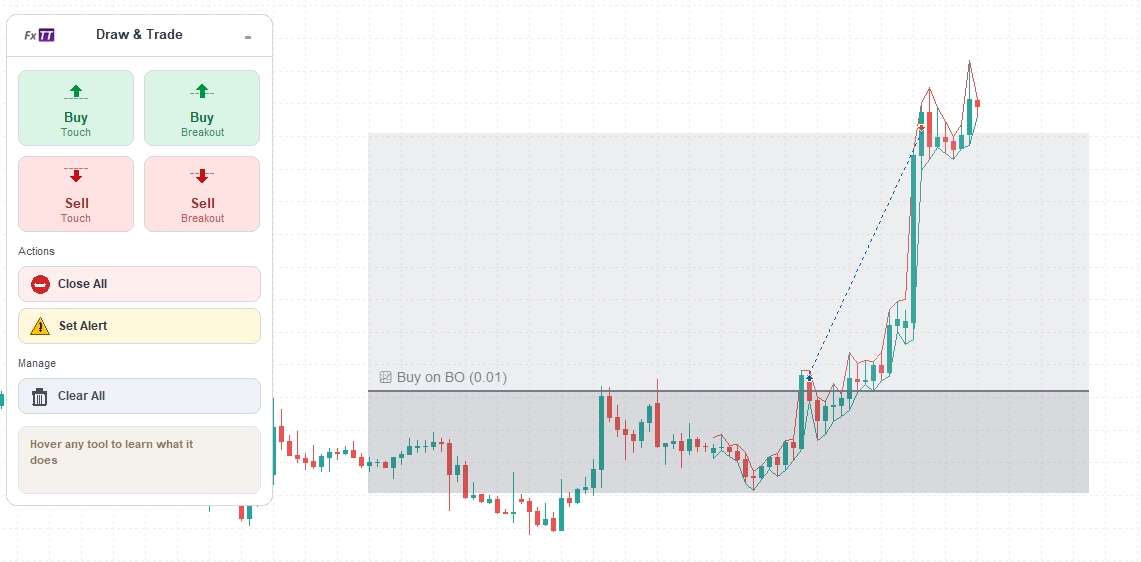
Breakout line selected - The trade is only opened after a candle closes on the other side of the trendline.
Visual TP and SL Zones
Take-profit and stop-loss zones are drawn directly on the chart around the entry line. The TP zone renders in green above the entry for buy setups and below for sell setups. The SL zone renders in red on the opposite side. Both zones can display pip distance and estimated money value as labels, so risk and reward are visible before the trade triggers.
Zones can be horizontal or sloped. TP and SL endpoint offsets are independent, allowing zones to follow angled chart structures such as rising support or falling resistance. Selected zones expose resize handles and slope endpoints for adjustment. Labels show a single distance for equal-endpoint zones, or a range such as "38.9 to 21.3 pips" for sloped zones.
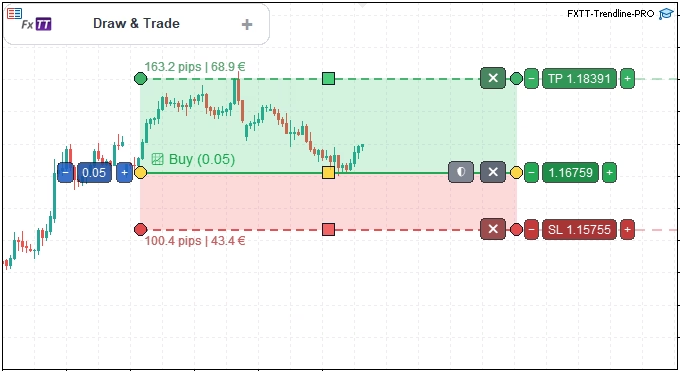
TP and SL zones with pip distance and money value labels — risk planning is visible on the chart before a trade triggers
Auto-Breakeven Protection
Trendline PRO includes per-setup auto-breakeven logic that moves stop protection after price reaches a defined profit distance. The trigger distance defines how far into profit price must travel before the breakeven rule activates. The lock-in distance defines how far into profit the stop is moved when triggered. Both values are visible on the chart and adjustable by dragging.
The trigger line renders in orange. The lock-in line renders in dark red. An arrow connector between the two lines shows the direction and relationship. An orange close button disables auto-breakeven for the selected setup without affecting other lines. If TP is enabled, the trigger distance is automatically capped at the TP distance.
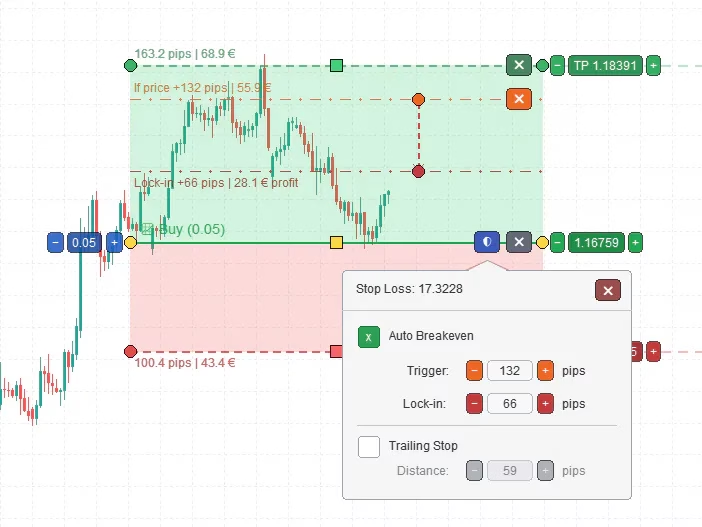
Auto-breakeven protection — orange trigger line and dark-red lock-in line, both draggable and visible on the chart before the trade opens
Trailing-Stop Trade Management
Trailing-stop protection is configured per setup with four parameters: enabled state, start distance, step size, and trail distance. Once a trade has moved the start distance into profit, the trailing stop activates and follows price with the configured step and distance values. Trailing stop is attached to the specific setup rather than applied globally across all positions.
The combination of auto-breakeven and trailing stop gives traders a complete rule-based management workflow defined before the trade triggers — not improvised under market pressure after entry.
Close All and Partial Close Workflows
Close lines work as planned exit rules on the chart. When price crosses a close line, Trendline PRO closes all matching positions or a defined partial volume. The volume badge on a selected close line shows the current setting: "Close All" for a full position, or "Close (0.10)" for a numeric partial volume. Partial volumes follow symbol minimum, maximum, and step rules.
Multiple close lines can cover different price zones, allowing staged partial exits across a trade's life. Exit levels are visible before entry, maintained as a visual reference during the trade, and activated when price reaches the defined level.
Alert Mode — Monitor Before You Trade
Alert lines let traders use Trendline PRO's line-crossing logic without enabling live order execution. When an alert condition is met, the EA fires an MT5 alert without sending any trade orders. Alert mode is a low-risk starting point for verifying line placement and crossing behavior before enabling the execution workflow.
The natural progression is straightforward: test setups with alert lines on demo, confirm behavior matches expectations, then enable trading after that confidence is established.
Chart Panel and Volume Controls
The chart panel provides fast access to all line types from a fixed position on the chart. Seven buttons cover the main workflows: Add Buy Line, Add Buy BO, Add Sell Line, Add Sell BO, Close All, Set Alert, and Clear All Lines. Each button creates the relevant line type at the center of the visible chart, ready for repositioning. Volume is set at the line level through the volume badge on selected entry and close lines.
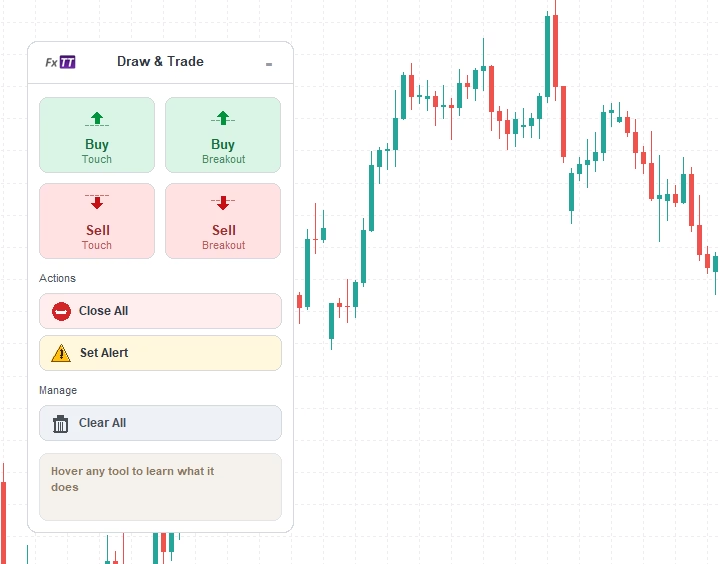
The Trendline PRO chart panel — add buy, sell, breakout, close, or alert lines in one click from the chart
MT5 Execution Safety Controls
Trading is disabled by default. The EA input Allow Trade Orders is set to false on first attach. No orders are sent until the user enables trading in the EA inputs and MetaTrader 5 Algo Trading is also enabled at the platform level. This prevents accidental execution while positioning lines or learning the interface.
Before every order, Trendline PRO checks max spread against the configured limit, normalizes volume to symbol minimum, maximum, and step rules, checks available margin, and uses the configured magic number for order separation. Orders are routed through MT5 trade functions with symbol-appropriate fill mode detection.
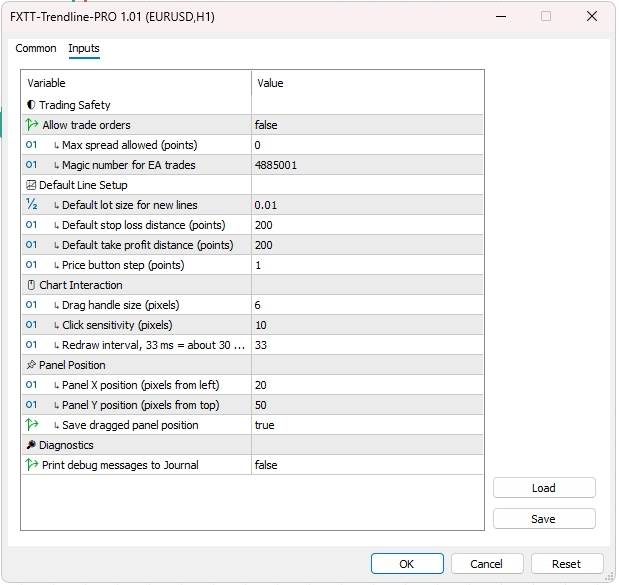
The Trendline PRO settings window, for configuring all available input parameters.
Who Trendline PRO Is For
Trendline PRO fits MT5 traders who make their own chart decisions and want a disciplined, rule-based way to execute them. Primary users are manual technical traders who work with trendlines, support and resistance, breakout levels, and chart structure analysis in MetaTrader 5. It suits semi-automated traders who want the analysis to stay manual and the execution to follow defined rules.
Trendline PRO is not for traders looking for trading signals, guaranteed results, mobile-only execution, MT4 support, or a fully hands-off automated strategy. If you want a tool that finds trade opportunities for you, this is the wrong product. If you want MT5 to execute the rules you draw on the chart, this is built for that workflow.
Best Use Cases
- Trendline cross entries and trendline break setups in MetaTrader 5.
- Support and resistance breakout execution with candle-close confirmation.
- Visual TP and SL planning before entering a position.
- Alert-only monitoring from chart levels without live execution.
- Auto-breakeven and trailing-stop management for open positions.
- Close all or partial close workflows planned at price levels before entry.
- Managing multiple MT5 charts with consistent, rule-based execution.
- Prop-style discretionary trading workflows that require execution discipline.
Examples
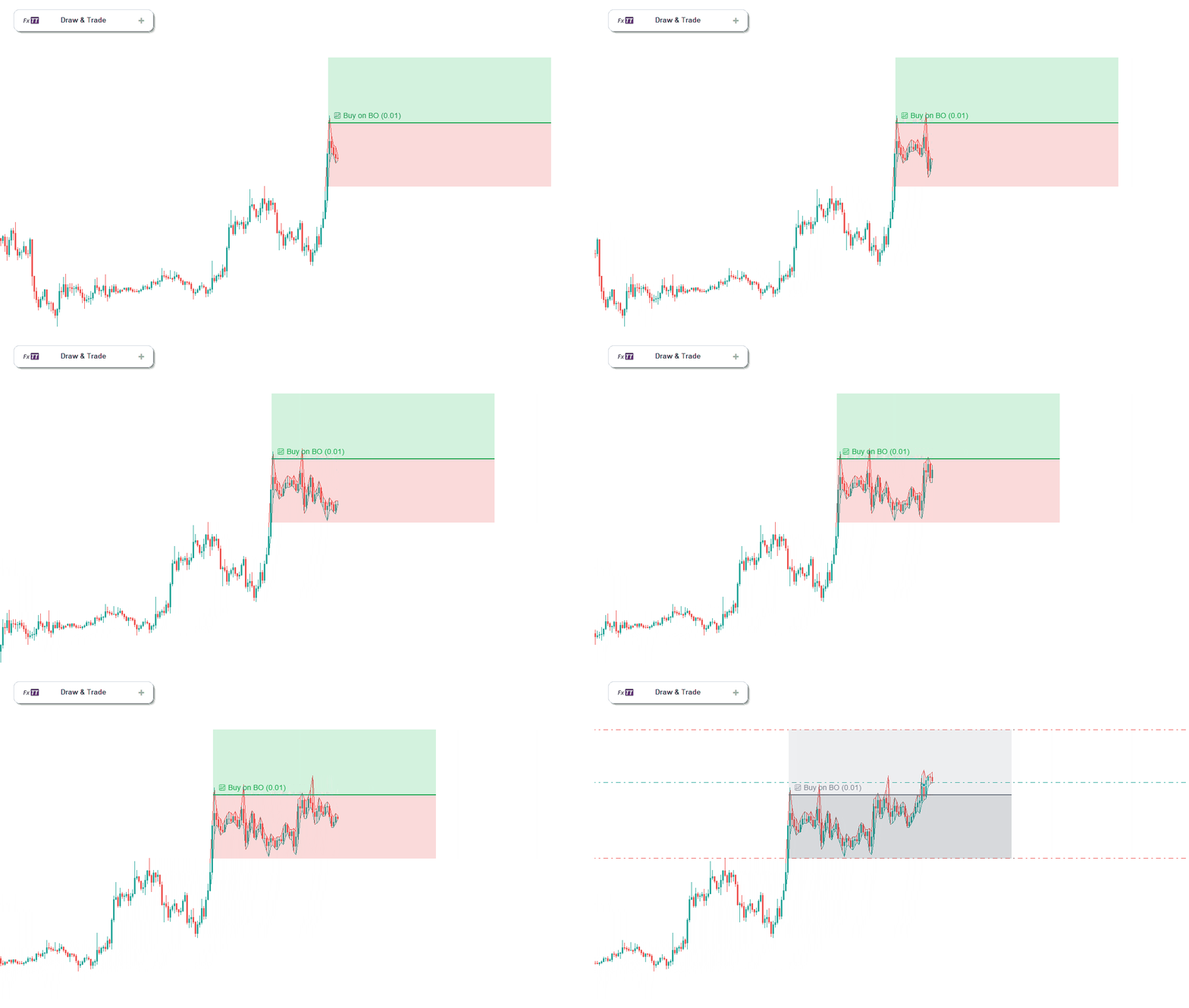
Trendline Pro - Buy on Breakout example
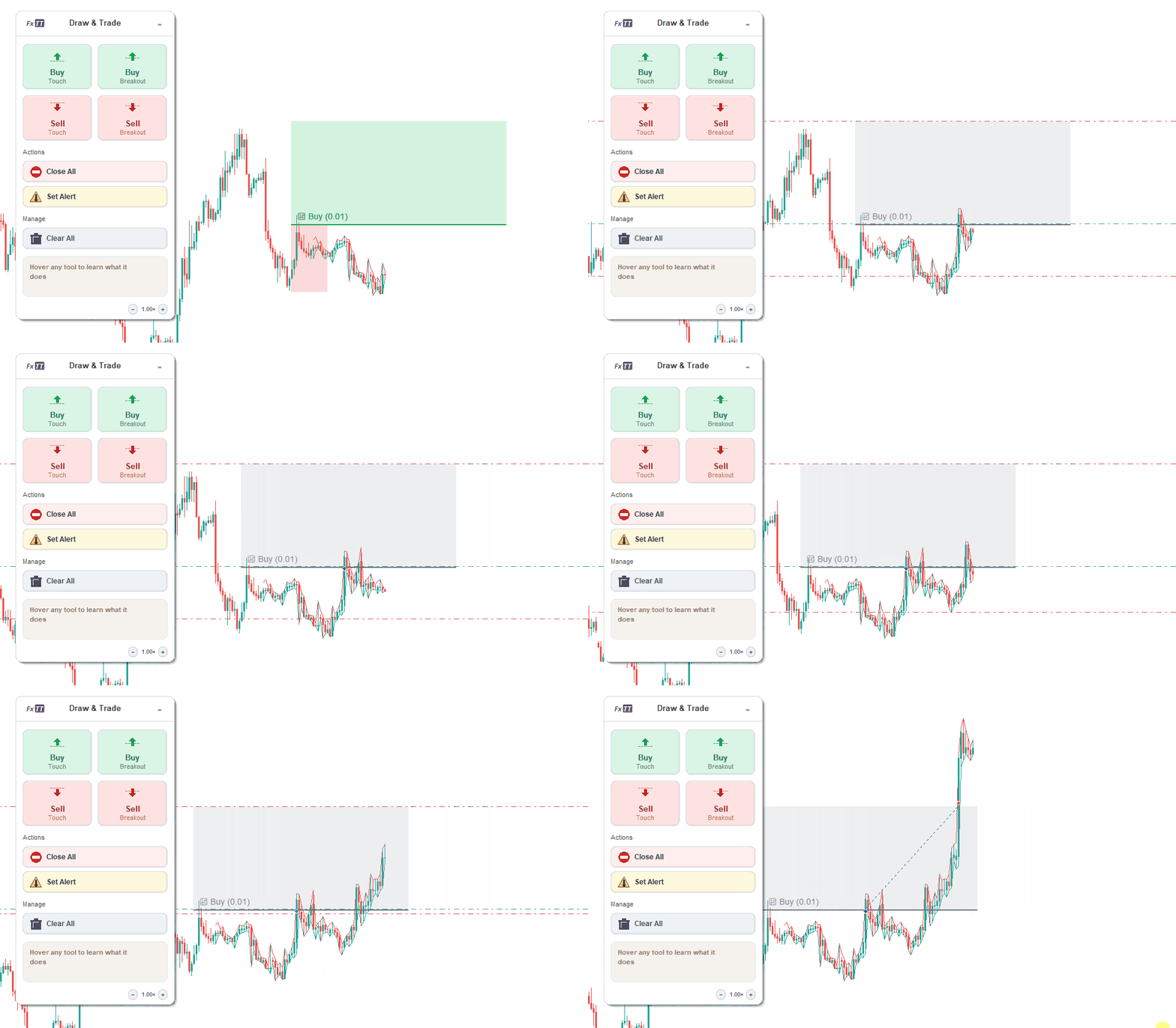
Trendline Pro - Trailing stop example
What Your Purchase Includes
- Trendline PRO EA file for MetaTrader 5 — immediate download after purchase.
- Lifetime free updates — every new version included at no extra cost. Trendline PRO is actively maintained with regular feature additions (see Changelog tab).
- Lifetime technical support — direct access for setup, configuration, and usage questions.
- 60-day money-back guarantee — full refund if Trendline PRO does not fit your trading workflow. No questions asked.
Looking for MT4 Support?
Trendline PRO is built exclusively for MetaTrader 5. If you trade on MetaTrader 4, or need an EA that works on both platforms, see the FXTT Trendline EA — the original trendline execution tool for MT4 and MT5, trusted by over 130 traders since 2017. It uses a text-command workflow instead of visual chart interaction.
Related Tools
For account-level equity and drawdown monitoring alongside chart trading, see FxTT Equity Tracker MT5. For a 7-in-1 analysis dashboard to complement your execution workflow, see Multi-Indicator Panel MT5. For scanning markets before deciding which symbols to chart-plan, see FXTT Forex Scanner MT5. For MetaTrader 5 platform documentation, see the official MetaTrader 5 website.
Risk Notice
Trading forex and CFDs involves risk. Trendline PRO automates rules configured by the user; it does not provide financial advice, trading signals, or guaranteed results. Results depend on strategy quality, broker conditions, spread, slippage, platform connection, and trader decisions. Test every workflow on a demo account before using it on a live account.
Everything you need to know before using Trendline PRO.
Does Trendline PRO place trades automatically?
Yes, but only when trading is enabled in the EA inputs and MT5 Algo Trading is also enabled at the platform level. Trading is disabled by default — no orders are sent until you explicitly allow it.
What does “semi-automated” mean for Trendline PRO?
Semi-automated means you decide the setup: where the entry line goes, where TP and SL sit, how big the position is, and when trading is enabled. Trendline PRO monitors price and executes the rule you defined — it does not decide when to trade on your behalf.
Is this an MT5 trendline EA or a signal robot?
Trendline PRO is an MT5 trendline EA for user-defined execution rules. It does not generate signals, predict market direction, or select trade opportunities. The analysis and decision remain with the trader.
What is the difference between a cross line and a breakout line?
A cross line triggers when the midpoint market price crosses from one side of the line to the other — tick-based and immediate. A breakout line waits for closed-candle body confirmation: a buy breakout requires a completed candle that opened below the line and closed above it. The breakout mode helps avoid false triggers from single tick touches or wicks that retrace before candle close.
Can I use Trendline PRO only for alerts without placing trades?
Yes. Alert lines fire an MT5 alert when the crossing condition is met, without sending any orders. This is a practical starting point for verifying line placement and crossing behavior before enabling live execution.
Can Trendline PRO manage stop loss and take profit?
Yes. TP and SL zones can be drawn directly on the chart and applied to the entry when trading is enabled. Zone distances display as pip and money value labels before the trade triggers, so the risk/reward is visible on the chart before entry.
Can TP and SL zones be sloped?
Yes. TP and SL endpoint offsets are independent, so zones can follow angled chart structures such as rising support or falling resistance — not only flat horizontal levels.
Does Trendline PRO support auto-breakeven?
Yes. Auto-breakeven uses a trigger distance and a lock-in distance, both visible and draggable on the chart. When price reaches the trigger, the stop is moved to the lock-in level. The trigger is automatically capped at the TP distance if TP is enabled, keeping the rule internally consistent.
Does Trendline PRO support trailing stop?
Yes. Trailing-stop protection is configured per setup with start distance, step size, and trail distance. Once the trade moves the start distance into profit, the trailing stop activates and follows price according to the configured values.
Can Trendline PRO close partial positions?
Yes. Close lines support “Close All” or a numeric partial volume. Partial volume follows the symbol’s minimum, maximum, and step rules. Multiple close lines can be placed at different price levels for staged partial exits across a trade’s life.
What happens if spread is too wide when a rule triggers?
If the current spread exceeds the configured MaxSpreadPoints limit at the moment of execution, the order is blocked. The rule remains active and will attempt execution on the next tick if conditions are still met and spread is within the allowed limit.
Does Trendline PRO work with any broker?
Trendline PRO works through standard MT5 trade functions and is not broker-specific. However, execution behavior depends on broker conditions including spread, slippage, execution mode, and allowed filling types. Always test on a demo account with your specific broker before going live.
Can I run Trendline PRO on multiple charts at the same time?
Yes. Attach the EA to each chart independently. Use a unique magic number per chart or symbol to separate positions and close-line behavior across multiple instruments running simultaneously.
How is Trendline PRO different from a standard MT5 breakout EA?
Most breakout EAs run a fixed built-in strategy automatically. Trendline PRO is an execution assistant — the trader draws each setup, positions the line, sets TP/SL, configures volume, and chooses alert or trade mode. The EA executes the rule the trader defined. There is no automated strategy logic inside Trendline PRO.
Does Trendline PRO work on MT4?
No. Trendline PRO is a MetaTrader 5 Expert Advisor. There is no MT4 version.
Requirements
- MetaTrader 5 (any current build). MT4 is not supported.
- MT5 Algo Trading must be enabled in the platform toolbar before orders can be sent.
- An active MT5 account (demo or live) with the symbols you intend to trade.
Installation
- Download the Trendline PRO file after purchase.
- Open MetaTrader 5 and go to File → Open Data Folder.
- Copy the EA file into the MQL5/Experts folder.
- Return to MT5 and press F5, or right-click the Navigator panel and select Refresh.
- Locate Trendline PRO under Navigator → Expert Advisors.
- Drag it onto the chart you want to manage, or double-click to attach it.
- In the inputs dialog, review the settings and leave TradingEnabled = false for initial testing.
- Click OK. The chart panel and canvas overlay will appear on the chart.
Key Input Settings
| Input | Default | Description |
|---|---|---|
| TradingEnabled | false | Master switch for order execution. Keep disabled until demo testing is complete. |
| DefaultLots | 0.01 | Starting lot size for new entry lines. Can be adjusted per line from the chart after adding. |
| MaxSpreadPoints | 20 | Maximum spread in points allowed at execution time. Orders are blocked if spread exceeds this value. |
| MagicNumber | 0 | Magic number assigned to positions opened by this EA. Use a unique value per chart to separate positions from other EAs on the same account. |
| HandleRadius | 8 | Hit area radius in pixels for line handles and drag circles. Increase on high-DPI displays if handles are hard to click. |
| FrameInterval | 33 ms | Canvas rendering refresh interval (approximately 30 FPS). Increase slightly on slower hardware if needed. |
Recommended Demo Testing Workflow
- Attach the EA to a demo chart with TradingEnabled = false.
- Add an alert line and confirm the MT5 alert fires when price crosses it.
- Add a buy entry line, set a small lot size, add TP and SL zones.
- Enable trading in the EA inputs and confirm the order opens at the correct level.
- Test auto-breakeven: add breakeven protection and monitor stop movement after entry.
- Test a close line: confirm it closes the matching position when price crosses it.
- Test a breakout line: confirm it waits for a completed candle before triggering.
- Review all behavior across multiple scenarios before switching to a live account.
Risk Notice
Trendline PRO follows rules configured by the user. It does not provide financial advice, trading signals, or guaranteed results. Execution depends on broker conditions, spread, slippage, platform connection, and permissions. Always complete demo testing before using on a live account.
Changelog
Version 1.4 2026-05-25
- Added Risk:Reward Zone Labels
- Replaced the fixed floating panel with a collapsible vertical icon sidebar
- Improved stability
Version 1.3 2026-05-06
- added panel OCO button that creates linked buy-below and sell-above entry lines
- improved netting account support
- added netting entry collision log
Version 1.2 2026-05-04
- fixed breakout entry arming so newly drawn or edited breakout lines cannot trigger from historical closed candles
- fixed duplicate entry risk by preserving full MT5 order ticket values from trade execution
Version 1.1 2026-04-27
- Initial Trendline PRO product page prepared for MT5 visual trendline execution workflows.
- Documented buy, sell, breakout, close, alert, TP/SL, breakeven, and trailing-stop use cases.
- Added FAQ and setup guidance focused on safe demo testing before live use.
Images Gallery
trendline-pro-mt5-trendline-ea-settings
The Trendline PRO settings window, for configuring all available input parameters.
trendline-pro-chart-panel-buttons
The Trendline PRO chart panel — add buy, sell, breakout, close, or alert lines in one click from the chart
trendline-pro-auto-breakeven-trigger-lockin
Auto-breakeven protection — orange trigger line and dark-red lock-in line, both draggable and visible on the chart before the trade opens
trendline-pro-tp-sl-zones-labels
TP and SL zones with pip distance and money value labels — risk planning is visible on the chart before a trade triggers
trendline-pro-breakout-candle-confirmation
trendline-pro-interactive-trendline-handles
Selected trendline with start anchor, end anchor, and middle drag handle — reposition any line at any time before or after a trade triggers
trendline-pro-mt5-trendline-ea-hero-chart
Trendline PRO MT5 trendline EA — buy entry setup with TP/SL zones, auto-breakeven protection, and the chart panel on MetaTrader 5


Reviews
There are no reviews yet.