
ZigZag Zones MT5 – Free ZigZag Support and Resistance Indicator for MetaTrader 5
Version 1.00
March, 2026
Download FXTT ZigZag Zones MT5, a free ZigZag support and resistance indicator for MT5 with dual-speed ZigZag lines, automatic pivot-based zones, and ATR-adaptive zone sizing for cleaner MetaTrader 5 structure analysis and trade timing.
ZigZag Support and Resistance Indicator for MT5
FXTT ZigZag Zones MT5 is a free ZigZag support and resistance indicator for MT5 built for traders who analyze market structure first. It combines an independent fast ZigZag and slow ZigZag with automatic support and resistance zones, helping you separate short-term noise from higher-confidence swing structure on the same MetaTrader 5 chart.
If you want a practical MT5 ZigZag indicator that does more than connect highs and lows, this tool adds configurable pivot-based zones, ATR-driven dynamic zone height, optional fast-pivot inclusion, broken-zone visibility controls, and extend-right logic for ongoing structure analysis.
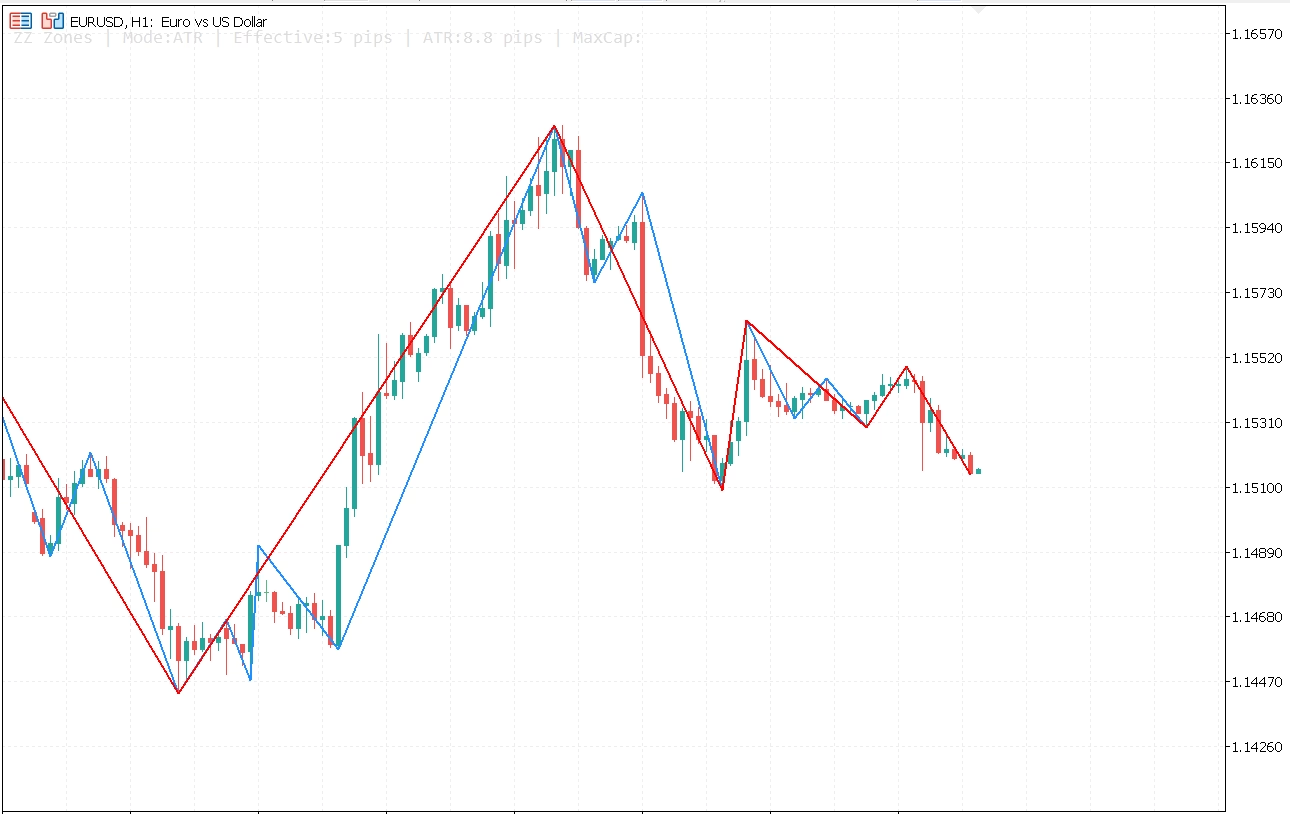
Dual ZigZag structure overview on MetaTrader 5
What This MT5 ZigZag Indicator Does
- Draws fast and slow ZigZag lines for multi-speed structure reading.
- Builds automatic support and resistance zones from repeated pivot clusters.
- Uses ATR-based dynamic zone sizing to adapt levels to current volatility.
- Lets you auto-widen zones when the market is too compressed for valid detection.
- Allows broken-zone visibility, forward extension, fill, and opacity control.
Why Traders Use This ZigZag Support and Resistance Indicator
| Feature | Benefit |
|---|---|
| Fast and slow ZigZag lines | Compare short-term swings against broader structure without changing indicators. |
| Automatic support and resistance zones | Map repeated reaction areas objectively from pivot behavior. |
| ATR-based dynamic zone height | Adjust zone thickness to current volatility instead of forcing one fixed width. |
| Auto-widen fallback | Broadens zone height when the market is too tight for valid zone detection. |
| Fast-pivot inclusion toggle | Choose between stricter slow-pivot validation or a more reactive zone model. |
| Broken-zone visibility control | Keep post-breakout context visible or hide invalidated zones for a cleaner chart. |
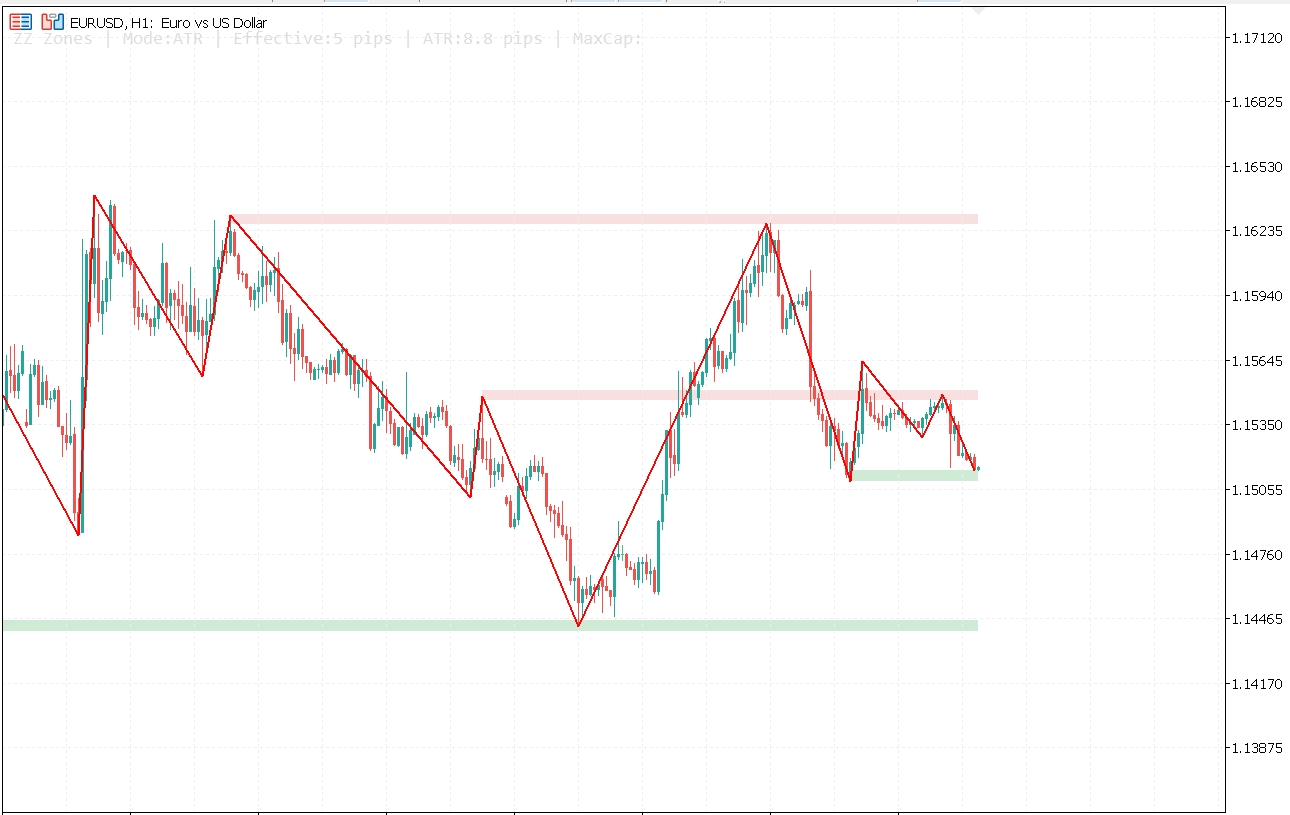
Automatic support and resistance zones reacting to price
How This Free ZigZag Indicator for MetaTrader 5 Improves Trading
Many traders do not struggle because they lack levels. They struggle because they cannot prioritize which levels actually matter. A single ZigZag can react too fast in noisy market conditions or too slowly when timing matters. With a fast line and a slow line working together, this free ZigZag indicator for MetaTrader 5 helps you read tactical shifts while still anchoring decisions to broader structure.
The zone engine converts repeated pivot behavior into actionable support and resistance areas. That makes the indicator useful for retest entries, breakout filtering, partial take-profit planning, and invalidation mapping with more consistency than drawing levels manually on every chart update.
Practical Workflow for Structure Traders
A common workflow is to use the slow ZigZag and slow-pivot zones as the higher-confidence map, then monitor the fast ZigZag for momentum changes as price approaches those areas. If price rejects a zone and the fast structure turns, timing improves. If price breaks through and you keep broken zones visible, post-breakout retests become easier to evaluate objectively.
This approach is useful for scalpers, intraday traders, and swing traders who want a repeatable, parameter-driven market structure model instead of redrawing support and resistance levels manually.
Installation and Settings for ZigZag Zones MT5
Use the Installation Guide tab for step-by-step setup and the Settings Reference tab for the full list of fast ZigZag, slow ZigZag, ATR, and support/resistance inputs.
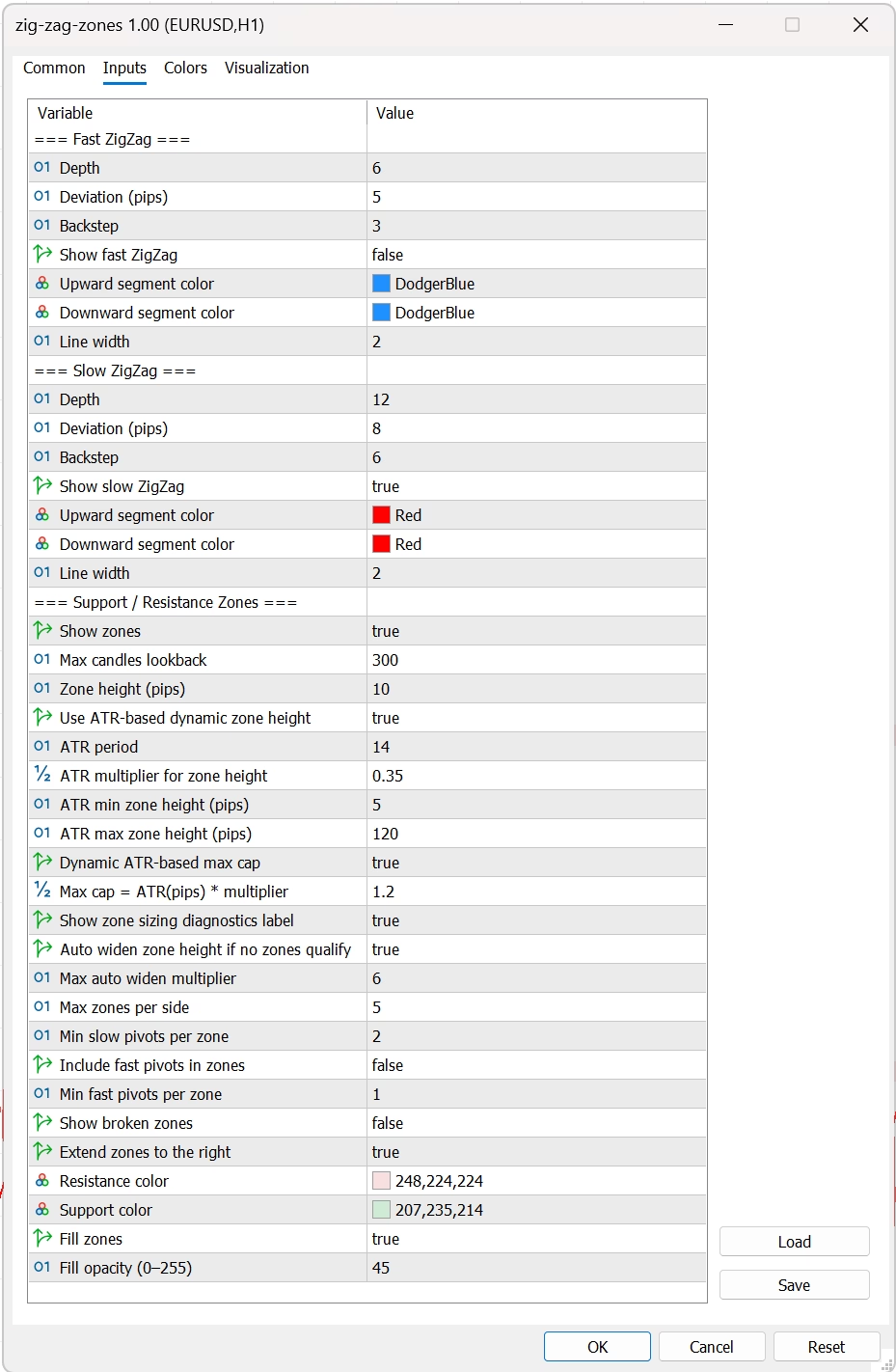
Full settings panel for dual ZigZag and zone controls
Who Should Use This MT5 ZigZag Support and Resistance Indicator
This indicator is best for discretionary traders who use price action, market structure, support and resistance reactions, breakout-retest setups, and multi-speed swing analysis to plan entries and exits. It works across forex pairs, metals, indices, and crypto CFDs available in MetaTrader 5.
Download FXTT ZigZag Zones MT5 if you want a free ZigZag support and resistance indicator for MetaTrader 5 with better structure mapping, cleaner zone logic, and more control than a basic ZigZag line alone.
Related MT5 Indicators
Browse more tools in our Forex indicators collection, or visit the Forex Trading Tools homepage to explore the full MT4 and MT5 catalog.
Educational Reference
For traders who want to validate ZigZag concepts against a neutral source, review Investopedia's explanation of the Zig Zag indicator and compare it with your live chart behavior in MT5.
Open Source and Transparent Development
Open source: View the GitHub repository here: ZigZag Zones MT5 on GitHub
- Click the download button on this page to get the free indicator zip file.
- In MetaTrader 5, go to File → Open Data Folder.
- Navigate to MQL5 → Indicators and copy the extracted
.ex5file into that folder. - Restart MetaTrader 5, or right-click the Navigator panel and select Refresh.
- Open any chart and drag FXTT ZigZag Zones MT5 from the Navigator onto the chart.
- Adjust the fast ZigZag, slow ZigZag, and support/resistance zone inputs to match your market and timeframe.
- If you want volatility-adaptive zones, keep Use ATR-based dynamic zone height enabled.
- Save your preferred settings as a template or preset for faster reuse.
Tip: Start with the default settings, then optimize the fast line for responsiveness and the slow line for structure. In most workflows, the slow ZigZag provides the higher-quality zone map while the fast ZigZag helps with timing.
| Setting | Description | Default |
|---|---|---|
InpFastDepth |
Minimum bar spacing used to detect fast ZigZag pivots. | 6 |
InpFastDeviation |
Minimum move in pips required to validate a fast pivot. | 5 |
InpFastBackstep |
Backstep filter used to reduce immediate pivot noise on the fast line. | 3 |
InpShowFastZZ |
Show or hide the fast ZigZag line. | true |
InpFastZZUpColor / InpFastZZDownColor |
Color settings for fast ZigZag segments. | clrDodgerBlue / clrDodgerBlue |
InpFastZZWidth |
Line width of the fast ZigZag. | 2 |
InpSlowDepth |
Minimum bar spacing used to detect slow ZigZag pivots. | 12 |
InpSlowDeviation |
Minimum move in pips required to validate a slow pivot. | 8 |
InpSlowBackstep |
Backstep filter for the slow ZigZag. | 6 |
InpShowSlowZZ |
Show or hide the slow ZigZag line. | true |
InpSlowZZUpColor / InpSlowZZDownColor |
Color settings for slow ZigZag segments. | clrRed / clrRed |
InpSlowZZWidth |
Line width of the slow ZigZag. | 2 |
InpShowZones |
Enable or disable automatic support and resistance zones. | true |
InpZoneLookback |
Maximum number of candles scanned for pivot history. | 300 |
InpZoneHeight |
Base fixed zone height in pips when ATR sizing is disabled. | 10 |
InpUseAtrZoneHeight |
Use ATR to calculate dynamic zone height based on current volatility. | true |
InpAtrPeriod |
ATR period used for dynamic zone sizing. | 14 |
InpAtrMultiplier |
ATR multiplier applied to derive effective zone height. | 0.35 |
InpAtrMinZonePips |
Minimum allowed zone size in pips when ATR sizing is active. | 5 |
InpAtrMaxZonePips |
Maximum zone size cap in pips for ATR sizing. | 120 |
InpUseDynamicAtrMaxCap |
Make the ATR maximum cap adapt to current ATR conditions. | true |
InpAtrMaxCapMultiplier |
Multiplier used to build the dynamic ATR max cap. | 1.20 |
InpShowZoneDebugLabel |
Display a chart label with live ATR and effective zone sizing diagnostics. | true |
InpAutoZoneHeight |
Automatically widen zones when no valid zones qualify at the current size. | true |
InpMaxZoneHeightMult |
Maximum multiplier used when auto-widening zone height. | 6 |
InpMaxZones |
Maximum number of support zones and resistance zones shown. | 5 |
InpMinSlowZonePivots |
Minimum slow pivots required to validate a zone. | 2 |
InpIncludeFastPivots |
Include fast ZigZag pivots in zone validation. | false |
InpMinFastZonePivots |
Minimum fast pivots required when fast pivots are included. | 1 |
InpShowBroken |
Keep broken zones visible after price invalidates them. | false |
InpExtendZones |
Extend zones to the right so active levels remain visible as price evolves. | true |
InpResistColor / InpSupportColor |
Color settings for resistance and support zones. | C’248,224,224′ / C’207,235,214′ |
InpFillZones |
Fill the support and resistance rectangles with color. | true |
InpZoneAlpha |
Zone fill opacity from 0 to 255. | 45 |
Full settings panel for dual ZigZag and zone controls
What is FXTT ZigZag Zones MT5?
It is a free MetaTrader 5 ZigZag indicator that combines a fast ZigZag, a slow ZigZag, and automatic support and resistance zones generated from repeated pivot behavior.
Is this a free ZigZag support and resistance indicator for MT5?
Yes. FXTT ZigZag Zones MT5 is free to download and use on MetaTrader 5.
What is the difference between the fast ZigZag and slow ZigZag?
The fast ZigZag reacts more quickly to short-term swings, while the slow ZigZag filters more noise and is better suited for broader structure analysis and zone validation.
How are the support and resistance zones calculated?
The indicator groups repeated pivots into support and resistance areas using configurable lookback, zone height, and pivot-count rules. You can require slow pivots only or include fast pivots for a more reactive model.
What does ATR-based dynamic zone height do?
It sizes zones according to current volatility instead of relying only on a fixed pip value. This helps keep zones more proportional across different symbols and trading conditions.
What is auto-widen zone height?
If the current zone size is too tight to qualify valid zones, the indicator can widen the zone height automatically up to the configured maximum multiplier. This helps avoid empty output in compressed conditions.
Can I show broken zones after a breakout?
Yes. Enable InpShowBroken if you want invalidated zones to remain visible for retest or post-breakout analysis.
Can I extend support and resistance zones to the right?
Yes. Keep InpExtendZones enabled to project active zones forward as price develops.
Does this ZigZag MT5 indicator work on all symbols and timeframes?
Yes. It works on any MT5 symbol and timeframe supported by your broker feed, including forex pairs, metals, indices, and crypto CFDs.
Who should use this indicator?
It is well suited to discretionary traders who use market structure, support and resistance reactions, breakout-retest patterns, and multi-speed swing analysis to plan entries and exits.
v1.00 2026-03-31
- Initial public release.
- Added independent fast and slow ZigZag lines with configurable depth, deviation, and backstep.
- Added automatic support and resistance zones rendered from repeated pivot clusters.
- Added ATR-based dynamic zone height with minimum and maximum caps.
- Added dynamic ATR max-cap logic and automatic zone widening when no zones qualify.
- Added optional fast-pivot inclusion for more reactive zone validation.
- Added broken-zone visibility, zone extension, color, fill, and opacity controls.
- Added optional on-chart zone debug label for live sizing diagnostics.
Images Gallery
FXTT ZigZag Zones MT5 settings panel
Full settings panel for dual ZigZag and zone controls
FXTT ZigZag Zones MT5 support resistance zones
Automatic support and resistance zones reacting to price
FXTT ZigZag Zones MT5 overview chart
Dual ZigZag structure overview on MetaTrader 5
Reviews
There are no reviews yet.