
You've drawn the trendline. You've identified the setup. You know exactly what price needs to do for your trade to trigger. Then your phone rings, your attention drifts for thirty seconds — and when you look back, price has already broken, run 40 pips, and is now extended far beyond your entry.
This is the core frustration of manual trendline trading. MetaTrader 5 — despite being one of the most capable retail trading platforms available — has no native mechanism to execute orders based on trendline interactions. You can draw lines on a chart, but the platform's execution engine ignores them entirely.
This post walks through Trendline PRO MT5 — the Expert Advisor built specifically for discretionary trendline traders. Draw your lines, arm them from the on-chart panel with a single click, and the EA handles every execution. No coding. No scripting. No MQL5 knowledge required.
The Problem: MetaTrader 5 Cannot Execute From Trendlines Natively
MetaTrader 5 gives you a full suite of drawing tools — trendlines, channels, Fibonacci retracements, horizontal rays. But these are purely visual overlays. The platform's execution engine ignores them entirely.
The only native execution tools are static price-based pending orders: Buy Limit, Sell Limit, Buy Stop, Sell Stop. A trendline is dynamic by definition — its price value changes with every passing candle as it moves at an angle through the chart. You cannot set a Buy Stop on a trendline in MT5. It is simply not possible.
The workaround most traders use: watch the chart constantly and enter manually when price reaches the line. This creates three problems:
- Missed entries — price moves through the line while attention is elsewhere
- Emotional execution — hesitation at the moment of truth, entering late or not at all
- Scalability limits — monitoring multiple pairs and trendlines simultaneously is not sustainable
Trendline PRO MT5 eliminates all three.
What Trendline PRO MT5 Does
Trendline PRO MT5 is a semi-automated Expert Advisor. You make the strategic decisions — the EA handles execution.
You decide:
- Which trendlines to draw and where
- What trigger type to use (breakout, pullback, touch, or false breakout)
- What stop loss, take profit, and lot size to apply
- Which lines to arm and which to leave as reference only
Trendline PRO MT5 handles:
- Monitoring all armed trendlines in real time on every tick
- Detecting when price interacts with a line in exactly the way you specified
- Placing the order instantly — without hesitation, without delay
- Managing the trade with trailing stop and breakeven stop after entry
This is not a black-box system. It does not analyse the market, predict direction, or make any judgement calls. It executes what you configured — the instant price reaches your line. Your edge stays yours.
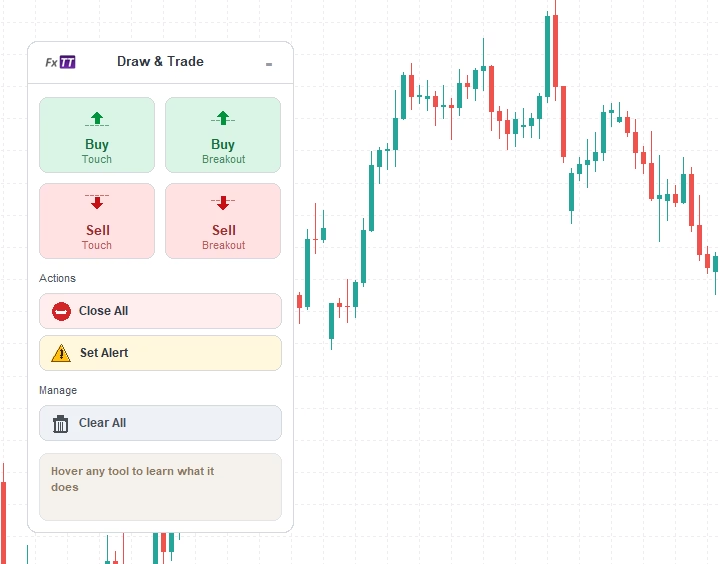
The On-Chart Panel: One Click to Arm Any Trendline
The defining feature of Trendline PRO MT5 is the on-chart control panel. Adding a trendline trade requires no command strings, no Object Properties dialogs, and no syntax to remember.
The workflow is straightforward:
- Click the trigger type in the panel (Buy Breakout, Sell Pullback, Buy Touch, etc.)
- Draw the trendline on the chart
- The EA arms it automatically with your configured default settings
The panel displays your current lot size, spread filter status, and trade controls. All settings are visible at a glance. The panel can be dragged anywhere on the chart, and its position is saved between sessions so it never covers the part of the chart you need.
Visual TP/SL Zones: See Your Risk Before the Trade Fires
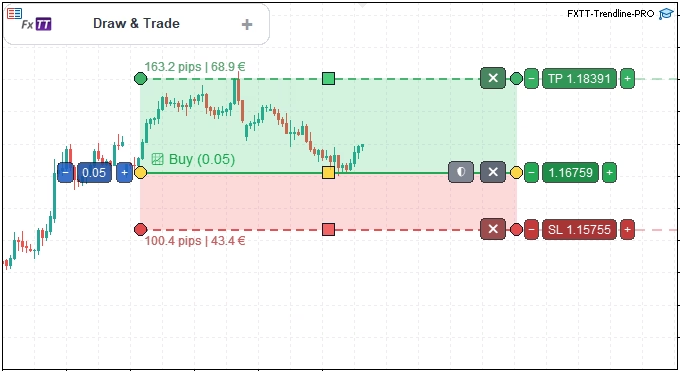
When you arm a trendline in Trendline PRO MT5, the EA draws your stop loss and take profit levels directly on the chart as shaded zones. Each zone displays the pip distance and the money value of that level — the exact potential loss and potential gain — calculated from your current lot size.
This changes how you plan trades. Instead of estimating risk from a settings panel, you see it on the price chart, anchored to the real price levels that will be active when the trade opens. If the zones don't match your intended risk/reward, you adjust the trendline or the parameters before anything executes.
Risk planning is visual, immediate, and happens before the trade — not after.
The Four Trigger Types Explained
Trendline PRO MT5 supports four trigger modes, each matched to a different trading approach. The trigger type is selected from the panel — no command strings required.
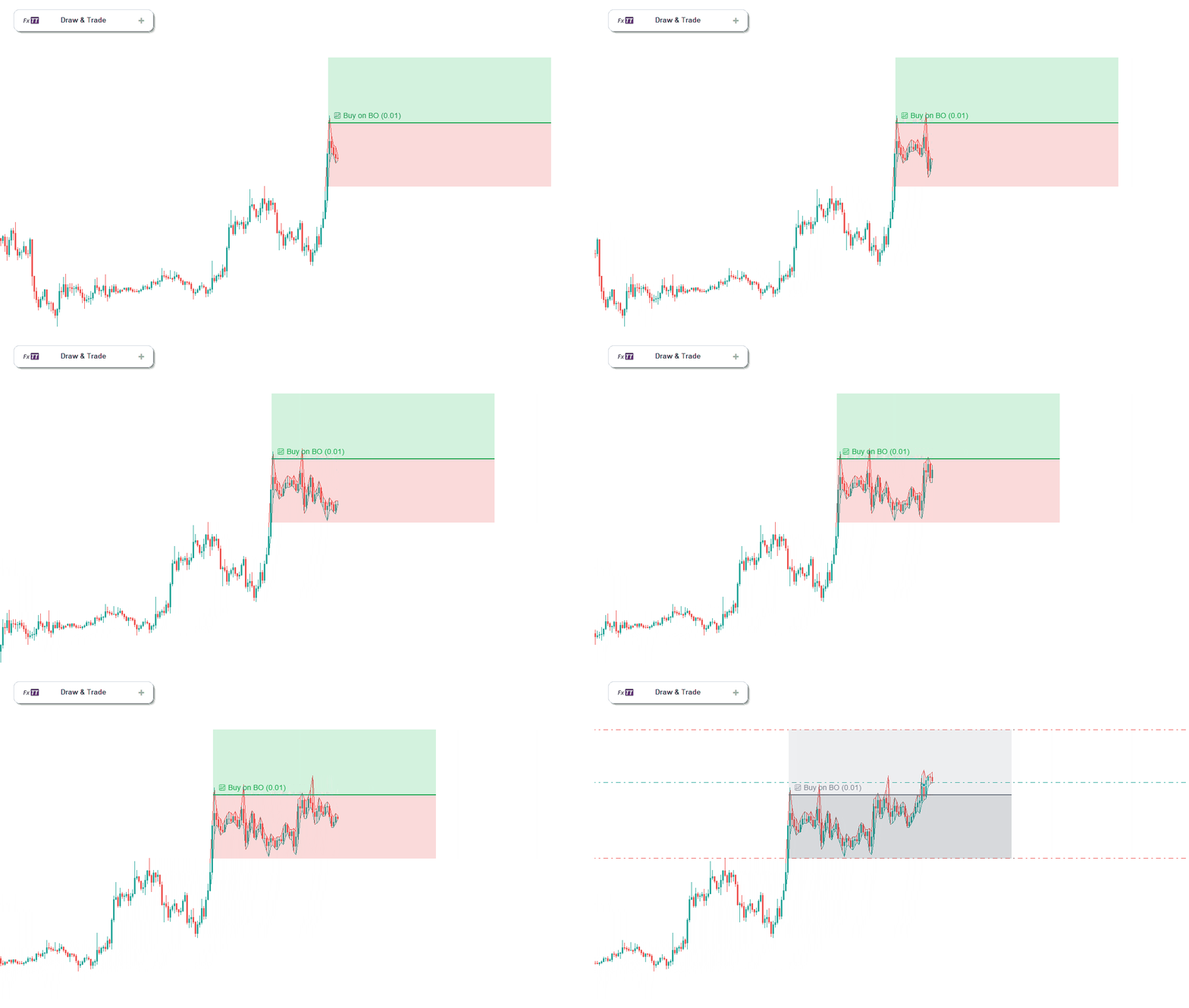
Breakout (BoB / SoB)
The trade fires when a candle closes beyond the trendline — above it for a buy, below it for a sell. This avoids false triggers from intra-candle wicks that briefly cross the line without closing through it. Ideal for momentum and channel breakout strategies where candle-close confirmation is required before entry.
Pullback (BoPB / SoPB)
The EA waits for price to break through the trendline, then monitors for a return move back to the line. When price retests the line from the other side, the trade fires. Better entry prices and tighter stops compared to entering on the initial break — at the cost of occasionally missing the entry if price does not return.
Touch (BoT / SoT)
The trade fires the moment price reaches the trendline — on contact, regardless of direction. No candle close confirmation required. Suited for range-bound markets where you expect price to respect the line and reverse. The fastest of the four trigger types.
False Breakout (BoFB / SoFB)
The EA monitors for price to cross the line and then reverse back through it — the classic stop-hunt or liquidity sweep pattern. When price crosses the trendline and closes back on the original side, the trade fires in the reverse direction. This trigger targets one of the highest-probability reversal patterns in institutional order flow, where large players use trendline breaks to sweep retail stops before reversing hard.
Auto-Breakeven with Draggable Visual Lines
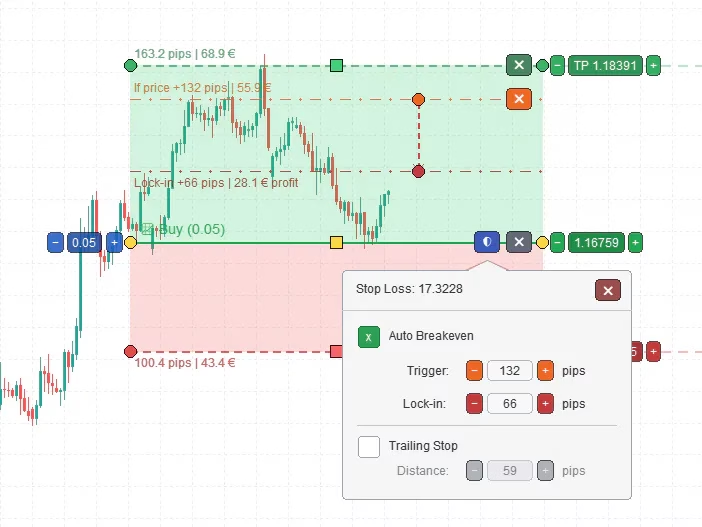
Trendline PRO MT5's breakeven system is fully visual. When you arm a trendline, two reference lines appear on the chart:
- Orange trigger line — when price reaches this level, breakeven activates
- Dark-red lock-in line — where the stop loss moves to when breakeven triggers
Both lines are draggable. Reposition them directly on the chart to adjust exactly when protection activates and where the stop moves to. When the trade is open and price hits the orange trigger line, the EA automatically moves the stop to the dark-red lock-in level — the trade becomes risk-free without any manual action.
Trailing Stop: Hands-Free Profit Protection
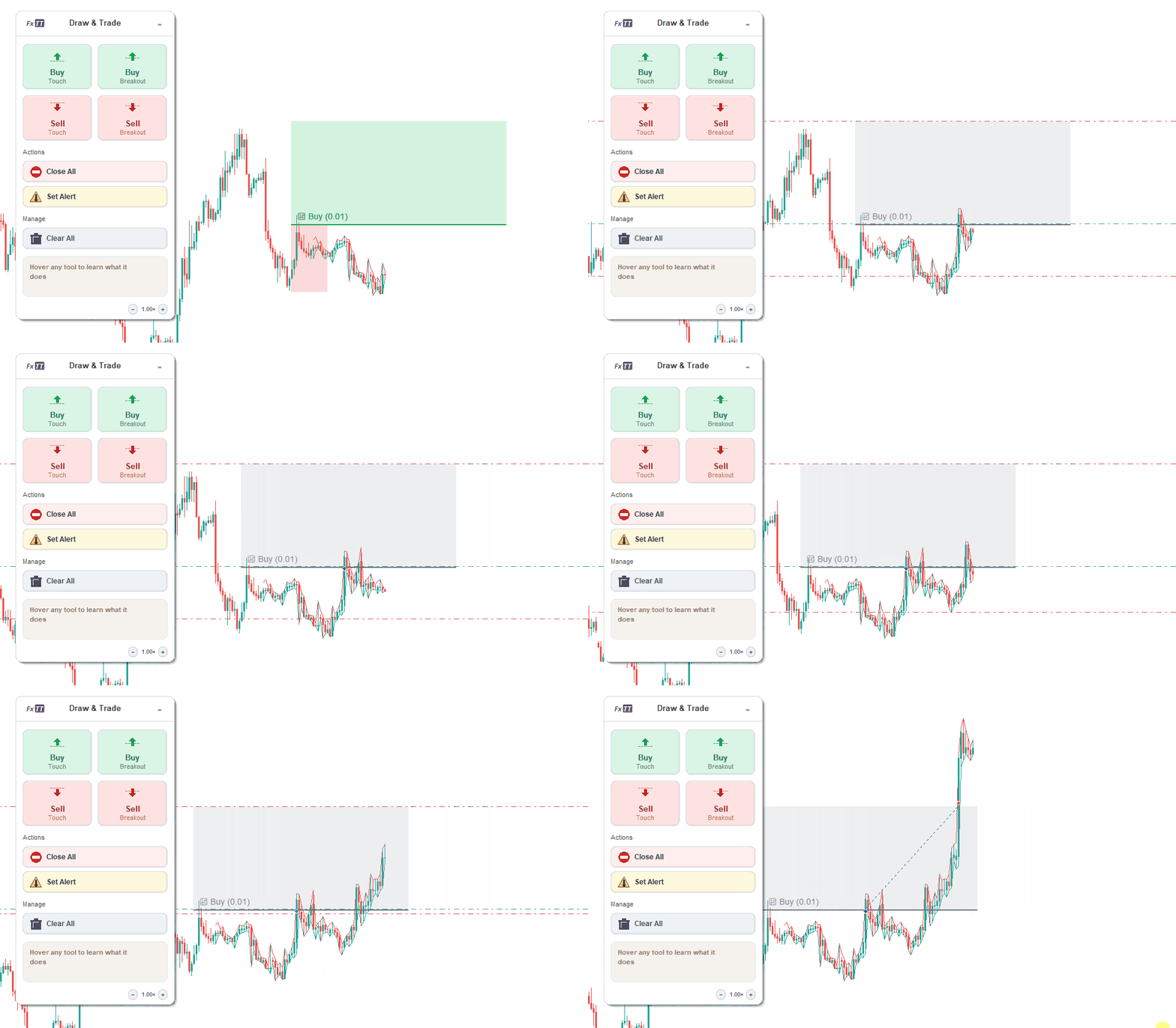
Once a trade is open, Trendline PRO MT5 can activate a trailing stop that follows price as the trade moves in your favour. The trailing stop maintains a specified distance behind price. When price reverses, the stop holds at its last position — locking in the captured profit without any manual intervention.
Trailing stop works alongside the breakeven system: eliminate risk first by moving the stop to entry, then let the trailing stop manage the remainder of the trade from a safe base. This is the most common professional configuration for breakout trades — protect capital early, then let the momentum run.
Interactive Trendline Handles: Reposition Lines Live
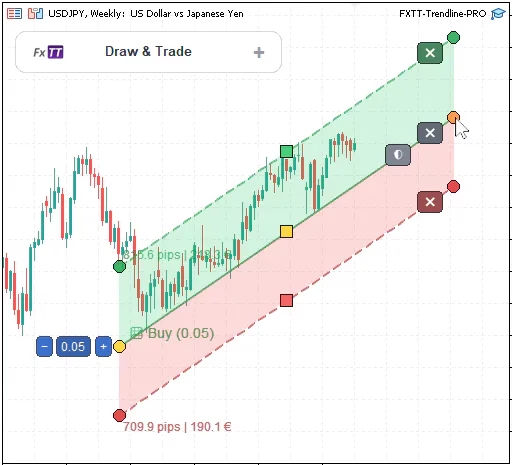
Every trendline managed by Trendline PRO MT5 has three interactive drag handles: one at the start point, one at the end point, and one at the midpoint. You can reposition any trendline at any time — before or after arming — by dragging the appropriate handle.
This matters in live trading. Trendlines drawn at the start of a session often need refinement as new bars form and the angle becomes clearer. With Trendline PRO MT5, you adjust the line without deleting it and starting over. The configured trigger type and parameters stay intact — only the price level and angle change.
The Full Workflow: How It All Connects
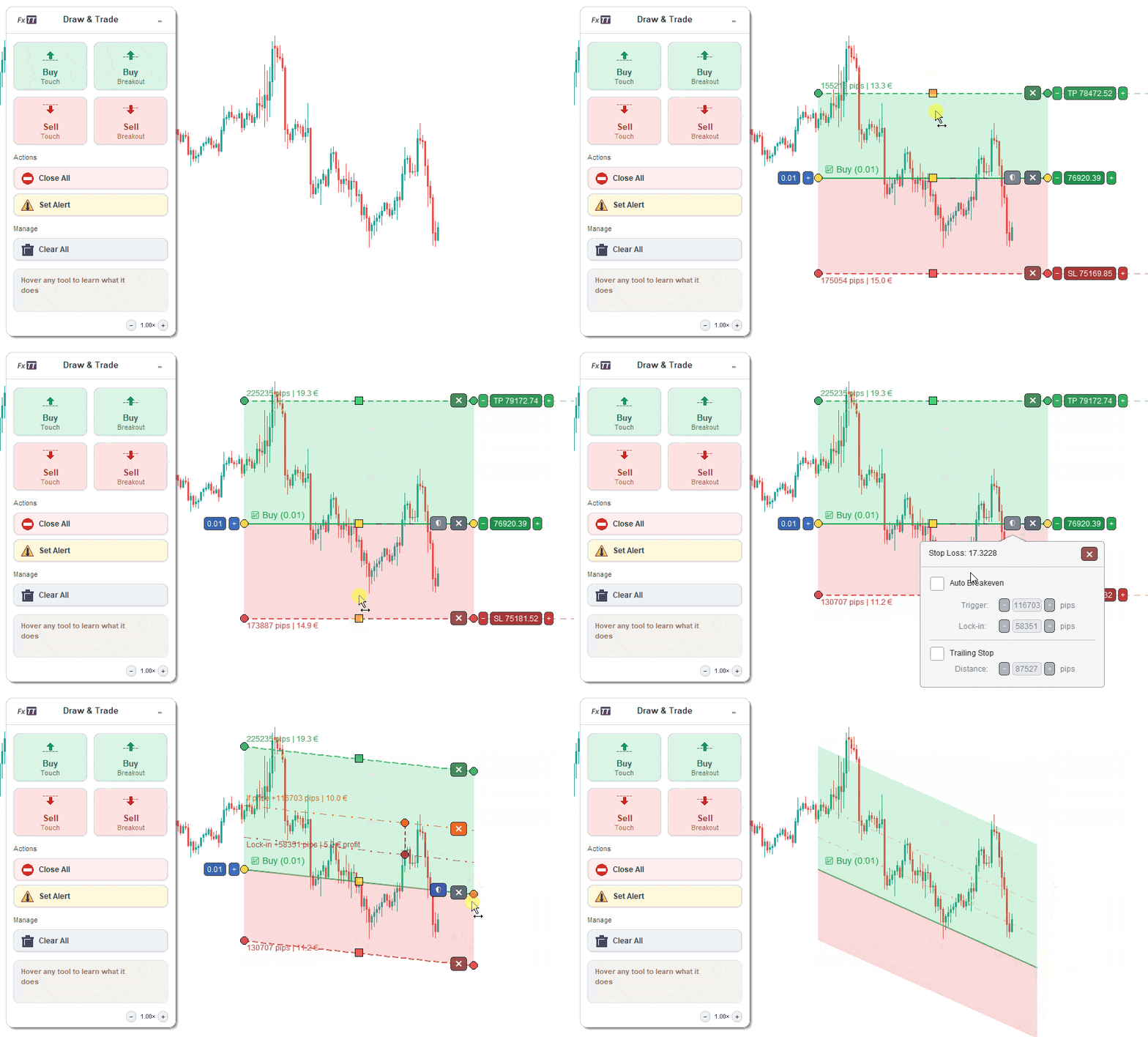
All features of Trendline PRO MT5 work together as a single integrated workflow. The animated overview below shows how a complete setup flows — from drawing the trendline to automatic execution and hands-free trade management:
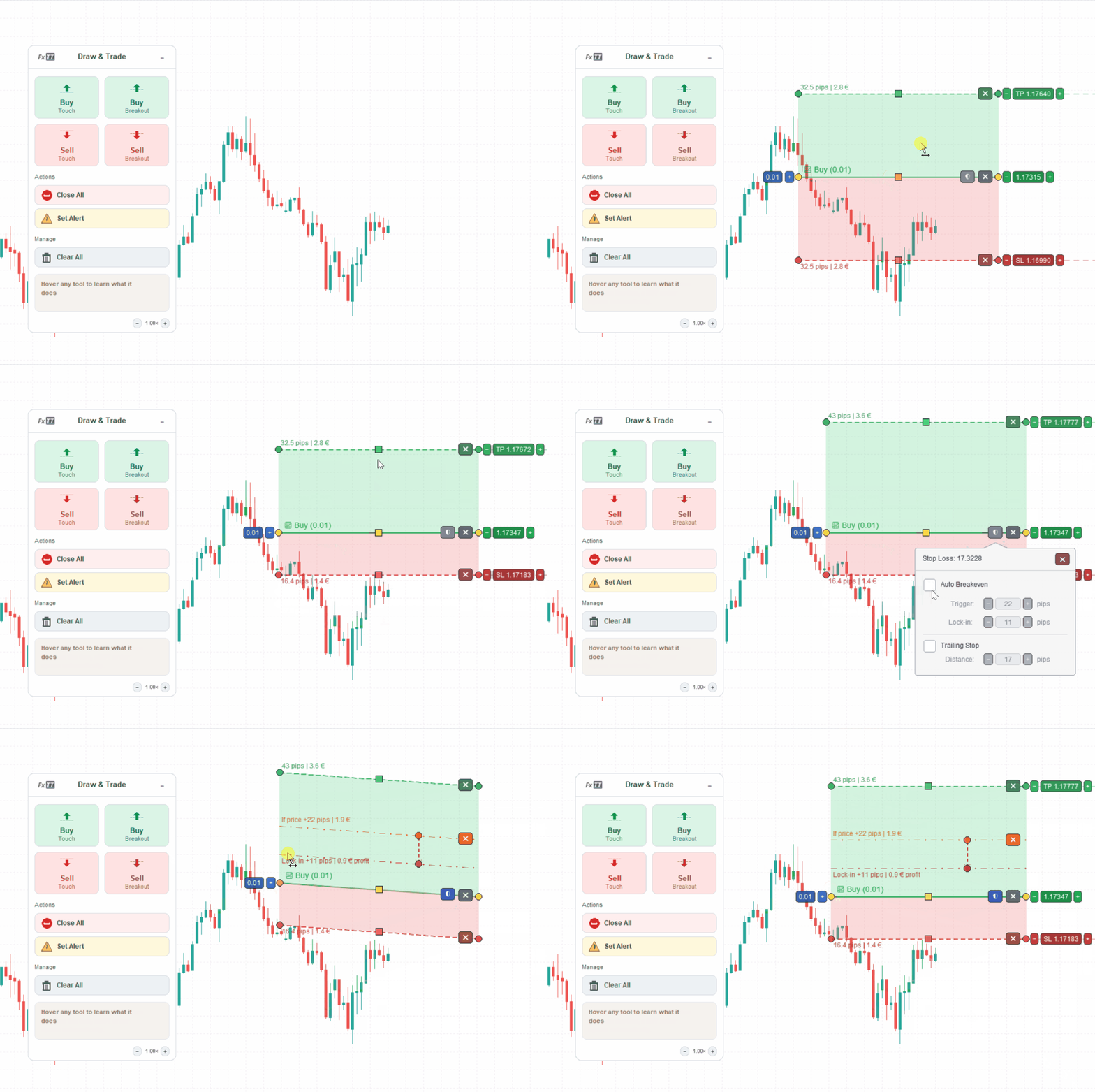
- Draw the trendline on the chart from your price action analysis
- Click the trigger type in the panel (Breakout, Pullback, Touch, or False Breakout)
- Review the TP/SL zones on the chart — drag the reference lines to adjust if needed
- Set breakeven levels by dragging the orange and red lines to your preferred price points
- Step away — the EA monitors every tick and fires the moment your conditions are met
Your analysis determines the setup. Your strategy determines the parameters. Trendline PRO MT5 guarantees you never fail to execute it.
Alert-Only Mode
Not every trendline interaction should open a trade. Sometimes you want to be notified when price reaches a level so you can decide manually whether to act on it.
Trendline PRO MT5 supports alert-only trendlines that trigger a platform notification on the same conditions as their trading counterparts — touch, breakout, pullback, or false breakout — without placing any order. Use these alongside trade trendlines to monitor levels you are still evaluating before committing to automatic execution.
Step-by-Step Setup: First Trade in Under Five Minutes
Getting Trendline PRO MT5 running on a live or demo chart is straightforward:
- Purchase and download — After purchase, download the
.ex5file from your account on forextradingtools.eu. - Install the EA — Copy the file into your MetaTrader 5 MQL5/Experts folder. Right-click the Expert Advisors section in the Navigator panel and select Refresh.
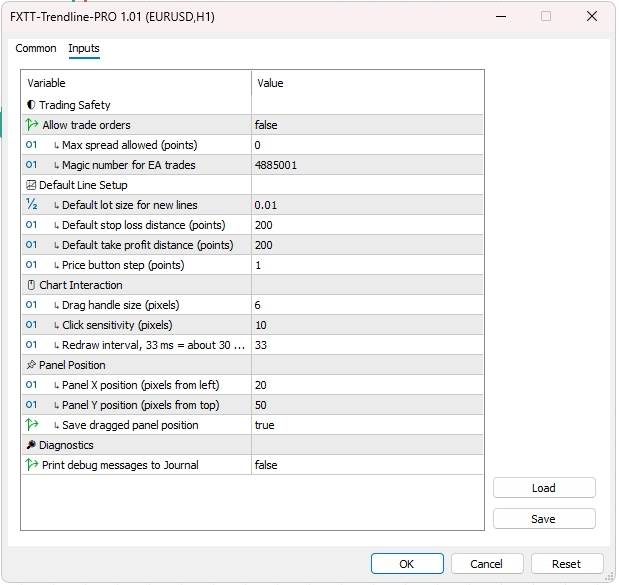
- Attach to a chart — Drag Trendline PRO MT5 from the Navigator onto any chart. In the settings dialog, configure your default lot size, magic number, spread filter, and panel position. Check Allow automated trading.
- Enable AutoTrading — Click the AutoTrading button in the MT5 toolbar. It must be green for the EA to place orders.
- Use the panel — The on-chart panel appears immediately. Click a trigger type, draw your trendline, and review the TP/SL zones. Trendline PRO MT5 monitors from that point forward.
Why Trendline PRO Is MT5 Only
Trendline PRO MT5 is built exclusively for MetaTrader 5. This is a deliberate architectural decision.
The interactive panel, draggable breakeven lines, and real-time visual zones rely on MT5's chart object model and event handling system. MT5 provides the native infrastructure that makes these features work reliably under live trading conditions. The same experience is not feasible within MT4's architecture.
If you are still on MT4, the original Trendline EA covers both MT4 and MT5 with the core trigger functionality. Trendline PRO MT5 is for traders who have moved to MT5 and want the most complete trendline execution workflow available on that platform.
Pricing and Guarantee
Trendline PRO MT5 is available exclusively for MetaTrader 5. A single purchase includes the EA and all future version updates. Check the product page for current pricing.
A 60-day money-back guarantee applies: if Trendline PRO MT5 does not perform as described on your platform, a full refund is available within 60 days of purchase — no questions asked.
Support and full documentation are available directly through the product page.
Summary
Manual trendline trading breaks down at execution. Trendline PRO MT5 closes that gap — without requiring any coding knowledge, command string memorisation, or constant chart monitoring.
Key points from this post:
- MetaTrader 5 has no native trendline execution — Trendline PRO MT5 fills this gap specifically for MT5 traders
- On-chart panel replaces command string typing — one click to arm any trendline with any trigger type
- Visual TP/SL zones show exact risk/reward on the chart before the trade fires
- Four trigger types: Breakout, Pullback, Touch, False Breakout — all accessible from the panel
- Draggable auto-breakeven lines and trailing stop for hands-free risk management after entry
- Interactive trendline handles — reposition armed lines at any time without resetting configuration
- Alert-only mode for levels you are monitoring without automatic execution
- MT5 only — built on MT5's native architecture for reliable performance under live conditions
- 60-day money-back guarantee