
You already know where you want to trade. The problem is the click.
You’re away from the screen when price touches the level. You enter late, after the move. You forget to move the stop to breakeven. You trail inconsistently. You close the wrong size. Not because you don’t know better — because manual execution under pressure is hard to do consistently, every single time.
Trendline PRO is a new MT5 trendline EA that fixes the execution layer. You draw the setup on the chart. The EA monitors it and executes — or alerts you — when the condition is met.
What This MT5 Trendline EA Does
It’s a semi-automated MetaTrader 5 Expert Advisor for chart traders. You keep the analysis. The MT5 trendline EA handles execution.
It doesn’t tell you where to trade. It doesn’t generate signals. It doesn’t have a built-in strategy. It handles the execution layer — the part where most manual traders lose consistency.
Trading is disabled by default. Nothing happens until you decide it should.
How It Works
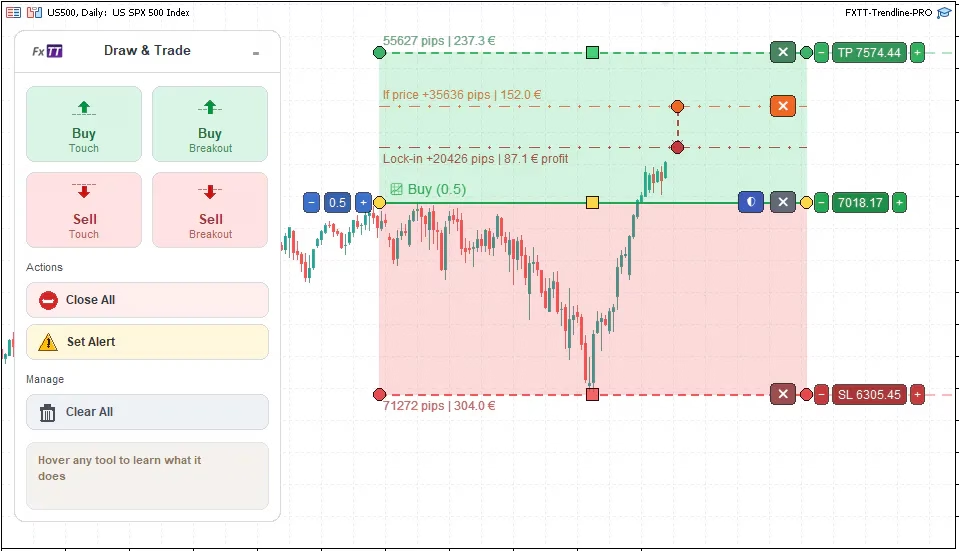
Add a line from the panel. Move it to where you want to act. Set your risk. Let the EA watch it.
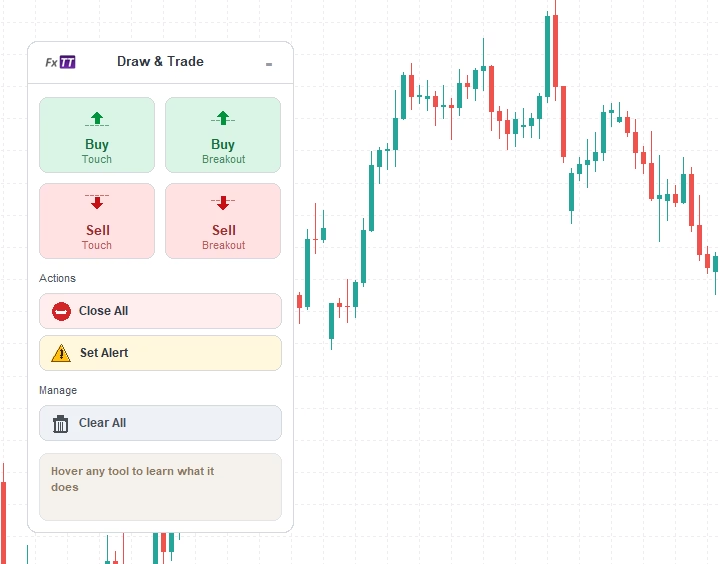
That’s the core loop. Seven buttons on the chart panel cover the main line types:
- Add Buy Line — entry on upward price cross
- Add Buy BO — buy breakout, confirmed by candle close above the line
- Add Sell Line — entry on downward price cross
- Add Sell BO — sell breakout, confirmed by candle close below the line
- Close All — close matching positions when price crosses
- Set Alert — monitor without placing trades
- Clear All Lines — remove all assistant lines from the chart
Lines are interactive. You drag them. You resize the TP and SL zones by dragging the handles. You select a line to see its controls, and deselect to keep the chart clean.
Two Entry Modes
Standard entry lines trigger when price crosses. Fast, tick-based, good for levels where you trust a touch.
Breakout lines wait for candle-body confirmation. A buy breakout only fires after a completed candle opens below the line and closes above it. A sell breakout does the opposite. Useful when you’ve been burned by wick touches that reverse immediately.
You choose per line which behavior you want.
Visual Risk Planning
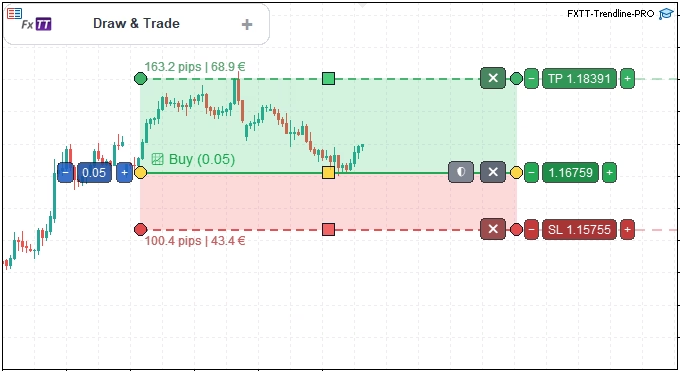
TP and SL aren’t numbers you type into a box after entry. They’re zones you see on the chart before the trade triggers.
Green zone above the line for take-profit. Red zone below for stop-loss. Both show pip and money values. Both update in real time as you drag them into position.
TP and SL zones can be sloped — they don’t have to be flat levels. If your trade plan follows an angled structure, the zones follow it too. You set one endpoint, then the other, independently.
You can see the risk/reward ratio before anything happens. That’s the point.
Auto-Breakeven and Trailing Stop
Both are configured per line, before the trade triggers.
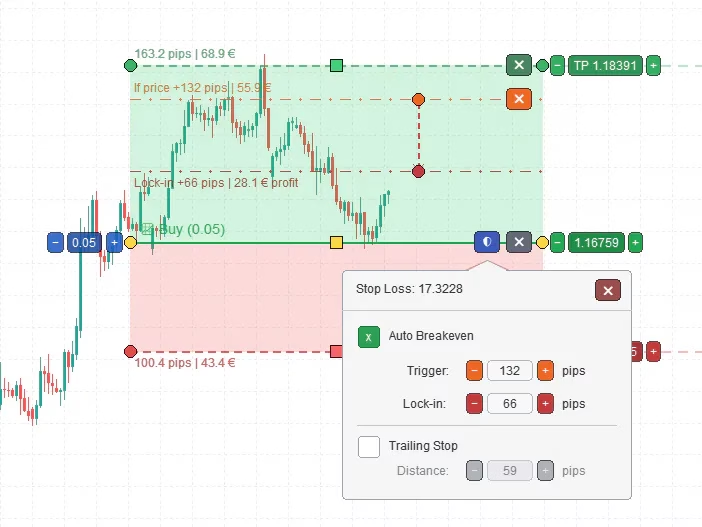
Auto-breakeven shows as two lines on the chart: an orange trigger line and a dark-red lock-in line. You drag each to set the distances. When price reaches the trigger, the EA moves the stop. You set up the rule once; it executes without you.
Trailing stop has four settings: enabled state, start distance, step, and trail distance. All defined in advance. The EA applies them after entry.
No improvising. No “I’ll move the stop when I remember to.” The rule is already set.
Close Lines and Partial Close
Close lines work like entry lines, but for exits. Add a close line at a price level. When price crosses it, the EA closes matching positions.
You choose the volume: all positions, or a specific partial size. Partial close volume follows symbol volume rules — minimum, maximum, and step. The line badge shows what will happen: “Close All” or “Close (0.05)” — no ambiguity.
Plan your exit the same way you plan your entry: visually, before the fact.
Alert Lines
Not ready to let the EA trade yet? Use alert lines instead. Same line logic, no orders placed. You get notified when price reaches the level; you decide what to do next.
Start with alerts on every setup. Watch how the EA monitors price. Enable trading only when you trust what you’ve seen.
Execution Safety
Before placing any order, this MT5 trendline EA checks:
- Spread is within your configured maximum
- Volume is valid for the symbol (min, max, step)
- Margin is sufficient before any order is sent
If any check fails, no order is placed. Trading also requires MT5 Algo Trading to be enabled — the EA won’t act if MetaTrader’s own execution switch is off.
Magic number support keeps Trendline PRO trades separate from other EAs on the same account.
What It Is Not
It does not generate signals. It does not know where price will go. It does not have a built-in edge.
It is not a black-box system. It is not a set-and-forget robot. Every rule you use came from you.
It does not work on MT4. This is an MT5-only Expert Advisor.
Who It Is For
Discretionary traders who use trendlines, support and resistance, or breakout levels on MT5 charts. Traders who miss entries when they’re away from the screen. Traders who execute manually but not consistently.
If you already know what setup you want, this MT5 trendline EA handles the when and how.
Who It Is Not For
Traders looking for signals. Traders who want a hands-off system that finds trades independently. Traders not on MT5. Traders who want guaranteed results from a tool.
If you’re looking for something to tell you what to trade, this isn’t it.
Get Trendline PRO
Trendline PRO is available now on the FxTT product page. Attach it to a chart, add a line, and test with alerts disabled and trading off. See how it monitors price. Watch how the zones work. Then decide if you want to enable execution.
The setup guide covers installation, inputs, and first use. Test on demo before live.
If you already use the original Trendline EA, Trendline PRO is a separate product — new architecture, fully MT5 native, canvas-rendered chart interaction rebuilt from scratch. It pairs well with the FXTT ZigZag Zones MT5 indicator for structure mapping, or with Equity Tracker MT5 for account monitoring alongside active trades.
Trading forex and CFDs involves risk. Trendline PRO automates rules you configure — it does not provide financial advice, signals, or guaranteed results. Test on a demo account before using on a live account.